
Swift & runtimeHistorical technical note
Understanding blocks in iOS development
Starts with block declarations and calls, then examines captured variables and callback wrappers. Examples modelled on Swift's higher-order functions demonstrate how blocks can be used to process data in Objective-C.
Originally credited to Sindri; edited and archived by Bison.
Source listed in the originalOn this page
"Blocks arrived after iOS4.0. They encapsulate code, treat it as a variable, and invoke it through block(). This brings to mind C function pointers, which can be declared and called as follows:"
Editor: Bison
Contributor: Sindri’s Notes
About blocks
Blocks arrived after iOS4.0. They encapsulate code, treat it as a variable, and invoke it through block(). This brings to mind C function pointers, which can be declared and called as follows:
bool executeSomeTask(void) {
    //do something and return if success or not
}
bool (*taskPoint)(void);
taskPoint = something
The function pointer above invokes executeSomeTask directly as (*taskPoint)(). This makes a block look much like a C function pointer, but the two still differ in the following ways:
A block's code is inline and more efficient than a function call.
External variables are read-only inside a block by default.
Objective-C treats blocks as objects.
There is already extensive information online about the internals of blocks, and their source is available at opensource.apple.com. This article focuses more on using them.
Block characteristics
- Understanding blocks
Start with a simple requirement: take two numbers and calculate their sum. We create this block:
int (^sumOfNumbers)(int a, int b) = ^(int a, int b) {
    return a + b;
};
On the left of the equals sign, this declares a block named sumOfNumbers. The ^ before the name identifies it as a block name. The leftmost int is the return type, and the parentheses contain the parameter list: two int parameters here. The right-hand side defines the block. Its return type may be omitted because the compiler infers it from context. A ^ followed by a parenthesized parameter list identifies a block to the compiler; braces enclose its code.
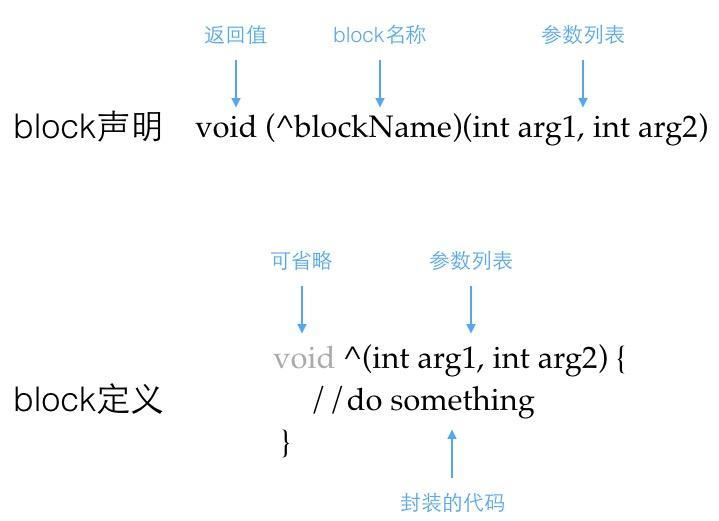
-
Capturing external variables
A block can also access external local variables. The following code from my article on UIView animations uses a local variable from outside the block:CGPoint center = cell.center; CGPoint startCenter = center; startCenter.y += LXD_SCREEN_HEIGHT; cell.center = startCenter;
[UIView animateWithDuration: 0.5 delay: 0.35 * indexPath.item usingSpringWithDamping: 0.6 initialSpringVelocity: 0 options: UIViewAnimationOptionCurveLinear animations: ^{ cell.center = center; } completion: ^(BOOL finished) { NSLog(“animation %@ finished”, finished? @”is”, @”isn’t”); }];
This uses
void(^animations)(void)跟void(^completion)(BOOL finished)
two blocks, which the system invokes when the animation starts and ends, respectively. Inside the animation block, the code accesses the center property described above. By the time the animation starts, that animation function's lifetime has already ended, but the block captures local variables outside its body. Such access is read-only. Attempting to modify an external variable inside the block produces a compiler error:

For external local variables we want to modify inside a block, add the __block qualifier. They can then be changed within the block. Variable capture has another interesting mechanism; change the code above as follows:
CGPoint center = CGPointZero;
CGPoint (^pointAddHandler)(CGPoint addPoint) = ^(CGPoint addPoint) {
    return CGPointMake(center.x + addPoint.x, center.y + addPoint.y);
}
center = CGPointMake(100, 100);
NSLog(@"%@", pointAddHandler(CGPointMake(10, 10)));    //输出{10,10}
When a block captures a variable, it saves only that variable's state at capture time, except for object variables. Subsequent changes do not change the value inside the block. Therefore, in the code above, center is still CGPointZero when the new coordinates are calculated.
- Retain cycles
As noted at the beginning, iOS treats a block as an object, so its lifetime continues until that of its owner ends. However, because blocks capture variables, a block may also retain the object that owns it. This creates a retain cycle, preventing either object from being released:
@implementation LXDObject
{
   void (^_cycleReferenceBlock)(void);
}

- (void)viewDidLoad
{
    [super viewDidLoad];
    _cycleReferenceBlock = ^{
        NSLog(@"%@", self);   //引发循环引用
    };
}

@end
The compiler only warns about code like this. Warnings are often ignored, eventually causing a memory leak because neither object can be released. Just as __block is available for ordinary variables, __weak can qualify an object variable as a weak reference and thereby resolve the retain cycle:
__weak typeof(*&self) weakSelf = self;
_cycleReferenceBlock = ^{
    NSLog(@"%@", weakSelf);   //弱指针引用,不会造成循环引用
};
This interesting aspect of blocks is discussed in Tang Qiao's On the implementation of Objective-C blocks provides a detailed account of the underlying implementation, so I will not repeat it here.
Using blocks
Before blocks, developers mainly implemented callbacks through delegation. For example, the native networking class NSURLConnection uses several protocol methods to handle events during a request. In newer environments, NSURLSession uses blocks to handle request tasks, and third-party networking frameworks use them for callbacks too. Much of this shift comes from their simplicity, clear logic, and flexibility. Next, I will make a network request and handle its callbacks with blocks, including request completion and download progress.
Declaring blocks as returnValue(^blockName)(parameters) is rather cumbersome. Use typedef to name a block type, then create blocks directly through that type name:
@interface LXDDownloadManager: NSObject< NSURLSessionDownloadDelegate >

//block重命名
typedef void(^LXDDownloadHandler)(NSData * receiveData, NSError * error);
typedef void(^LXDDownloadProgressHandler)(CGFloat progress);

- (void)downloadWithURL: (NSString *)URL parameters: (NSDictionary *)parameters handler: (LXDDownloadHandler)handler progress: (LXDDownloadProgressHandler)progress;

@end

@implementation LXDDownloadManager
{
    LXDDownloadProgressHandler _progress;
}

- (void)downloadWithURL: (NSString *)URL parameters: (NSDictionary *)parameters handler: (LXDDownloadHandler)handler progress: (LXDDownloadProgressHandler)progress
{
    //创建请求对象
    NSURLRequest * request = [self postRequestWithURL: URL params: parameters];
    NSURLSession * session = [NSURLSession sharedSession];

    //执行请求任务
    NSURLSessionDataTask * task = [session dataTaskWithRequest: request completionHandler: ^(NSData * _Nullable data, NSURLResponse * _Nullable response, NSError * _Nullable error) {
        if (handler) {
            dispatch_async(dispatch_get_main_queue(), ^{
                handler(data, error);
            });
        }
    }];
    [task resume];
}

//进度协议方法
- (void)URLSession:(NSURLSession *)session
     downloadTask:(NSURLSessionDownloadTask *)downloadTask
    didWriteData:(int64_t)bytesWritten // 每次写入的data字节数
   totalBytesWritten:(int64_t)totalBytesWritten // 当前一共写入的data字节数
  totalBytesExpectedToWrite:(int64_t)totalBytesExpectedToWrite // 期望收到的所有data字节数
{
    double downloadProgress = totalBytesWritten / (double)totalBytesExpectedToWrite;
    if (_progress) { _progress(downloadProgress); }
}

@end
The NSURLSession wrapper above takes a block that handles the result and automatically executes the request task on a worker thread. Call it from the networking logic as follows:
#define QQMUSICURL @"https://www.baidu.com/link?url=UTiLwaXdh_-UZG31tkXPU62Jtsg2mSbZgSPSR3ME3YwOBSe97Hw6U6DNceQ2Ln1vXnb2krx0ezIuziBIuL4fWNi3dZ02t2NdN6946XwN0-a&wd=&eqid=ce6864b50004af120000000656fe235f"
[[LXDDownloadManager alloc] downloadWithURL: QQMUSICURL parameters: nil handler ^(NSData * receiveData, NSError * error) {
    if (error) { NSLog(@"下载失败:%@", error) }
    else {
        //处理下载数据
    }
} progress: ^(CGFloat progress) {
    NSLog(@"下载进度%lu%%", progress*100);
}];
Recreating Swift-style higher-order functions
Developers who have used swift know that its function calls support chaining well: several operations are joined with . for better readability, for example
ocString.stringByAppendingFormat("abc").stringByAppendingFormat("edf")
calls the string-append method successively. One requirement for this style is that each function returns a value. Objective-C methods are normally called as [target action], but blocks are invoked as blockName(parameters), which lends itself to similar chaining.
Swift provides concise, useful higher-order functions such as map, filter, and reduce for manipulating arrays. For comparison, here is how traversing and summing an array looks in oc without kvc and in swift:
#pragma mark - OC code
NSArray numbers = @[@10, @15, @99, @66, @25];
NSInteger totalNumber = 0;
for (NSNumber number in numbers) {
    totalNumber += number.integerValue;
}

#pragma mark - swift code
let numbers = [10, 15, 99, 66, 25];
let totalNumber = numbers.reduce(0, { $0+$1 })
At this point, oc cannot match swift in either code size or conciseness. Next, we will use blocks to add these higher-order functions to oc. Create an NSArray category named NSArray+LXDExtension.
#import <UIkit/UIKit.h>

/// 数组元素转换
typedef id(^LXDItemMap)(id item);
typedef NSArray *(^LXDArrayMap)(LXDItemMap itemMap);

/// 数组元素筛选
typedef BOOL(^LXDItemFilter)(id item);
typedef NSArray *(^LXDArrayFilter)(LXDItemFilter itemFilter);

/**
 *  扩展数组高级方法仿swift调用
 */
@interface NSArray (LXDExtension)

@property (nonatomic, copy, readonly) LXDArrayMap map;
@property (nonatomic, copy, readonly) LXDArrayFilter filter;

@end
As discussed earlier, chaining requires function calls to return an object. I therefore used typedef to declare several block types. LXDArrayMap and LXDArrayFilter are fundamentally the same type, but separate names help distinguish their purposes. Here is the implementation file:
typedef void(^LXDEnumerateHandler)(id item);

@implementation NSArray (LXDTopMethod)

- (LXDArrayMap)map
{
    LXDArrayMap map = (LXDArrayMap)^(LXDItemMap itemMap) {
        NSMutableArray * items = @[].mutableCopy;
        for (id item in self) {
            [items addObject: itemMap(item)];
        }
        return items;
    };
    return map;
}

- (LXDArrayFilter)filter
{
    LXDArrayFilter filter = (LXDArrayFilter)^(LXDItemFilter itemFilter) {
        NSMutableArray * items = @[].mutableCopy;
        for (id item in self) {
            if (itemFilter(item)) { [items addObject: item]; }
        }
        return items;
    };
    return filter;
}

- (void)setFilter:(LXDArrayFilter)filter {}
- (void)setMap:(LXDArrayMap)map {}

@end
We override the setter to prevent external replacement of the block implementation. In the getter, we iterate over the array and invoke the supplied code to implement map, filter, and similar functions. These two implementations are simple. Here are two examples of calling higher-order functions:
#pragma mark - 筛选数组中大于20的数值并转换成字符串
NSArray<NSNumber *> * numbers = @[@10, @15, @99, @66, @25, @28.1, @7.5, @11.2, @66.2];
NSArray * result = numbers.filter((LXDArrayFilter)^(NSNumber * item) {
    return item.doubleValue > 20
}).map((LXDArrayMap)^(NSNumber * item) {
    return [NSString stringWithFormat: @"string %g", item.doubleValue];
});

#pragma mark - 将数组中的字典转换成对应的数据模型
NSArray<NSDictionary *> * jsons = @[@{ ... }, @{ ... }, @{ ... }];
NSArray<LXDModel *> * models = jsons.map((LXDArrayMap)^(id item) {
    return [[LXDModel alloc] initWithJSON: item];
})
Syntax restrictions still make this more complicated than native swift calls, but using blocks for chained calls makes the oc code considerably cleaner.
Summary
Variable capture, passing code around, and inline code give blocks capabilities and flexibility beyond delegation. They also have drawbacks, including retain cycles and difficulties with debugging and tracing, but their advantages are understandably popular with developers. Learning to use blocks more flexibly requires continued practice and exploration.
Recommended reading: A beginner developer's review of 2015