
Process notes contents
A cool-blue city outside; an open book, coffee and a warm lamp inside. The rain and lit windows carry the smaller marks, while the pages and cup retain larger areas of colour, so every part of the picture does not compete for attention.
This piece uses Aquarell, a 1400 × 1000 px landscape canvas at 300 dpi in sRGB, with 13 native layers. The main operations are selection fills, real brush strokes, local erasing and layer-opacity adjustments.
Creation disclosure: AI assisted this work through Aquarell’s in-app AI Control (MCP). Every image element was produced by native selection/fill commands and the real brush renderer, then saved as an editable artwork. No externally composited image was imported. The recording documents actual simulator edits rather than every stroke drawn manually by a person. The video follows creation order, removes waiting and keeps the real app interface visible. This session uses a local build with a Chinese interface. The steps below follow the actual order of creation.
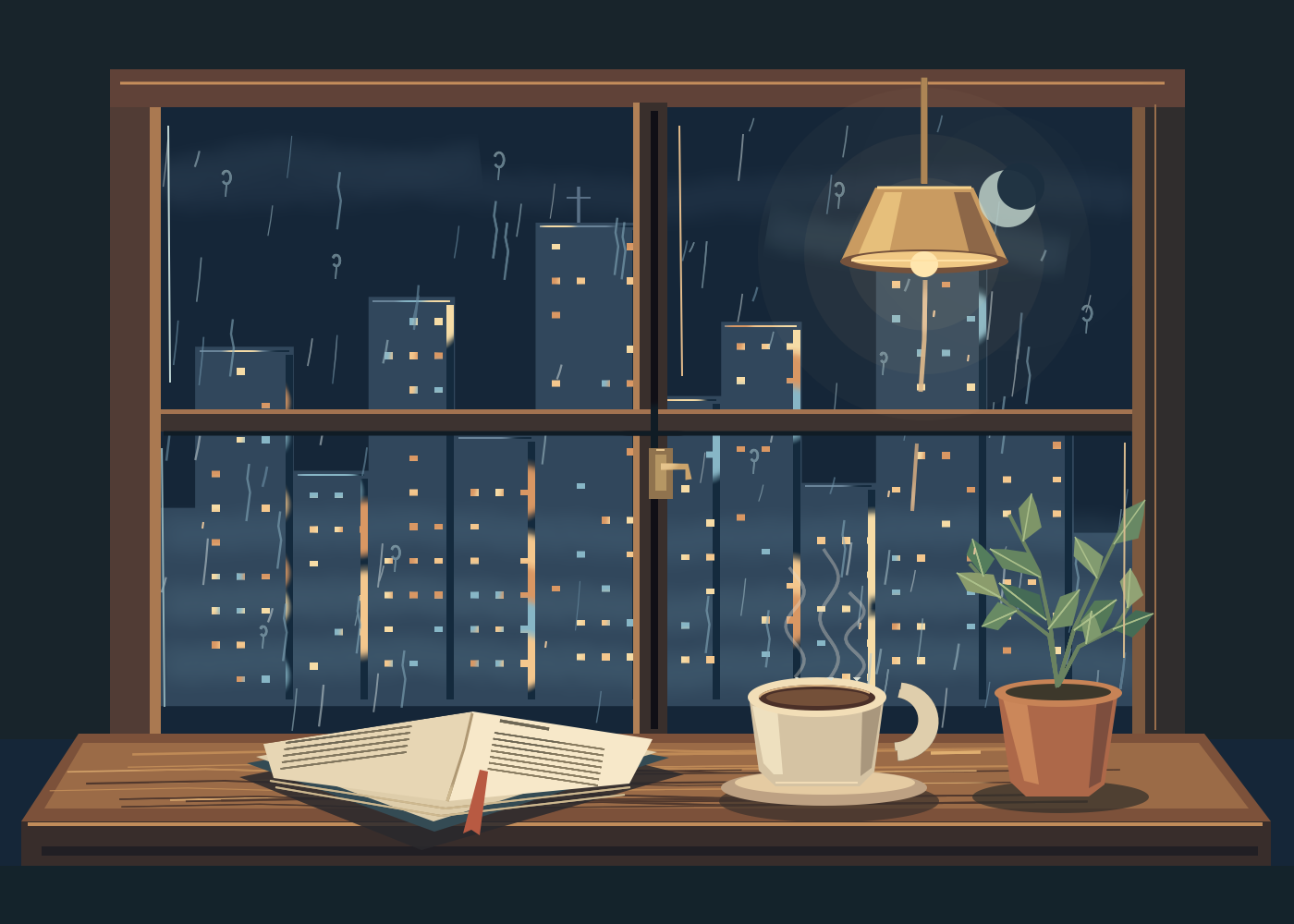
Arrange the content across these 13 layers
These are the layers from bottom to top. The labels explain their roles; they are not names individually assigned in the app’s layer panel.
| Order | Content | Treatment in this piece |
|---|---|---|
| 1 | Night base | Original deep-blue base retained |
| 2 | City silhouette | Original continuous cool-coloured skyline retained |
| 3 | Atmosphere and moonlight | Whole-layer opacity reduced to 19% at the end |
| 4 | City lights | Warm windows, a few cool windows and building-edge light |
| 5 | Rain on glass | Short rain lines, water trails and droplets; 58% layer opacity |
| 6 | Interior window frame | Wooden frame, horizontal and vertical divisions, brass latch |
| 7 | Wooden sill | Top surface, dark front edge and low-contrast grain |
| 8 | Hanging lamp | Halo, shade and bulb |
| 9 | Book | Shadow, cover, page stack, paper, short marks and red bookmark |
| 10 | Coffee | Saucer, handle, cup body and coffee surface |
| 11 | Potted plant | Pot, stems, 13 leaves and their veins |
| 12 | Separate steam | Three curves; 36% layer opacity |
| 13 | Finishing light | Crescent and a few reflections on glass and interior objects |
The rain sits below the window frame, letting the wood conceal the outer edges of the view. The book, cup and pot sit above the sill, so their overlaps can be handled separately. Steam has its own layer so that reducing it at the end does not fade the cup too.
Set the base and main colours
The night retains #152638 and the city silhouette retains #31475C. Keep background and buildings separate before adding the interior objects above them. The main colours used later are:
| Use | HEX |
|---|---|
| Crescent | #C9DDD3 |
| Walnut window frame | #604238 |
| Wooden sill | #9B6B47 |
| Brass lampshade | #C99B61 |
| Light side of the paper | #F7E8C9 |
| Coffee surface | #745039 |
| Main terracotta colour | #AD6849 |
| Mid-green foliage | #658560 |
Large areas outside stay blue-grey, while the interior wood, paper and brass are warmer. The crescent uses a pale green-grey so that it does not become the same yellow as the lamp.
Build the skyline with a selection and the windows with short strokes
First, follow the changing rooftop heights with a polygon selection and fill it with the city colour. Wide buildings, narrow buildings and small rooftop projections join into one distant outline. Each building does not need a full set of details at the outset.
Add a separate city-lights layer and distribute short horizontal strokes along the buildings. This piece mixes warm yellow #F4C78D, pale yellow #F6DCA6, orange-brown #D99763 and a little cool blue #87B6C6. Leave gaps between windows; not every position on a floor needs to be lit. A few rooftops receive a subdued blue-grey edge light, with dark side edges separating neighbouring buildings.
The fine windows, rain lines and leaf veins share a method: make a narrow selection first, then draw inside it, letting the selection limit the visible width of the stroke. To recreate this manually, enclose a narrow strip and brush within it. Clearing the selection leaves a fairly clean line. This helps where an edge needs control; broad colour shapes can still be filled directly.
Handle the crescent’s shape and the rain’s strength separately
The crescent in the upper right begins with a light ellipse of about 62 × 62 px. A night-coloured ellipse of about 51 × 51 px overlaps it, offset towards the upper right, leaving the bright rim. Moonlight first establishes atmosphere on the fog layer. Its outline is reinforced on the finishing layer later, so reducing the fog does not make the crescent disappear with it.
There are three kinds of rain on the glass. The first is fine sloping lines of different lengths, running broadly down-left. The second is longer water trails with slight bends. The third is nearer droplets, made from a dark curved rim, a broken pale highlight and a short downward trail.
The rain has a separate layer, reduced to 58% opacity at the end. The atmosphere layer drops to 19%, revealing the buildings and lit windows again. Separate layers allow the rain to be softened without darkening the city at the same time.
Build the outer wooden frame, then its cross divisions
The wood clearly separates the outside view from the room. Use broad rectangular selections for the left and right jambs and the top frame, then add a central vertical division and a horizontal one to make four panes. Walnut is the main colour, with lighter brown strips inside and deep brown retained on the shaded sides.
A brass latch sits on the central vertical frame. Make a dark-gold backplate, then add a narrower light face and a bent handle. It is a small detail that needs little structure; its placement makes the large frame feel like a window that could open.
The sill uses three large areas: a trapezoidal top, a dark front edge and a slightly inset warm wooden surface. The top spreads downwards with its sides angled out, giving the book and cup enough support. Use low-contrast strokes of varied lengths for the grain, avoiding a row of evenly spaced horizontal lines.
Separate the lampshade’s light and dark sides, with a gentle halo
The lamp hangs in the upper right. Its shade is a trapezoid, narrower at the top. Fill the main shape with brass #C99B61, add a pale-gold face on the left and a brown-gold shaded face on the right, then use a flattened ellipse for the lower rim. A small cream-coloured circular highlight below it forms the bulb.
The hanging cord descends from near the upper frame to the top of the shade. Keep the warm halo light enough for the nearby rain and city to remain visible. The area behind the cup and plant is not broadly brightened; the interior’s main light stays on the bulb, paper and cup rim.
Draw the two sides of the open book separately
The book lies on the left of the sill, spanning roughly 260–740 px horizontally and 770–920 px vertically. These positions use the canvas’s upper-left corner as a visual reference, with horizontal values increasing rightwards and vertical values downwards. They guide the composition rather than requiring identical point placement.
Lay down the book’s dark shadow on the sill, then overlap a deep blue-grey cover and pale-brown page stack. Fill the two open paper faces separately: #E7D6B4 on the left and brighter #F7E8C9 on the right. A shallow V near the spine and two fine lines along the bottom suggest the stack’s thickness. Finally, let a red-brown bookmark fall from the centre and extend beyond the pages.
Short lines suggest writing. On the left page they slope up-right with the paper; on the right they slope down-right. They provide the rhythm of reading without inventing legible prose. Some marks crossed the left page’s upper edge in this session. The correction was to select that small area outside the page and erase only on the book layer, preserving the marks within the paper.
Draw the handle before the cup body
The cup sits to the right of the book, with its body roughly within 810–960 px horizontally. Draw the saucer’s shadow and elliptical surface first, then the handle on the right, and let the cup body cover the handle’s roots. That order joins them more naturally than attaching a handle onto the finished wall of the cup.
The body consists of a large pale-beige shape, a light left face and a darker right face. Stack three flattened ellipses at the opening: the pale rim, a dark coffee edge and the #745039 coffee surface. Keep their height much smaller than their width so the opening reads as a cup resting on the sill.
The steam was initially on the same layer as the cup and became too bright when composited. The actual correction was to erase the old steam locally, redraw three curves of different heights on a separate layer, and reduce that layer to 36% opacity. The cup retains its brightness while the steam recedes.
Use three pot faces and 13 leaves pointing in different directions
For the plant on the right, start with an elliptical shadow on the sill, then make the pot wider at the top and narrower below. Its main colour is #AD6849, with a lighter left face and darker right face. A brighter flattened ellipse forms the rim, with a dark fill inside for the opening.
Stems branch towards the upper left, upper right and sides, with leaves added individually along them. This piece retains 13 polygon leaves, including more upright long leaves and smaller ones extending sideways. Use #658560 as the middle green, alternate darker and lighter greens, then add the veins with fine brush strokes.
For each leaf, set the attachment point and tip first, then widen the middle to either side to form an angular elongated shape. Vary their directions: leaves on the left can extend sideways, the highest ones rise, and those on the right spread out slightly, keeping the plant from becoming a set of duplicated arrows.
Finish with three checks: edges, overlaps and opacity
Check whether page marks, droplets or veins have crossed their intended outlines, then inspect the depth order of sill, book, cup and pot. One final correction in this piece removed a sill highlight that crossed the book, cup and plant, leaving it only on the exposed wood where it belongs.
Confirm the three layer settings: rain 58%, atmosphere 19% and separate steam 36%. Save after clearing any active selection. The original retains 13 layers, and the actual full-size PNG is 1400 × 1000 px. An editable original was also exported in Aquarell’s native format, so the book, coffee or rain can be changed separately later.
Open Duo, partially fold it, close it, then open it again
After completion, Device Hub was actually switched through Open → Partially Open → Closed → Open, with a device-window capture at each state. These are genuine samples of four poses, edited into a sequence of steps; they do not represent continuously recorded hinge motion.
The partially open sample shows the full landscape artwork. When closed, the horizontal view narrows and some content on either side moves out of view. Return to the open state to inspect the full picture and compare its edges with the native PNG. The viewport changes, while the original remains 1400 × 1000 px.
For the basic operations, see local colouring with selections, the three-layer workflow and layer opacity. If fine rain looks faint after export, use the image-blur checklist to distinguish pixel dimensions from scaling on the webpage.