
Data & networkingHistorical technical note
iOS 10 Notifications, Part 2: Service Extensions
Explains how a Notification Service Extension processes content before a notification appears. It covers creating an extension target, changing text, loading attachments, and falling back to the original notification when processing times out.
Originally credited to 徐不同; edited and archived by Bison.
Source listed in the originalOn this page
Sorry this update is late!
If you have not read these two articles, I recommend starting with them and progressing step by step. Links follow:
iOS Development: Essential iOS10 Push Notifications—Basics
iOS Development: Essential iOS10 Push Notifications—Advanced 1
Finally, this installment includes a demo!
This article covers more advanced and customizable remote notifications, including multimedia notifications omitted earlier and the related UNNotificationServiceExtension, UNNotificationContentExtension, and UNNotificationAction classes. It may not make you an expert in every aspect of Apple's push notifications, but it should help you implement basic extensions.
1, UNNotificationServiceExtension
1.1. Introduction to UNNotificationServiceExtension
UNNotificationServiceExtension is a new iOS10 feature. First, look at this diagram:
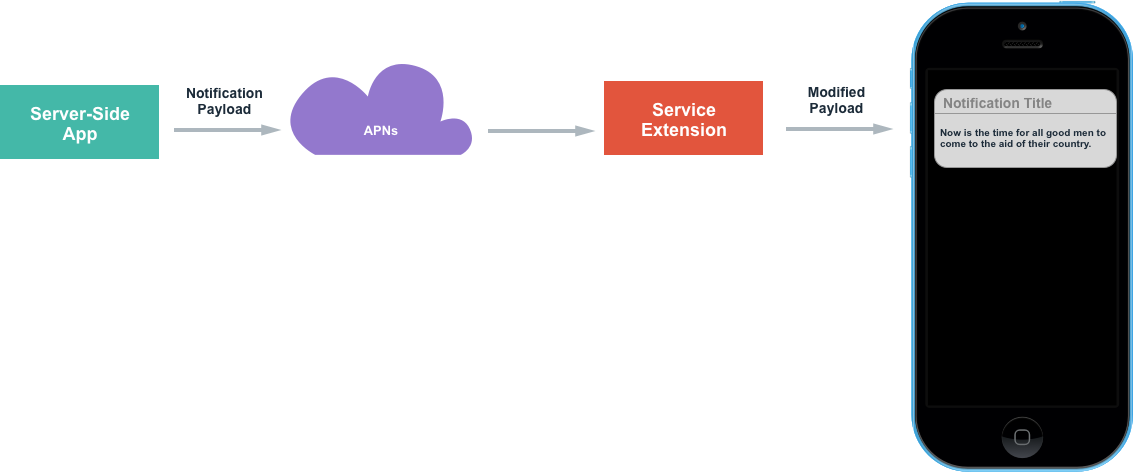
The diagram shows a ServiceExtension processing step inserted between APNs and the user's phone; processing is optional. This extension can customize notification content before presentation, producing a richer notification. If the network is poor or an attachment too large to finish editing within the allotted time, the original notification is displayed instead.
What can ServiceExtension do, and why does it matter? I summarize several points:
1. Security
Security comes first. Apple's encouragement of https since iOS9 shows its emphasis on security. Why raise it here? Previously, notification contents sent through third-party services or Apple's own notification handling could be exposed if someone intercepted the data or captured packets. You might say the content can be encrypted—but then how should it appear in Notification Center? Please do not suggest turning every remote notification into a local one. UNNotificationServiceExtension helps implement encrypted notification content: within a maximum of 30s after receipt, decrypt the contents and display them to the user again.
2. Richer content
Earlier notifications offered little content and were often dominated by advertisements. The new attachment support, combined with notification extensions, enables richer notifications—for example, a frame from a short video (I strongly dislike some platforms' misleading movie previews), or small images supplied through a server imaUrl. These can attract attention and encourage users to open the notification and use the App. Some users disable notifications, but most leave them enabled, so there remains a large opportunity. Used flexibly, notifications open many possibilities for an application.
1.2. Creating a UNNotificationServiceExtension
Creating a UNNotificationServiceExtension class alone is insufficient. Create a Target containing the provided template. Its 2 methods are called automatically by the system:
//  你需要通过重写这个方法,来重写你的通知内容,也可以在这里下载附件内容
- (void)didReceiveNotificationRequest:(UNNotificationRequest *)request withContentHandler:(void (^)(UNNotificationContent *contentToDeliver))contentHandler;

//  如果处理时间太长,等不及处理了,就会把收到的apns直接展示出来
- (void)serviceExtensionTimeWillExpire;
Follow along to create a UNNotificationServiceExtension.
Create a Target.
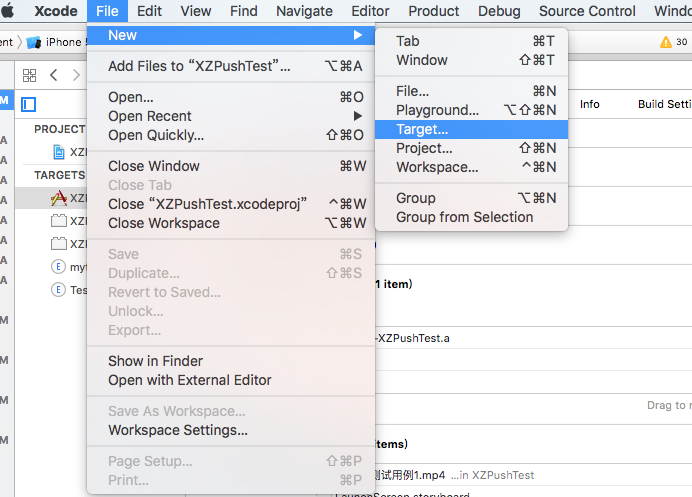
Select the option shown:
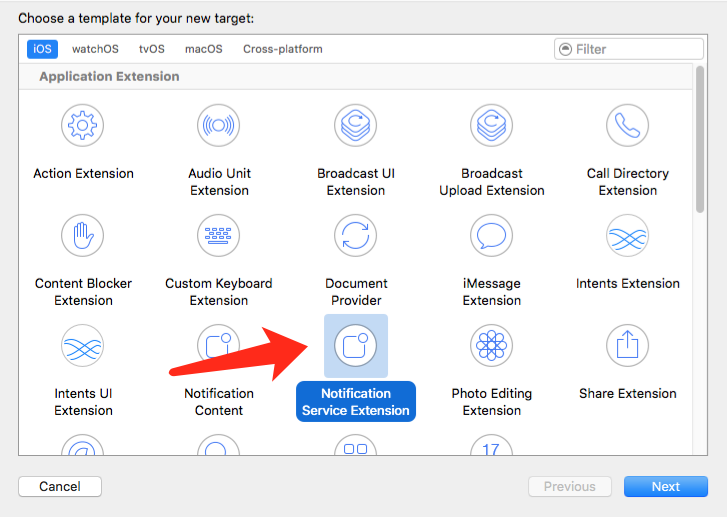
Enter a name, then click Next.
A new folder now appears in the directory structure.
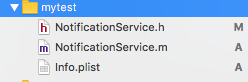
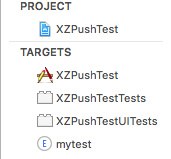
each has an additional myTest.

Notice the bundleID in the image: it is the main project's bundleID plus a dot and the extension name. Do not change it; the system creates it automatically. For example, if the project's BundleID is coderxu.pushDemo, the extension's BundleID is coderxu.pushDemo.mytest. The suffix depends on the service-extension name chosen at creation. Inspect the other small details as well. At this point, the notification service extension has been created.
1.3. Usage and Demo
I overrode the following code when using this class. First: (1) the method that modifies notification content:
- (void)didReceiveNotificationRequest:(UNNotificationRequest *)request withContentHandler:(void (^)(UNNotificationContent * _Nonnull))contentHandler {
    self.contentHandler = contentHandler;
    // copy发来的通知,开始做一些处理
    self.bestAttemptContent = [request.content mutableCopy];
    // Modify the notification content here...
    self.bestAttemptContent.title = [NSString stringWithFormat:@"%@ [modified]", self.bestAttemptContent.title];

    // 重写一些东西
    self.bestAttemptContent.title = @"我是标题";
    self.bestAttemptContent.subtitle = @"我是子标题";
    self.bestAttemptContent.body = @"来自徐不同";

    // 附件
    NSDictionary *dict =  self.bestAttemptContent.userInfo;
    NSDictionary *notiDict = dict[@"aps"];
    NSString *imgUrl = [NSString stringWithFormat:@"%@",notiDict[@"imageAbsoluteString"]];

    if (!imgUrl.length) {
        self.contentHandler(self.bestAttemptContent);
    }

    [self loadAttachmentForUrlString:imgUrl withType:@"png" completionHandle:^(UNNotificationAttachment *attach) {

        if (attach) {
            self.bestAttemptContent.attachments = [NSArray arrayWithObject:attach];
        }
        self.contentHandler(self.bestAttemptContent);

    }];
}
(2) The method for downloading notification attachments:
 - (void)loadAttachmentForUrlString:(NSString *)urlStr
                          withType:(NSString *)type
                 completionHandle:(void(^)(UNNotificationAttachment *attach))completionHandler{
    __block UNNotificationAttachment *attachment = nil;
    NSURL *attachmentURL = [NSURL URLWithString:urlStr];
    NSString *fileExt = [self fileExtensionForMediaType:type];

    NSURLSession *session = [NSURLSession sessionWithConfiguration:[NSURLSessionConfiguration defaultSessionConfiguration]];
    [[session downloadTaskWithURL:attachmentURL
                completionHandler:^(NSURL *temporaryFileLocation, NSURLResponse *response, NSError *error) {
                    if (error != nil) {
                        NSLog(@"%@", error.localizedDescription);
                    } else {
                        NSFileManager *fileManager = [NSFileManager defaultManager];
                        NSURL *localURL = [NSURL fileURLWithPath:[temporaryFileLocation.path stringByAppendingString:fileExt]];
                        [fileManager moveItemAtURL:temporaryFileLocation toURL:localURL error:&error];

                        NSError *attachmentError = nil;
                        attachment = [UNNotificationAttachment attachmentWithIdentifier:@"" URL:localURL options:nil error:&attachmentError];
                        if (attachmentError) {
                            NSLog(@"%@", attachmentError.localizedDescription);
                        }
                    }
                     completionHandler(attachment);
               }] resume];

}
(3) Method for identifying the file type
- (NSString *)fileExtensionForMediaType:(NSString *)type {
    NSString *ext = type;
    if ([type isEqualToString:@"image"]) {
        ext = @"jpg";
    }
    if ([type isEqualToString:@"video"]) {
        ext = @"mp4";
    }
    if ([type isEqualToString:@"audio"]) {
        ext = @"mp3";
    }
    return [@"." stringByAppendingString:ext];
}
The first code section reconstructs the notification: if an attachment url exists, download it; otherwise, display the notification directly. The second uses a system class to download and save the image, obtain filePath, and create the notification attachment. An attachment url must be a local file path, so download the file first; the URL starts with file://. The third section identifies the file extension so the frontend can handle it. My example hardcodes the type because I tested only one image. Ideally, the server includes the attachment type in the payload. My article “iOS Development: Essential iOS10 Push Notifications—Advanced 1” covers multimedia attachment types and size limits.
I strongly recommend having the server include the file type when sending notification content. Important points deserve repeating three times. I strongly recommend having the server include the file type when sending notification content. Important points deserve repeating three times. I strongly recommend having the server include the file type when sending notification content. Important points deserve repeating three times.
Some additional questions
1. Why did I use a system download class rather than AFN in this push-service extension? Answer: importing AFN kept causing compilation errors, and I do not know why. The cases were: 1. Import AFN through cocoapods and include it in the class: compilation error. 2. Drag AFN into the project manually without checking the option, then include it: compilation error. 3. Drag AFN in with the option checked: immediate compilation error. 4. Use notification callbacks for downloading: slow, with uncertain threading. I ultimately chose the system download class with a block callback to download notification attachments. Screenshots of some errors follow; you may skip them.
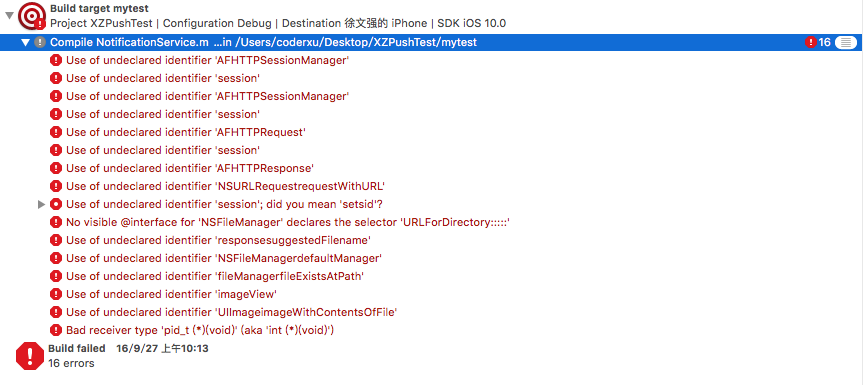
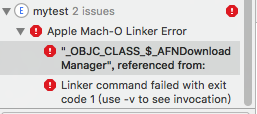
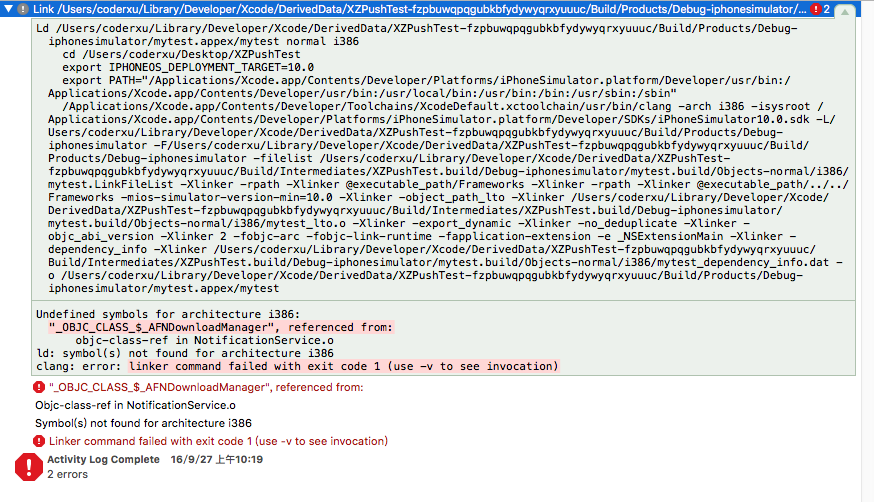
2. Why do breakpoints not trigger when debugging this notification extension?
Answer: you are running the wrong target. Run the correct one, as shown below:
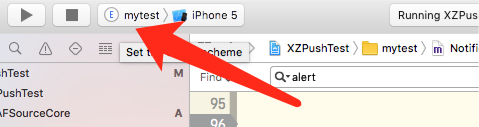
Select your application's Target.
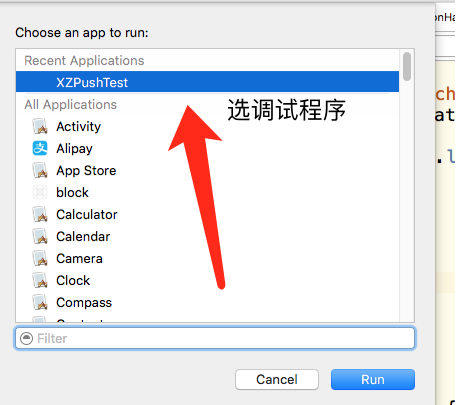
Breakpoints should now work.
Finally, here is the notification payload format:
{
    "aps": {
        "alert": "This is some fancy message.",
        "badge": 1,
        "sound": "default",
        "mutable-content": "1",
        "imageAbsoluteString": "http://upload.univs.cn/2012/0104/1325645511371.jpg"

    }
}
Be sure to include ”mutable-content”: “1” and an Alert field, or interception may fail, according to Apple's documentation. You can also add custom fields, such as an image URL and image type. Explore further, and leave a comment if you have questions.
To conclude this section, here is a successfully delivered notification:
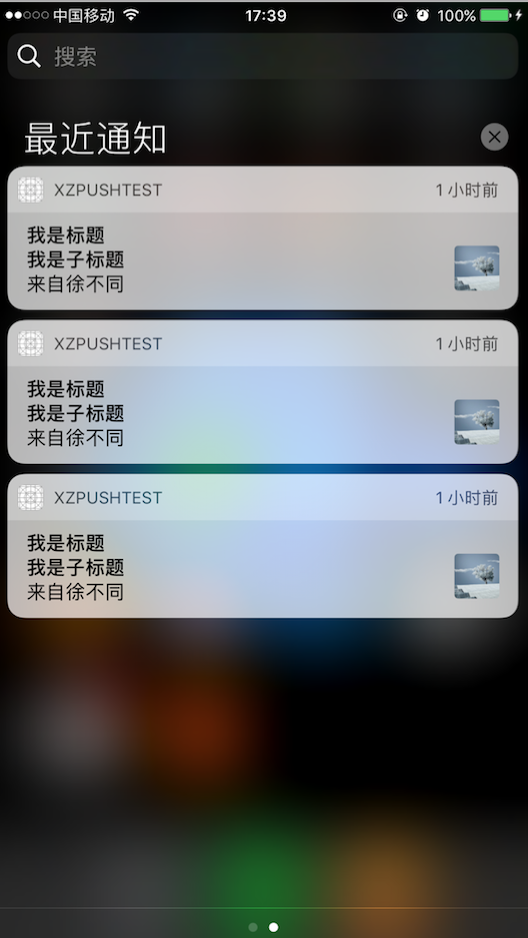
The following will be added later.
# 2、UNNotificationContentExtension
## 2.1、UNNotificationContentExtension简介
## 2.2、如何新建一个UNNotificationContentExtension
## 2.3、如何使用以及相关Demo
# 3、UNNotificationAction
## 3.1、UNNotificationAction简介
## 3.2、如何新建一个UNNotificationAction
## 3.3、如何使用以及相关Demo
If you like the article, please follow me. Thank you! Please credit the source when republishing. I will keep writing useful articles in return.
The important point bears repeating three times: Demo project The important point bears repeating three times: Demo project The important point bears repeating three times: Demo project
Recommended reading: Implement an iOS launch-screen advertisement in minutes