
Data & networkingHistorical technical note
Reading CocoaAsyncSocket: Connection Setup
Follows GCDAsyncSocket initialization and connection entry points through the CocoaAsyncSocket source. It traces parameter checks, local and server address creation, and socket configuration before connecting, using annotated code to explain the call sequence.
Originally credited to 涂耀辉; edited and archived by Bison.
Source listed in the originalOn this page
Introduction:
CocoaAsyncSocket is an IM framework written by a Google developer on top of BSD-Socket. It provides powerful, easy-to-use asynchronous sockets for Mac and iOS through convenient OC interfaces, avoiding cumbersome direct Socket and Stream programming. This series explains how it wraps the underlying APIs and operates.
Note: this article contains extensive code. Reading it alongside the source makes it easier to understand. My annotated source is available as a reference: CocoaAsyncSocket Source Annotations.
If unfamiliar with the framework, see my earlier article “iOS Instant Messaging: From Getting Started to Giving Up?” or consult other documentation.
Main text:
First, examine the framework's structure:

The library contains just two classes, one for TCP and one for UDP. The TCP class, GCDAsyncSocket, has over 8000 lines; GCDAsyncUdpSocket is smaller but still exceeds 5000. Even judging only by line count, the library does considerable work.
Incidentally, the framework previously had a runloop version. Feature overlap and other reasons led to its removal; only the GCD version remains.
This series focuses on GCDAsyncSocket.
First, examine the class's properties:
@implementation GCDAsyncSocket
{
    //flags,当前正在做操作的标识符
    uint32_t flags;
    uint16_t config;

    //代理
    __weak id<GCDAsyncSocketDelegate> delegate;
    //代理回调的queue
    dispatch_queue_t delegateQueue;

    //本地IPV4Socket
    int socket4FD;
    //本地IPV6Socket
    int socket6FD;
    //unix域的套接字
    int socketUN;
    //unix域 服务端 url
    NSURL *socketUrl;
    //状态Index
    int stateIndex;

    //本机的IPV4地址
    NSData * connectInterface4;
    //本机的IPV6地址
    NSData * connectInterface6;
    //本机unix域地址
    NSData * connectInterfaceUN;

    //这个类的对Socket的操作都在这个queue中,串行
    dispatch_queue_t socketQueue;

    dispatch_source_t accept4Source;
    dispatch_source_t accept6Source;
    dispatch_source_t acceptUNSource;

    //连接timer,GCD定时器
    dispatch_source_t connectTimer;
    dispatch_source_t readSource;
    dispatch_source_t writeSource;
    dispatch_source_t readTimer;
    dispatch_source_t writeTimer;

    //读写数据包数组 类似queue,最大限制为5个包
    NSMutableArray *readQueue;
    NSMutableArray *writeQueue;

    //当前正在读写数据包
    GCDAsyncReadPacket *currentRead;
    GCDAsyncWritePacket *currentWrite;
    //当前socket未获取完的数据大小
    unsigned long socketFDBytesAvailable;

    //全局公用的提前缓冲区
    GCDAsyncSocketPreBuffer *preBuffer;

#if TARGET_OS_IPHONE
    CFStreamClientContext streamContext;
    //读的数据流
    CFReadStreamRef readStream;
    //写的数据流
    CFWriteStreamRef writeStream;
#endif
    //SSL上下文,用来做SSL认证
    SSLContextRef sslContext;

    //全局公用的SSL的提前缓冲区
    GCDAsyncSocketPreBuffer *sslPreBuffer;
    size_t sslWriteCachedLength;

    //记录SSL读取数据错误
    OSStatus sslErrCode;
    //记录SSL握手的错误
    OSStatus lastSSLHandshakeError;

    //socket队列的标识key
    void *IsOnSocketQueueOrTargetQueueKey;

    id userData;

    //连接备选服务端地址的延时 (另一个IPV4或IPV6)
    NSTimeInterval alternateAddressDelay;
}
Several properties are defined here. Read the comments briefly; for now, they are listed to make them familiar. Later code uses them extensively, and their roles will be explained individually.
Now examine method one: initialization.
//层级调用
- (id)init
{
     return [self initWithDelegate:nil delegateQueue:NULL socketQueue:NULL];
}

- (id)initWithSocketQueue:(dispatch_queue_t)sq
{
     return [self initWithDelegate:nil delegateQueue:NULL socketQueue:sq];
}

- (id)initWithDelegate:(id)aDelegate delegateQueue:(dispatch_queue_t)dq
{
     return [self initWithDelegate:aDelegate delegateQueue:dq socketQueue:NULL];
}

- (id)initWithDelegate:(id)aDelegate delegateQueue:(dispatch_queue_t)dq socketQueue:(dispatch_queue_t)sq
{
     if((self = [super init]))
     {
          delegate = aDelegate;
          delegateQueue = dq;

         //这个宏是在sdk6.0之后才有的,如果是之前的,则OS_OBJECT_USE_OBJC为0,!0即执行if语句
        //对6.0的适配,如果是6.0以下,则去retain release,6.0之后ARC也管理了GCD
          #if !OS_OBJECT_USE_OBJC

          if (dq) dispatch_retain(dq);
          #endif

        //创建socket,先都置为 -1
        //本机的ipv4
          socket4FD = SOCKET_NULL;
        //ipv6
          socket6FD = SOCKET_NULL;
        //应该是UnixSocket
          socketUN = SOCKET_NULL;
        //url
          socketUrl = nil;
        //状态
          stateIndex = 0;

          if (sq)
          {
            //如果scoketQueue是global的,则报错。断言必须要一个非并行queue。
               NSAssert(sq != dispatch_get_global_queue(DISPATCH_QUEUE_PRIORITY_LOW, 0),
                        @"The given socketQueue parameter must not be a concurrent queue.");
               NSAssert(sq != dispatch_get_global_queue(DISPATCH_QUEUE_PRIORITY_HIGH, 0),
                        @"The given socketQueue parameter must not be a concurrent queue.");
               NSAssert(sq != dispatch_get_global_queue(DISPATCH_QUEUE_PRIORITY_DEFAULT, 0),
                        @"The given socketQueue parameter must not be a concurrent queue.");
               //拿到scoketQueue
               socketQueue = sq;
            //iOS6之下retain
               #if !OS_OBJECT_USE_OBJC
               dispatch_retain(sq);
               #endif
          }
          else
          {
            //没有的话创建一个,  名字为:GCDAsyncSocket,串行
               socketQueue = dispatch_queue_create([GCDAsyncSocketQueueName UTF8String], NULL);
          }

          // The dispatch_queue_set_specific() and dispatch_get_specific() functions take a "void *key" parameter.
          // From the documentation:
          //
          // > Keys are only compared as pointers and are never dereferenced.
          // > Thus, you can use a pointer to a static variable for a specific subsystem or
          // > any other value that allows you to identify the value uniquely.
          //
          // We're just going to use the memory address of an ivar.
          // Specifically an ivar that is explicitly named for our purpose to make the code more readable.
          //
          // However, it feels tedious (and less readable) to include the "&" all the time:
          // dispatch_get_specific(&IsOnSocketQueueOrTargetQueueKey)
          //
          // So we're going to make it so it doesn't matter if we use the '&' or not,
          // by assigning the value of the ivar to the address of the ivar.
          // Thus: IsOnSocketQueueOrTargetQueueKey == &IsOnSocketQueueOrTargetQueueKey;


        //比如原来为   0X123 -> NULL 变成  0X222->0X123->NULL
        //自己的指针等于自己原来的指针,成二级指针了  看了注释是为了以后省略&,让代码更可读?
          IsOnSocketQueueOrTargetQueueKey = &IsOnSocketQueueOrTargetQueueKey;


          void *nonNullUnusedPointer = (__bridge void *)self;

        //dispatch_queue_set_specific给当前队里加一个标识 dispatch_get_specific当前线程取出这个标识,判断是不是在这个队列
        //这个key的值其实就是一个一级指针的地址  ,第三个参数把自己传过去了,上下文对象?第4个参数,为销毁的时候用的,可以指定一个函数
          dispatch_queue_set_specific(socketQueue, IsOnSocketQueueOrTargetQueueKey, nonNullUnusedPointer, NULL);
          //读的数组 限制为5
          readQueue = [[NSMutableArray alloc] initWithCapacity:5];
          currentRead = nil;

        //写的数组,限制5
          writeQueue = [[NSMutableArray alloc] initWithCapacity:5];
          currentWrite = nil;

        //设置大小为 4kb
          preBuffer = [[GCDAsyncSocketPreBuffer alloc] initWithCapacity:(1024 * 4)];

#pragma mark alternateAddressDelay??
        //交替地址延时?? wtf
        alternateAddressDelay = 0.3;
     }
     return self;
}
See the comments for details. These properties are initialized:
1. Assign the delegate and its queue.
2. Initialize the local socket, including these 3 cases.
//本机的ipv4
socket4FD = SOCKET_NULL;
//ipv6
socket6FD = SOCKET_NULL;
//UnixSocket
socketUN = SOCKET_NULL;
The third structure, UnixSocket, is worth highlighting: it is used for Unix Domain Socket communication. What is that? It is an IPC, or interprocess communication, mechanism developed within the socket framework. Network sockets can also connect processes on one host through the loopback address 127.0.0.1, but UNIX Domain Socket is more efficient for IPC:
-
No network protocol stack is required.
-
No packet assembly, parsing, checksums, sequence numbers, or acknowledgments are required; application data is simply copied between processes. IPC is inherently reliable, while network protocols account for unreliable communication. UNIX Domain Socket offers stream and datagram APIs resembling TCP and UDP, but its message-oriented communication is reliable too: messages are neither lost nor reordered.
It is essentially the predominant IPC approach today. How does its implementation differ from ordinary socket communication? Keep reading.
3. Create a serial socketQueue. Later code shows that it is used throughout the class. Every socket operation and relevant internal-data operation runs on this serial queue, providing thread safety without adding locks.
4. Create two read/write queues, implemented as arrays. Every later read or write task is appended to its queue, and tasks are processed from the front.
5. Create a shared data buffer, preBuffer. Most data is stored there first and then read out for processing.
6. Initialize alternateAddressDelay, the delay before attempting another server address. For now, that simple explanation is enough; its use will become clear later.
That concludes initialization.

Once we have a socket, a client must connect to the server.
If acting as a server, bind a port and accept connections from clients. iOS is rarely used as a server, though.
First, examine connect from the client's perspective:
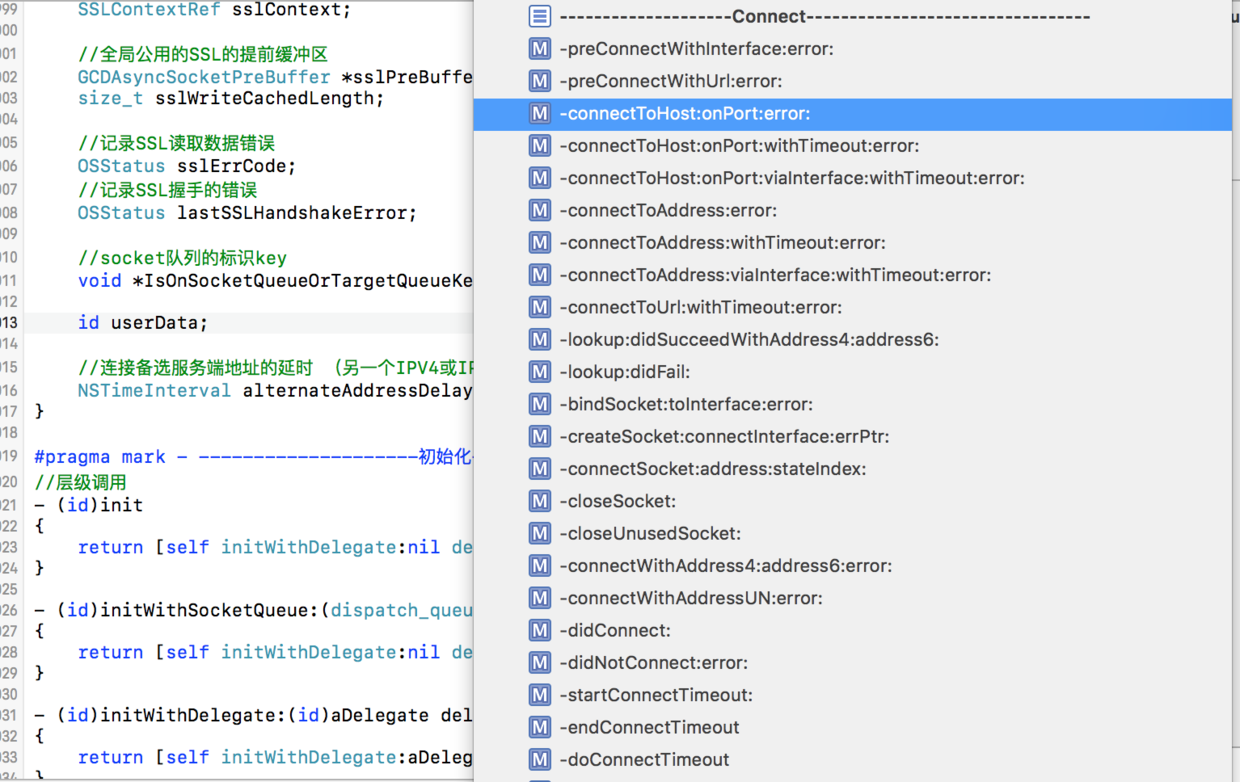
These are the connect-related methods. We normally connect to the server like this:
[socket connectToHost:Khost onPort:Kport error:nil];
This is the method selected in the screenshot, so we will begin there.
Method two: Overall connect method
//逐级调用
- (BOOL)connectToHost:(NSString*)host onPort:(uint16_t)port error:(NSError **)errPtr
{
    return [self connectToHost:host onPort:port withTimeout:-1 error:errPtr];
}

- (BOOL)connectToHost:(NSString *)host
               onPort:(uint16_t)port
          withTimeout:(NSTimeInterval)timeout
                error:(NSError **)errPtr
{
    return [self connectToHost:host onPort:port viaInterface:nil withTimeout:timeout error:errPtr];
}

//多一个inInterface,本机地址
- (BOOL)connectToHost:(NSString *)inHost
               onPort:(uint16_t)port
         viaInterface:(NSString *)inInterface
          withTimeout:(NSTimeInterval)timeout
                error:(NSError **)errPtr
{
    //{} 跟踪当前行为
    LogTrace();

    // Just in case immutable objects were passed
    //拿到host ,copy防止值被修改
    NSString *host = [inHost copy];
    //interface?接口?
    NSString *interface = [inInterface copy];

    //声明两个__block的
    __block BOOL result = NO;
    //error信息
    __block NSError *preConnectErr = nil;

    //gcdBlock ,都包裹在自动释放池中
    dispatch_block_t block = ^{ @autoreleasepool {

        // Check for problems with host parameter

        if ([host length] == 0)
        {
            NSString *msg = @"Invalid host parameter (nil or \"\"). Should be a domain name or IP address string.";
            preConnectErr = [self badParamError:msg];

            //其实就是return,大牛的代码真是充满逼格
            return_from_block;
        }

        // Run through standard pre-connect checks
        //一个前置的检查,如果没通过返回,这个检查里,如果interface有值,则会将本机的IPV4 IPV6的 address设置上。
        if (![self preConnectWithInterface:interface error:&preConnectErr])
        {
            return_from_block;
        }

        // We've made it past all the checks.
        // It's time to start the connection process.
        //flags 做或等运算。 flags标识为开始Socket连接
        flags |= kSocketStarted;

        //又是一个{}? 只是为了标记么?
        LogVerbose(@"Dispatching DNS lookup...");

        // It's possible that the given host parameter is actually a NSMutableString.
        //很可能给我们的服务端的参数是一个可变字符串
        // So we want to copy it now, within this block that will be executed synchronously.
        //所以我们需要copy,在Block里同步的执行
        // This way the asynchronous lookup block below doesn't have to worry about it changing.
        //这种基于Block的异步查找,不需要担心它被改变

        //copy,防止改变
        NSString *hostCpy = [host copy];

        //拿到状态
        int aStateIndex = stateIndex;
        __weak GCDAsyncSocket *weakSelf = self;

        //全局Queue
        dispatch_queue_t globalConcurrentQueue = dispatch_get_global_queue(DISPATCH_QUEUE_PRIORITY_DEFAULT, 0);
        //异步执行
        dispatch_async(globalConcurrentQueue, ^{ @autoreleasepool {
            //忽视循环引用
        #pragma clang diagnostic push
        #pragma clang diagnostic warning "-Wimplicit-retain-self"

            //查找错误
            NSError *lookupErr = nil;
            //server地址数组(包含IPV4 IPV6的地址  sockaddr_in6、sockaddr_in类型)
            NSMutableArray *addresses = [[self class] lookupHost:hostCpy port:port error:&lookupErr];

            //strongSelf
            __strong GCDAsyncSocket *strongSelf = weakSelf;

            //完整Block安全形态,在加个if
            if (strongSelf == nil) return_from_block;

            //如果有错
            if (lookupErr)
            {
                //用cocketQueue
                dispatch_async(strongSelf->socketQueue, ^{ @autoreleasepool {
                    //一些错误处理,清空一些数据等等
                    [strongSelf lookup:aStateIndex didFail:lookupErr];
                }});
            }
            //正常
            else
            {

                NSData *address4 = nil;
                NSData *address6 = nil;
                //遍历地址数组
                for (NSData *address in addresses)
                {
                    //判断address4为空,且address为IPV4
                    if (!address4 && [[self class] isIPv4Address:address])
                    {
                        address4 = address;
                    }
                    //判断address6为空,且address为IPV6
                    else if (!address6 && [[self class] isIPv6Address:address])
                    {
                        address6 = address;
                    }
                }
                //异步去发起连接
                dispatch_async(strongSelf->socketQueue, ^{ @autoreleasepool {

                    [strongSelf lookup:aStateIndex didSucceedWithAddress4:address4 address6:address6];
                }});
            }

        #pragma clang diagnostic pop
        }});


        //开启连接超时
        [self startConnectTimeout:timeout];

        result = YES;
    }};
    //在socketQueue中执行这个Block
    if (dispatch_get_specific(IsOnSocketQueueOrTargetQueueKey))
        block();
    //否则同步的调起这个queue去执行
    else
        dispatch_sync(socketQueue, block);

    //如果有错误,赋值错误
    if (errPtr) *errPtr = preConnectErr;
    //把连接是否成功的result返回
    return result;
}
This long method mainly does the following:
- First, macros such as LogTrace() appear throughout the class. Inspecting one shows that it currently expands to {}, doing nothing.
These macros trace execution flow. They are defined inside a large #if #else block:
#ifndef GCDAsyncSocketLoggingEnabled
#define GCDAsyncSocketLoggingEnabled 0
#endif
#if GCDAsyncSocketLoggingEnabled
// Logging Enabled - See log level below
// Logging uses the CocoaLumberjack framework (which is also GCD based).
// https://github.com/robbiehanson/CocoaLumberjack
//
// It allows us to do a lot of logging without significantly slowing down the code.
#import "DDLog.h"
#define LogAsync   YES
#define LogContext GCDAsyncSocketLoggingContext
#define LogObjc(flg, frmt, ...) LOG_OBJC_MAYBE(LogAsync, logLevel, flg, LogContext, frmt, ##__VA_ARGS__)
#define LogC(flg, frmt, ...)    LOG_C_MAYBE(LogAsync, logLevel, flg, LogContext, frmt, ##__VA_ARGS__)
#define LogError(frmt, ...)     LogObjc(LOG_FLAG_ERROR,   (@"%@: " frmt), THIS_FILE, ##__VA_ARGS__)
#define LogWarn(frmt, ...)      LogObjc(LOG_FLAG_WARN,    (@"%@: " frmt), THIS_FILE, ##__VA_ARGS__)
#define LogInfo(frmt, ...)      LogObjc(LOG_FLAG_INFO,    (@"%@: " frmt), THIS_FILE, ##__VA_ARGS__)
#define LogVerbose(frmt, ...)   LogObjc(LOG_FLAG_VERBOSE, (@"%@: " frmt), THIS_FILE, ##__VA_ARGS__)
#define LogCError(frmt, ...)    LogC(LOG_FLAG_ERROR,   (@"%@: " frmt), THIS_FILE, ##__VA_ARGS__)
#define LogCWarn(frmt, ...)     LogC(LOG_FLAG_WARN,    (@"%@: " frmt), THIS_FILE, ##__VA_ARGS__)
#define LogCInfo(frmt, ...)     LogC(LOG_FLAG_INFO,    (@"%@: " frmt), THIS_FILE, ##__VA_ARGS__)
#define LogCVerbose(frmt, ...)  LogC(LOG_FLAG_VERBOSE, (@"%@: " frmt), THIS_FILE, ##__VA_ARGS__)
#define LogTrace()              LogObjc(LOG_FLAG_VERBOSE, @"%@: %@", THIS_FILE, THIS_METHOD)
#define LogCTrace()             LogC(LOG_FLAG_VERBOSE, @"%@: %s", THIS_FILE, __FUNCTION__)
#ifndef GCDAsyncSocketLogLevel
#define GCDAsyncSocketLogLevel LOG_LEVEL_VERBOSE
#endif
// Log levels : off, error, warn, info, verbose
static const int logLevel = GCDAsyncSocketLogLevel;
#else
// Logging Disabled
#define LogError(frmt, ...)     {}
#define LogWarn(frmt, ...)      {}
#define LogInfo(frmt, ...)      {}
#define LogVerbose(frmt, ...)   {}
#define LogCError(frmt, ...)    {}
#define LogCWarn(frmt, ...)     {}
#define LogCInfo(frmt, ...)     {}
#define LogCVerbose(frmt, ...)  {}
#define LogTrace()              {}
#define LogCTrace(frmt, ...)    {}
#endif
GCDAsyncSocketLoggingEnabled defaults to 0, so the macro expands only to {}. Set it to 1 to log the current execution flow, greatly helping debugging.
-
Returning to the main flow, we define a Block containing all connection operations and perform these checks:
//在socketQueue中执行这个Block
if (dispatch_get_specific(IsOnSocketQueueOrTargetQueueKey))
    block();
//否则同步的调起这个queue去执行
else
    dispatch_sync(socketQueue, block);
Ensure the connection operation runs synchronously and serially on socketQueue, avoiding thread-safety problems.
-
Then assign any connection error produced inside the Block and return the connection result.
//如果有错误,赋值错误 if (errPtr) *errPtr = preConnectErr; //把连接是否成功的result返回 return result;
Next, look inside the Block, where the connection's main work occurs. Many functions call one another in sequence; I will explain them as clearly and thoroughly as possible.
1. This Block first checks for errors and calls error-construction methods, such as:
if ([host length] == 0)
{
     NSString *msg = @"Invalid host parameter (nil or \"\"). Should be a domain name or IP address string.";
     preConnectErr = [self badParamError:msg];

  //其实就是return,大牛的代码真是充满逼格
     return_from_block;
}
//用该字符串生成一个错误,错误的域名,错误的参数
- (NSError *)badParamError:(NSString *)errMsg
{
    NSDictionary *userInfo = [NSDictionary dictionaryWithObject:errMsg forKey:NSLocalizedDescriptionKey];

    return [NSError errorWithDomain:GCDAsyncSocketErrorDomain code:GCDAsyncSocketBadParamError userInfo:userInfo];
}
2. Perform a preliminary error check:
if (![self preConnectWithInterface:interface error:&preConnectErr])
{
     return_from_block;
}
check returns NO on failure. If interface has a value, it also sets the local IPV4 and IPV6 addresses—the two properties mentioned earlier:
  //本机的IPV4地址
NSData * connectInterface4;
//本机的IPV6地址
NSData * connectInterface6;
Let's examine the preliminary-check method:
Method three: Preliminary checks
//在连接之前的接口检查,一般我们传nil  interface本机的IP 端口等等
- (BOOL)preConnectWithInterface:(NSString *)interface error:(NSError **)errPtr
{
    //先断言,如果当前的queue不是初始化quueue,直接报错
    NSAssert(dispatch_get_specific(IsOnSocketQueueOrTargetQueueKey), @"Must be dispatched on socketQueue");

    //无代理
    if (delegate == nil) // Must have delegate set
    {
        if (errPtr)
        {
            NSString *msg = @"Attempting to connect without a delegate. Set a delegate first.";
            *errPtr = [self badConfigError:msg];
        }
        return NO;
    }
    //没有代理queue
    if (delegateQueue == NULL) // Must have delegate queue set
    {
        if (errPtr)
        {
            NSString *msg = @"Attempting to connect without a delegate queue. Set a delegate queue first.";
            *errPtr = [self badConfigError:msg];
        }
        return NO;
    }

    //当前不是非连接状态
    if (![self isDisconnected]) // Must be disconnected
    {
        if (errPtr)
        {
            NSString *msg = @"Attempting to connect while connected or accepting connections. Disconnect first.";
            *errPtr = [self badConfigError:msg];
        }
        return NO;
    }

    //判断是否支持IPV4 IPV6  &位与运算,因为枚举是用  左位移<<运算定义的,所以可以用来判断 config包不包含某个枚举。因为一个值可能包含好几个枚举值,所以这时候不能用==来判断,只能用&来判断
    BOOL isIPv4Disabled = (config & kIPv4Disabled) ? YES : NO;
    BOOL isIPv6Disabled = (config & kIPv6Disabled) ? YES : NO;

    //是否都不支持
    if (isIPv4Disabled && isIPv6Disabled) // Must have IPv4 or IPv6 enabled
    {
        if (errPtr)
        {
            NSString *msg = @"Both IPv4 and IPv6 have been disabled. Must enable at least one protocol first.";
            *errPtr = [self badConfigError:msg];
        }
        return NO;
    }

    //如果有interface,本机地址
    if (interface)
    {
        NSMutableData *interface4 = nil;
        NSMutableData *interface6 = nil;

        //得到本机的IPV4 IPV6地址
        [self getInterfaceAddress4:&interface4 address6:&interface6 fromDescription:interface port:0];

        //如果两者都为nil
        if ((interface4 == nil) && (interface6 == nil))
        {
            if (errPtr)
            {
                NSString *msg = @"Unknown interface. Specify valid interface by name (e.g. \"en1\") or IP address.";
                *errPtr = [self badParamError:msg];
            }
            return NO;
        }

        if (isIPv4Disabled && (interface6 == nil))
        {
            if (errPtr)
            {
                NSString *msg = @"IPv4 has been disabled and specified interface doesn't support IPv6.";
                *errPtr = [self badParamError:msg];
            }
            return NO;
        }

        if (isIPv6Disabled && (interface4 == nil))
        {
            if (errPtr)
            {
                NSString *msg = @"IPv6 has been disabled and specified interface doesn't support IPv4.";
                *errPtr = [self badParamError:msg];
            }
            return NO;
        }
        //如果都没问题,则赋值
        connectInterface4 = interface4;
        connectInterface6 = interface6;
    }

    // Clear queues (spurious read/write requests post disconnect)
    //清除queue(假的读写请求 ,提交断开连接)
    //读写Queue清除
    [readQueue removeAllObjects];
    [writeQueue removeAllObjects];

    return YES;
}
Another long method, but one that is easy to follow.
- It mainly checks preconnection properties and parameters. If anything is missing, it assigns the error pointer and returns NO.
-
If interface is nonempty, additional work is performed. This parameter specifies a local IP and port. Normally, we need not set it: the default is localhost (127.0.0.1), and the system chooses an available port. Setting it forces the specified local IP and port. That can be undesirable: a hardcoded port may already belong to another process, preventing connection. IM clients therefore normally let the system choose a port instead of binding a specific one.
- Finally, remove every task from the current read/write queues.
What extra work occurs when interface is supplied? Examine this method:
Method four: Local address binding
- (void)getInterfaceAddress4:(NSMutableData **)interfaceAddr4Ptr
                    address6:(NSMutableData **)interfaceAddr6Ptr
             fromDescription:(NSString *)interfaceDescription
                        port:(uint16_t)port
{
    NSMutableData *addr4 = nil;
    NSMutableData *addr6 = nil;

    NSString *interface = nil;

    //先用:分割
    NSArray *components = [interfaceDescription componentsSeparatedByString:@":"];
    if ([components count] > 0)
    {
        NSString *temp = [components objectAtIndex:0];
        if ([temp length] > 0)
        {
            interface = temp;
        }
    }
    if ([components count] > 1 && port == 0)
    {
        //拿到port strtol函数,将一个字符串,根据base参数转成长整型,如base值为10则采用10进制,若base值为16则采用16进制
        long portL = strtol([[components objectAtIndex:1] UTF8String], NULL, 10);
        //UINT16_MAX,65535最大端口号
        if (portL > 0 && portL <= UINT16_MAX)
        {
            port = (uint16_t)portL;
        }
    }

    //为空则自己创建一个 0x00000000 ,全是0 ,为线路地址
    //如果端口为0 通常用于分析操作系统。这一方法能够工作是因为在一些系统中“0”是无效端口,当你试图使用通常的闭合端口连接它时将产生不同的结果。一种典型的扫描,使用IP地址为0.0.0.0,设置ACK位并在以太网层广播。
    if (interface == nil)
    {

        struct sockaddr_in sockaddr4;

        //memset作用是在一段内存块中填充某个给定的值,它是对较大的结构体或数组进行清零操作的一种最快方法

        //memset(void *s,int ch,size_t n);函数,第一个参数为指针地址,第二个为设置值,第三个为连续设置的长度(大小)
        memset(&sockaddr4, 0, sizeof(sockaddr4));
        //结构体长度
        sockaddr4.sin_len         = sizeof(sockaddr4);
        //addressFamily IPv4(AF_INET) 或 IPv6(AF_INET6)。
        sockaddr4.sin_family      = AF_INET;
        //端口号 htons将主机字节顺序转换成网络字节顺序  16位
        sockaddr4.sin_port        = htons(port);
        //htonl ,将INADDR_ANY:0.0.0.0,不确定地址,或者任意地址  htonl 32位。 也是转为网络字节序

        //ipv4 32位  4个字节    INADDR_ANY,0x00000000 (16进制,一个0代表4位,8个0就是32位) =   4个字节的
        sockaddr4.sin_addr.s_addr = htonl(INADDR_ANY);
        struct sockaddr_in6 sockaddr6;
        memset(&sockaddr6, 0, sizeof(sockaddr6));

        sockaddr6.sin6_len       = sizeof(sockaddr6);
        //ipv6
        sockaddr6.sin6_family    = AF_INET6;
        //port
        sockaddr6.sin6_port      = htons(port);

        //共128位
        sockaddr6.sin6_addr      = in6addr_any;

        //把这两个结构体转成data
        addr4 = [NSMutableData dataWithBytes:&sockaddr4 length:sizeof(sockaddr4)];
        addr6 = [NSMutableData dataWithBytes:&sockaddr6 length:sizeof(sockaddr6)];
    }
    //如果localhost、loopback 回环地址,虚拟地址,路由器工作它就存在。一般用来标识路由器
    //这两种的话就赋值为127.0.0.1,端口为port
    else if ([interface isEqualToString:@"localhost"] || [interface isEqualToString:@"loopback"])
    {
        // LOOPBACK address

        //ipv4
        struct sockaddr_in sockaddr4;
        memset(&sockaddr4, 0, sizeof(sockaddr4));

        sockaddr4.sin_len         = sizeof(sockaddr4);
        sockaddr4.sin_family      = AF_INET;
        sockaddr4.sin_port        = htons(port);

        //#define    INADDR_LOOPBACK        (u_int32_t)0x7f000001
        //7f000001->1111111 00000000 00000000 00000001->127.0.0.1
        sockaddr4.sin_addr.s_addr = htonl(INADDR_LOOPBACK);

        //ipv6
        struct sockaddr_in6 sockaddr6;
        memset(&sockaddr6, 0, sizeof(sockaddr6));

        sockaddr6.sin6_len       = sizeof(sockaddr6);
        sockaddr6.sin6_family    = AF_INET6;
        sockaddr6.sin6_port      = htons(port);

        sockaddr6.sin6_addr      = in6addr_loopback;
        //赋值
        addr4 = [NSMutableData dataWithBytes:&sockaddr4 length:sizeof(sockaddr4)];
        addr6 = [NSMutableData dataWithBytes:&sockaddr6 length:sizeof(sockaddr6)];
    }
    //非localhost、loopback,去获取本机IP,看和传进来Interface是同名或者同IP,相同才给赋端口号,把数据封装进Data。否则为nil
    else
    {
        //转成cString
        const char *iface = [interface UTF8String];

        //定义结构体指针,这个指针是本地IP
        struct ifaddrs *addrs;
        const struct ifaddrs *cursor;

        //获取到本机IP,为0说明成功了
        if ((getifaddrs(&addrs) == 0))
        {
            //赋值
            cursor = addrs;
            //如果IP不为空,则循环链表去设置
            while (cursor != NULL)
            {
                //如果 addr4 IPV4地址为空,而且地址类型为IPV4
                if ((addr4 == nil) && (cursor->ifa_addr->sa_family == AF_INET))
                {
                    // IPv4

                    struct sockaddr_in nativeAddr4;
                    //memcpy内存copy函数,把src开始到size的字节数copy到 dest中
                    memcpy(&nativeAddr4, cursor->ifa_addr, sizeof(nativeAddr4));

                    //比较两个字符串是否相同,本机的IP名,和接口interface是否相同
                    if (strcmp(cursor->ifa_name, iface) == 0)
                    {
                        // Name match
                        //相同则赋值 port
                        nativeAddr4.sin_port = htons(port);
                        //用data封号IPV4地址
                        addr4 = [NSMutableData dataWithBytes:&nativeAddr4 length:sizeof(nativeAddr4)];
                    }
                    //本机IP名和interface不相同
                    else
                    {
                        //声明一个IP 16位的数组
                        char ip[INET_ADDRSTRLEN];

                        //这里是转成了10进制。。(因为获取到的是二进制IP)
                        const char *conversion = inet_ntop(AF_INET, &nativeAddr4.sin_addr, ip, sizeof(ip));

                        //如果conversion不为空,说明转换成功而且 ,比较转换后的IP,和interface是否相同
                        if ((conversion != NULL) && (strcmp(ip, iface) == 0))
                        {
                            // IP match
                            //相同则赋值 port
                            nativeAddr4.sin_port = htons(port);

                            addr4 = [NSMutableData dataWithBytes:&nativeAddr4 length:sizeof(nativeAddr4)];
                        }
                    }
                }
                //IPV6 一样
                else if ((addr6 == nil) && (cursor->ifa_addr->sa_family == AF_INET6))
                {
                    // IPv6

                    struct sockaddr_in6 nativeAddr6;
                    memcpy(&nativeAddr6, cursor->ifa_addr, sizeof(nativeAddr6));

                    if (strcmp(cursor->ifa_name, iface) == 0)
                    {
                        // Name match

                        nativeAddr6.sin6_port = htons(port);

                        addr6 = [NSMutableData dataWithBytes:&nativeAddr6 length:sizeof(nativeAddr6)];
                    }
                    else
                    {
                        char ip[INET6_ADDRSTRLEN];

                        const char *conversion = inet_ntop(AF_INET6, &nativeAddr6.sin6_addr, ip, sizeof(ip));

                        if ((conversion != NULL) && (strcmp(ip, iface) == 0))
                        {
                            // IP match

                            nativeAddr6.sin6_port = htons(port);

                            addr6 = [NSMutableData dataWithBytes:&nativeAddr6 length:sizeof(nativeAddr6)];
                        }
                    }
                }

                //指向链表下一个addr
                cursor = cursor->ifa_next;
            }
            //和getifaddrs对应,释放这部分内存
            freeifaddrs(addrs);
        }
    }
    //如果这两个二级指针存在,则取成一级指针,把addr4赋值给它
    if (interfaceAddr4Ptr) *interfaceAddr4Ptr = addr4;
    if (interfaceAddr6Ptr) *interfaceAddr6Ptr = addr6;
The many socket-function calls can make this method appear difficult, but its purpose is simple: convert interface into the address structure required for socket operations, then wrap that structure in NSMutableData.
To make this easier to follow, here are the socket functions and macros used by this method in call order:
//拿到port strtol函数,将一个字符串,根据base参数转成长整型,
//如base值为10则采用10进制,若base值为16则采用16进制
long  strtol(const char *__str, char **__endptr, int __base);

//作用是在一段内存块中填充某个给定的值,它是对较大的结构体或数组进行清零操作的一种最快方法
//第一个参数为指针地址,第二个为设置值,第三个为连续设置的长度(大小)
memset(void *s,int ch,size_t n);

//最大端口号
#define UINT16_MAX        65535

//作用是把主机字节序转化为网络字节序
htons() //参数16位
htonl() //参数32位
//获取占用内存大小
sizeof()
//比较两个指针,是否相同 相同返回0
int   strcmp(const char *__s1, const char *__s2)


//内存copu函数,把src开始到len的字节数copy到 dest中
memcpy(dest, src, len)

//inet_pton和inet_ntop这2个IP地址转换函数,可以在将IP地址在“点分十进制”和“二进制整数”之间转换
//参数socklen_t cnt,他是所指向缓存区dst的大小,避免溢出,如果缓存区太小无法存储地址的值,则返回一个空指针,并将errno置为ENOSPC
const char *inet_ntop(int af, const void *src, char *dst, socklen_t cnt);

//得到本机地址
extern int getifaddrs(struct ifaddrs **);
//释放本机地址
extern void freeifaddrs(struct ifaddrs *);
Some structures used as parameters:
//socket通信用的 IPV4地址结构体
struct sockaddr_in {
     __uint8_t sin_len;      //整个结构体大小
     sa_family_t    sin_family;      //协议族,IPV4?IPV6
     in_port_t sin_port;      //端口
     struct    in_addr sin_addr;      //IP地址
     char      sin_zero[8];     //空的占位符,为了和其他地址结构体保持一致大小,方便转化
};
//IPV6地址结构体,和上面的类似
struct sockaddr_in6 {
     __uint8_t sin6_len; /* length of this struct(sa_family_t) */
     sa_family_t    sin6_family;   /* AF_INET6 (sa_family_t) */
     in_port_t sin6_port;     /* Transport layer port # (in_port_t) */
     __uint32_t     sin6_flowinfo; /* IP6 flow information */
     struct in6_addr     sin6_addr;     /* IP6 address */
     __uint32_t     sin6_scope_id; /* scope zone index */
};

//用来获取本机IP的参数结构体
struct ifaddrs {
    //指向链表的下一个成员
    struct ifaddrs  *ifa_next;
    //接口名称
    char       *ifa_name;
    //接口标识位(比如当IFF_BROADCAST或IFF_POINTOPOINT设置到此标识位时,影响联合体变量ifu_broadaddr存储广播地址或ifu_dstaddr记录点对点地址)
    unsigned int     ifa_flags;
    //接口地址
    struct sockaddr *ifa_addr;
    //存储该接口的子网掩码;
    struct sockaddr *ifa_netmask;

    //点对点的地址
    struct sockaddr *ifa_dstaddr;
    //ifa_data存储了该接口协议族的特殊信息,它通常是NULL(一般不关注他)。
    void       *ifa_data;
};
This material is rather dry, but essential to understanding socket programming.
This involves network byte order and host byte order. Before creating a socket, convert parameters such as port and host to network byte order. Why is this necessary?
Different CPUs use different byte orders: the order in which integer bytes are stored in memory is called host byte order. The two most common are: 1. Little endian: store the least-significant byte at the starting address. 2. Big endian: store the most-significant byte at the starting address.
Across a network, we cannot know each other's byte order, so a common convention is necessary. That is the purpose of network byte order.
Network byte order is a TCP/IP-defined representation independent of CPU and operating system, allowing different hosts to interpret transmitted data correctly. It uses big endian order.
If interested, read this article: Network byte order and host byte order.
Several address structures are also important. They define the current socket's IP, Port, length, address family, and other information. Socket addresses are not limited to these 3 structures; more appear in later code.
With the concepts above understood, this method is straightforward. It creates and binds local IPV4 and IPV6 addresses, handling several cases:
1. An empty interface does not occur in our client path, since this method is called only when that parameter is nonempty. This case is generally used for server listening, binding the local address to 0, meaning any address. What does that achieve? Consider this scenario:
Suppose a server has several network interfaces, each with a different IP, and its service listens on a udp or tcp port. For some reason—perhaps the operating system may add or remove IP addresses, or you want to avoid determining which Network port network interfaces are available—you may, when calling bind(), tell the operating system: “Listen on port yyyy and send me everything received on server this port, regardless of which network interface or IP received it.” The server then listens on 0.0.0.0.
2. If interface is localhost or loopback, set IP to 127.0.0.1. localhost is familiar, but what is loopback? A loopback address is virtual rather than attached to a physical interface. It exists as long as the router operates and uniquely identifies the router. See the encyclopedia for further details: loopback
3. For another address, use getifaddrs() to obtain local addresses and compare the interface name or IP. A match makes the address valid and enables IPV4 and IPV6 binding; otherwise, do nothing.
That completes local address binding. As noted earlier, clients generally do not need this step: the system binds the local IP and selects an available port automatically. This method is therefore used when iOS acts as a server.
Having covered method three, preliminary checks, and method four, local address binding, return to method two:
We previously reached point 3:
3. Mark flag as kSocketStarted:
flags |= kSocketStarted;
| The source uses 3 bitwise operators extensively: OR ( | ), AND (&), and NOT (~) operators. Flags conveniently represent the current state, and their enum values use left shifts: |
enum GCDAsyncSocketFlags
{
    kSocketStarted                 = 1 <<  0,  // If set, socket has been started (accepting/connecting)
    kConnected                     = 1 <<  1,  // If set, the socket is connected
    kForbidReadsWrites             = 1 <<  2,  // If set, no new reads or writes are allowed
    kReadsPaused                   = 1 <<  3,  // If set, reads are paused due to possible timeout
    kWritesPaused                  = 1 <<  4,  // If set, writes are paused due to possible timeout
    kDisconnectAfterReads          = 1 <<  5,  // If set, disconnect after no more reads are queued
    kDisconnectAfterWrites         = 1 <<  6,  // If set, disconnect after no more writes are queued
    kSocketCanAcceptBytes          = 1 <<  7,  // If set, we know socket can accept bytes. If unset, it's unknown.
    kReadSourceSuspended           = 1 <<  8,  // If set, the read source is suspended
    kWriteSourceSuspended          = 1 <<  9,  // If set, the write source is suspended
    kQueuedTLS                     = 1 << 10,  // If set, we've queued an upgrade to TLS
    kStartingReadTLS               = 1 << 11,  // If set, we're waiting for TLS negotiation to complete
    kStartingWriteTLS              = 1 << 12,  // If set, we're waiting for TLS negotiation to complete
    kSocketSecure                  = 1 << 13,  // If set, socket is using secure communication via SSL/TLS
    kSocketHasReadEOF              = 1 << 14,  // If set, we have read EOF from socket
    kReadStreamClosed              = 1 << 15,  // If set, we've read EOF plus prebuffer has been drained
    kDealloc                       = 1 << 16,  // If set, the socket is being deallocated
#if TARGET_OS_IPHONE
    kAddedStreamsToRunLoop         = 1 << 17,  // If set, CFStreams have been added to listener thread
    kUsingCFStreamForTLS           = 1 << 18,  // If set, we're forced to use CFStream instead of SecureTransport
    kSecureSocketHasBytesAvailable = 1 << 19,  // If set, CFReadStream has notified us of bytes available
#endif
};
| Therefore, flags can use | to combine multiple states with lightweight operations. The comments explain each flag. Here, the flag marks the socket as having started connecting. |
4. Use a global queue to connect asynchronously, performing two operations:
First, obtain the array of server addresses to connect to:
//server地址数组(包含IPV4 IPV6的地址  sockaddr_in6、sockaddr_in类型)
NSMutableArray *addresses = [[self class] lookupHost:hostCpy port:port error:&lookupErr];
The second step checks for errors, assigns address information to address4 and address6, then asynchronously returns to socketQueue and invokes another connection method:
//异步去发起连接
dispatch_async(strongSelf->socketQueue, ^{ @autoreleasepool {

   [strongSelf lookup:aStateIndex didSucceedWithAddress4:address4 address6:address6];
}});
This method performs expensive work, such as creating the server addresses, concurrently on an asynchronous thread. Once the data is ready, it returns to socketQueue to continue connecting.
The next section has two large branches. First, obtain the server addresses:
Method five: Creating server-address data
//根据host、port
+ (NSMutableArray *)lookupHost:(NSString *)host port:(uint16_t)port error:(NSError **)errPtr
{
     LogTrace();

     NSMutableArray *addresses = nil;
     NSError *error = nil;

    //如果Host是这localhost或者loopback
     if ([host isEqualToString:@"localhost"] || [host isEqualToString:@"loopback"])
     {
          // Use LOOPBACK address
          struct sockaddr_in nativeAddr4;
          nativeAddr4.sin_len         = sizeof(struct sockaddr_in);
          nativeAddr4.sin_family      = AF_INET;
          nativeAddr4.sin_port        = htons(port);
          nativeAddr4.sin_addr.s_addr = htonl(INADDR_LOOPBACK);
        //占位置0
          memset(&(nativeAddr4.sin_zero), 0, sizeof(nativeAddr4.sin_zero));

        //ipv6
          struct sockaddr_in6 nativeAddr6;
          nativeAddr6.sin6_len        = sizeof(struct sockaddr_in6);
          nativeAddr6.sin6_family     = AF_INET6;
          nativeAddr6.sin6_port       = htons(port);
          nativeAddr6.sin6_flowinfo   = 0;
          nativeAddr6.sin6_addr       = in6addr_loopback;
          nativeAddr6.sin6_scope_id   = 0;

          // Wrap the native address structures

          NSData *address4 = [NSData dataWithBytes:&nativeAddr4 length:sizeof(nativeAddr4)];
          NSData *address6 = [NSData dataWithBytes:&nativeAddr6 length:sizeof(nativeAddr6)];

        //两个添加进数组
          addresses = [NSMutableArray arrayWithCapacity:2];
          [addresses addObject:address4];
          [addresses addObject:address6];
     }
     else
     {
        //拿到port String
          NSString *portStr = [NSString stringWithFormat:@"%hu", port];


        //定义三个addrInfo  是一个sockaddr结构的链表而不是一个地址清单

          struct addrinfo hints, *res, *res0;

        //初始化为0
          memset(&hints, 0, sizeof(hints));

        //相当于 AF_UNSPEC ,返回的是适用于指定主机名和服务名且适合任何协议族的地址。
          hints.ai_family   = PF_UNSPEC;
          hints.ai_socktype = SOCK_STREAM;
          hints.ai_protocol = IPPROTO_TCP;


        //根据host port,去获取地址信息。

          int gai_error = getaddrinfo([host UTF8String], [portStr UTF8String], &hints, &res0);

        //出错
          if (gai_error)
          {   //获取到错误
               error = [self gaiError:gai_error];
          }
        //正确获取到addrInfo
          else
          {
            //
               NSUInteger capacity = 0;
            //遍历 res0
               for (res = res0; res; res = res->ai_next)
               {
                //如果有IPV4 IPV6的,capacity+1
                    if (res->ai_family == AF_INET || res->ai_family == AF_INET6) {
                         capacity++;
                    }
               }
               //生成一个地址数组,数组为capacity大小
               addresses = [NSMutableArray arrayWithCapacity:capacity];

            //再去遍历,为什么不一次遍历完,仅仅是为了限制数组的大小?
               for (res = res0; res; res = res->ai_next)
               {
                //IPV4
                    if (res->ai_family == AF_INET)
                    {
                         // Found IPv4 address.
                         // Wrap the native address structure, and add to results.
                         //加到数组中
                         NSData *address4 = [NSData dataWithBytes:res->ai_addr length:res->ai_addrlen];
                         [addresses addObject:address4];
                    }
                    else if (res->ai_family == AF_INET6)
                    {
                         // Fixes connection issues with IPv6
                         // https://github.com/robbiehanson/CocoaAsyncSocket/issues/429#issuecomment-222477158

                         // Found IPv6 address.
                         // Wrap the native address structure, and add to results.
                    //强转
                         struct sockaddr_in6 *sockaddr = (struct sockaddr_in6 *)res->ai_addr;
                    //拿到port
                         in_port_t *portPtr = &sockaddr->sin6_port;
                    //如果Port为0
                         if ((portPtr != NULL) && (*portPtr == 0)) {
                        //赋值,用传进来的port
                                 *portPtr = htons(port);
                         }
                    //添加到数组
                         NSData *address6 = [NSData dataWithBytes:res->ai_addr length:res->ai_addrlen];
                         [addresses addObject:address6];
                    }
               }
            //对应getaddrinfo 释放内存
               freeaddrinfo(res0);

            //如果地址里一个没有,报错 EAI_FAIL:名字解析中不可恢复的失败
               if ([addresses count] == 0)
               {
                    error = [self gaiError:EAI_FAIL];
               }
          }
     }
     //赋值错误
     if (errPtr) *errPtr = error;
    //返回地址
     return addresses;
}
This method branches according to host:
If host is localhost or loopback, generate IPV4 and IPV6 addresses in the same way as for local binding, wrap each address structure in NSData, and put them in an NSMutableArray. Otherwise, create addresses from host and port with the following function:
int getaddrinfo( const char *hostname, const char *service, const struct addrinfo *hints, struct addrinfo **result ); This function obtains address information from hostname (IP) and service (port), returning it through result. hints may be null or point to an addrinfo structure. When supplied, it configures which address information is returned, for example:
For example, a service may support both TCP and UDP. Set hints.ai_socktype to SOCK_DGRAM to return only datagram-socket information. Here, result and hints both point to addrinfo structures, the 4th kind of address structure encountered so far. Its definition follows:
struct addrinfo {
 int    ai_flags;    /* AI_PASSIVE, AI_CANONNAME, AI_NUMERICHOST */
 int    ai_family;    /* PF_xxx */
 int    ai_socktype;    /* SOCK_xxx */
 int    ai_protocol;    /* 0 or IPPROTO_xxx for IPv4 and IPv6 */
 socklen_t ai_addrlen;    /* length of ai_addr */
 char    *ai_canonname;    /* canonical name for hostname */
 struct    sockaddr *ai_addr;    /* binary address */
 struct    addrinfo *ai_next;    /* next structure in linked list */
};
It includes an IPV4 address structure, ai_addr, and ai_next, a pointer to the next node of the same type. Other fields resemble those in the earlier address structures; consult the comments or the article “Socket Programming: addrinfo and getaddrinfo”. ai_next matters because a server may have multiple addresses: IPV4, IPV6, or several network interfaces. The pointer links these addresses into a singly linked list.
Iterate over the address list, extract IPV4 and IPV6 addresses, wrap them in NSData, and add them to the array.
If an error occurs, assign it and return the address array. Once the structures and functions are understood, the method is straightforward. See the comments for details.
Return to method two and use this address array to connect.
//异步去发起连接
dispatch_async(strongSelf->socketQueue, ^{ @autoreleasepool {

     [strongSelf lookup:aStateIndex didSucceedWithAddress4:address4 address6:address6];
}});
This calls step 1 of method six, “Start connecting”, discussed in this article.
// Final connection method 1
- (void)lookup:(int)aStateIndex didSucceedWithAddress4:(NSData *)address4 address6:(NSData *)address6
{
     LogTrace();

     NSAssert(dispatch_get_specific(IsOnSocketQueueOrTargetQueueKey), @"Must be dispatched on socketQueue");
    //至少有一个server地址
     NSAssert(address4 || address6, @"Expected at least one valid address");

    //如果状态不一致,说明断开连接
     if (aStateIndex != stateIndex)
     {
          LogInfo(@"Ignoring lookupDidSucceed, already disconnected");

          // The connect operation has been cancelled.
          // That is, socket was disconnected, or connection has already timed out.
          return;
     }

     // Check for problems
     //分开判断。
     BOOL isIPv4Disabled = (config & kIPv4Disabled) ? YES : NO;
     BOOL isIPv6Disabled = (config & kIPv6Disabled) ? YES : NO;

     if (isIPv4Disabled && (address6 == nil))
     {
          NSString *msg = @"IPv4 has been disabled and DNS lookup found no IPv6 address.";

          [self closeWithError:[self otherError:msg]];
          return;
     }

     if (isIPv6Disabled && (address4 == nil))
     {
          NSString *msg = @"IPv6 has been disabled and DNS lookup found no IPv4 address.";

          [self closeWithError:[self otherError:msg]];
          return;
     }

     // Start the normal connection process

     NSError *err = nil;
    //调用连接方法,如果失败,则错误返回
     if (![self connectWithAddress4:address4 address6:address6 error:&err])
     {
          [self closeWithError:err];
     }
}
This method is also simple: it mainly checks for errors, such as:
-
Check whether execution is on the socket queue.
-
Check whether the passed aStateIndex equals the stateIndex property. This illustrates the framework author's meticulous error handling. aStateIndex was passed from that property earlier, so they should match. But the value might change during the call, meaning the socket configuration has changed entirely: addresses may have been cleared, the socket destroyed, or the connection closed. Later, we will examine when stateIndex changes.
-
Determine the required config settings. Its values correspond to an enumeration:
enum GCDAsyncSocketConfig { kIPv4Disabled = 1 « 0, // If set, IPv4 is disabled kIPv6Disabled = 1 « 1, // If set, IPv6 is disabled kPreferIPv6 = 1 « 2, // If set, IPv6 is preferred over IPv4 kAllowHalfDuplexConnection = 1 « 3, // If set, the socket will stay open even if the read stream closes };
The first 3 options simply choose IPV4 or IPV6. According to the comment, the 4th keeps the Socket open even if the read stream closes. We will discuss its precise meaning later. This calls method seven, connection-start method 2.
//连接最终方法 2。用两个Server地址去连接,失败返回NO,并填充error
- (BOOL)connectWithAddress4:(NSData *)address4 address6:(NSData *)address6 error:(NSError **)errPtr
{
    LogTrace();

    NSAssert(dispatch_get_specific(IsOnSocketQueueOrTargetQueueKey), @"Must be dispatched on socketQueue");

    //输出一些东西?
    LogVerbose(@"IPv4: %@:%hu", [[self class] hostFromAddress:address4], [[self class] portFromAddress:address4]);
    LogVerbose(@"IPv6: %@:%hu", [[self class] hostFromAddress:address6], [[self class] portFromAddress:address6]);

    // Determine socket type

    //判断是否倾向于IPV6
    BOOL preferIPv6 = (config & kPreferIPv6) ? YES : NO;

    // Create and bind the sockets

    //如果有IPV4地址,创建IPV4 Socket
    if (address4)
    {
        LogVerbose(@"Creating IPv4 socket");

        socket4FD = [self createSocket:AF_INET connectInterface:connectInterface4 errPtr:errPtr];
    }
    //如果有IPV6地址,创建IPV6 Socket
    if (address6)
    {
        LogVerbose(@"Creating IPv6 socket");

        socket6FD = [self createSocket:AF_INET6 connectInterface:connectInterface6 errPtr:errPtr];
    }

    //如果都为空,直接返回
    if (socket4FD == SOCKET_NULL && socket6FD == SOCKET_NULL)
    {
        return NO;
    }

    //主选socketFD,备选alternateSocketFD
    int socketFD, alternateSocketFD;
    //主选地址和备选地址
    NSData *address, *alternateAddress;

    //IPV6
    if ((preferIPv6 && socket6FD) || socket4FD == SOCKET_NULL)
    {
        socketFD = socket6FD;
        alternateSocketFD = socket4FD;
        address = address6;
        alternateAddress = address4;
    }
    //主选IPV4
    else
    {
        socketFD = socket4FD;
        alternateSocketFD = socket6FD;
        address = address4;
        alternateAddress = address6;
    }
    //拿到当前状态
    int aStateIndex = stateIndex;
    //用socket和address去连接
    [self connectSocket:socketFD address:address stateIndex:aStateIndex];

    //如果有备选地址
    if (alternateAddress)
    {
        //延迟去连接备选的地址
        dispatch_after(dispatch_time(DISPATCH_TIME_NOW, (int64_t)(alternateAddressDelay * NSEC_PER_SEC)), socketQueue, ^{
            [self connectSocket:alternateSocketFD address:alternateAddress stateIndex:aStateIndex];
        });
    }

    return YES;
}
This is another transitional connection method, with a simple role:
- Obtain the IPV4 and IPV6 addresses, then create the corresponding sockets. These are local client sockets, not server sockets. The server addresses only determine whether corresponding local sockets are needed. Socket creation uses the local address information generated earlier, connectInterface4 or connectInterface6.
2. Use config to determine the preferred and alternate connections. Attempt the preferred address first, then use alternateAddressDelay, set during initialization, to delay connecting to the alternate address. If the preferred connection has already succeeded, another connection attempt would cause a socket error and closure.
These two steps call separate methods. First, look at the method that creates the local Socket:
Method eight: Creating a Socket
//创建Socket
- (int)createSocket:(int)family connectInterface:(NSData *)connectInterface errPtr:(NSError **)errPtr
{
    //创建socket,用的SOCK_STREAM TCP流
    int socketFD = socket(family, SOCK_STREAM, 0);
    //如果创建失败
    if (socketFD == SOCKET_NULL)
    {
        if (errPtr)
            *errPtr = [self errnoErrorWithReason:@"Error in socket() function"];

        return socketFD;
    }

    //和connectInterface绑定
    if (![self bindSocket:socketFD toInterface:connectInterface error:errPtr])
    {
        //绑定失败,直接关闭返回
        [self closeSocket:socketFD];

        return SOCKET_NULL;
    }

    // Prevent SIGPIPE signals
    //防止终止进程的信号?
    int nosigpipe = 1;
    //SO_NOSIGPIPE是为了避免网络错误,而导致进程退出。用这个来避免系统发送signal
    setsockopt(socketFD, SOL_SOCKET, SO_NOSIGPIPE, &nosigpipe, sizeof(nosigpipe));

    return socketFD;
}
This method performs the following tasks:
Create a socket:
//创建一个socket,返回值为Int。(注scoket其实就是Int类型)
 //第一个参数addressFamily IPv4(AF_INET) 或 IPv6(AF_INET6)。
 //第二个参数 type 表示 socket 的类型,通常是流stream(SOCK_STREAM) 或数据报文datagram(SOCK_DGRAM)
 //第三个参数 protocol 参数通常设置为0,以便让系统自动为选择我们合适的协议,对于 stream socket 来说会是 TCP 协议(IPPROTO_TCP),而对于 datagram来说会是 UDP 协议(IPPROTO_UDP)。
int socketFD = socket(family, SOCK_STREAM, 0);
The earlier IM article also covered this function. Refer to the comments; a return value of -1 means creation failed.
to bind the local address created earlier. It delegates to another method.
Finally, call this function:
setsockopt(socketFD, SOL_SOCKET, SO_NOSIGPIPE, &nosigpipe, sizeof(nosigpipe));
What does this function do? It adds socket options to configure behavior. It has many uses; see this article: The setsockopt function
Here, the purpose is to prevent a network error from terminating the process. After this option is set, the system no longer sends that termination signal for network errors. See this article about the issue: Unusual SO_NOSIGPIPE behavior on Mac OSX
Interim summary:
The connect discussion is unfinished, but this article must stop here because of its length. Next comes local socket binding, followed by the final connection method. After many obstacles, the destination is nearly in sight—though this is only the beginning. The next article continues with the final connection and postconnection source and stream handling. It also covers accpet when iOS acts as a server, plus unix domin socket connections for interprocess communication.
I have felt restless lately, so here is a favorite saying: “The highest good is like water. Water benefits all things without competing.”
Recommended reading: Implement an iOS launch-screen advertisement in minutes