
Data & networkingHistorical technical note
DNS Hijacking and Request Handling in iOS
Introduces DNS hijacking through unexpected name-resolution results, then describes using NSURLProtocol to adjust requests and resolution. It discusses compatibility boundaries involving IPv6, WebKit, and NSURLSession and retains the implementation examples and references.
Originally credited to SindriLin; edited and archived by Bison.
Source listed in the originalOn this page
Introduction
DNS hijacking, DNS劫持, intercepts name-resolution requests within the controlled network, examines the requested domain, and allows requests outside its inspection scope. For the rest, it returns a false IP address or does nothing, leaving the request unanswered.
Editor: Bison
Source: SindriLin's Nest

A common sign of DNS hijacking, DNS劫持, is tapping a video and unexpectedly reaching an advertising site. Normally, tapping a link sends a request to a DNS服务器, or DNS server, to convert the link into a machine-readable ip address. The process is:
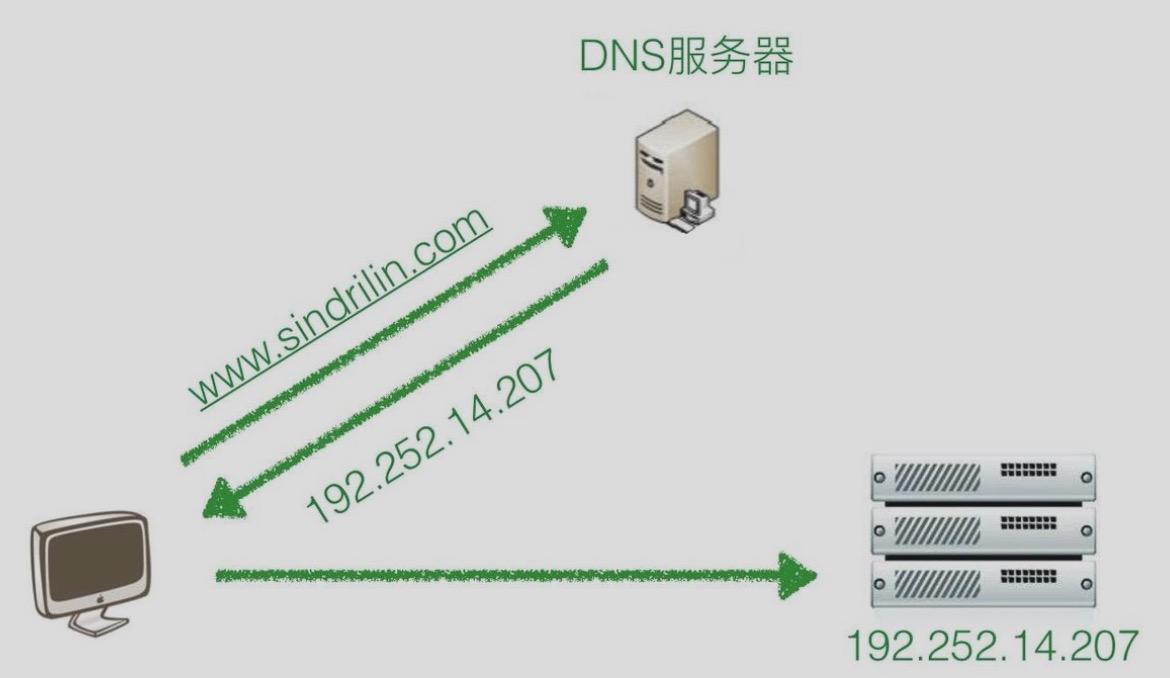
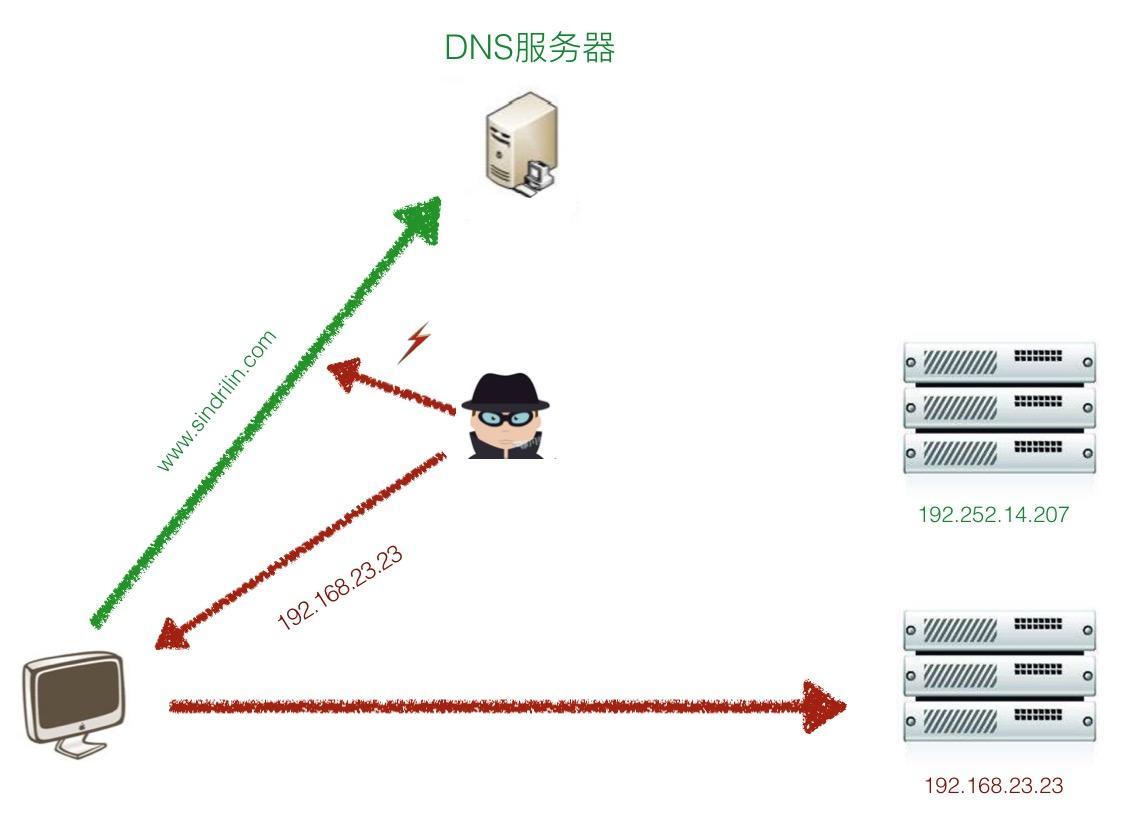
Converting a domain to an ip address is called DNS resolution, DNS解析. Because DNS request packets are plaintext, they may be observed in transit. An attacker can impersonate a DNS server and return a false ip address, sending the host to a fake server.
NSURLProtocol
NSURLProtocol is one of Apple's powerful low-level tools for developers. It can intercept and alter most network requests to change URL-loading behavior, letting us adjust request details without changing networking business code. As an abstract class, NSURLProtocol must be subclassed to implement this interception.
-
Determine whether to handle the request. Webpages may contain dynamic links, so simply returning
YEScan create manyNSURLProtocolobjects. Ensure that each request receivesYESonly once.- (BOOL)canInitWithRequest: (NSURLRequest *)request;
- (BOOL)canInitWithTask: (NSURLSessionTask *)task;
-
Determine whether to redirect or change important details such as headers or domain. Return a new
NSURLRequestto customize the behavior.- (NSURLRequest *)canonicalRequestForRequest: (NSURLRequest *)request;
-
If request handling returns
YES, the following callbacks correspond to the request's start and end. This is where we can mark it as already handled.- (void)startLoading;
- (void)stopLoading;
When a network request starts, the system consults registered NSURLProtocol classes to decide whether to handle or alter it. Register your subclass with this code:
[NSURLProtocol registerClass: [CustomURLProtocol class]];
DNS resolution
We usually consider DNS劫持, or DNS hijacking, when using a webView. Compared with webpages, ordinary requests may simply return wrong data or a 404 if hijacked, and they have other defensive options. This article therefore focuses on hijacked webpage loading.
LocalDNS
LocalDNS is a common anti-hijacking approach. In brief, obtain the requested domain, resolve it locally to an ip, and return a request that accesses the page's ip address directly. Address information is represented by struct hostent:
struct hostent {
    char *h_name;                     // official name of host
    char **h_aliases;                 // alias list
    int h_addrtype;                   // host address type——AF_INET || AF_INET6
    int h_length;                     // length of address
    char **h_addr_list;               // list of addresses
};
The C function gethostbyname recursively resolves a supplied domain into a struct hostent. This has a drawback: recursive lookup often times out, yet gethostbyname has no timeout handling itself. Run it on an operation queue and use a semaphore to wait 1.5 seconds for the lookup:
+ (struct hostent *)getHostByName: (const char *)hostName {
    __block struct hostent * phost = NULL;
    dispatch_semaphore_t semaphore = dispatch_semaphore_create(0);
    NSOperationQueue * queue = [NSOperationQueue new];
    queue.maxConcurrentOperationCount = 1;
    [queue addOperationWithBlock: ^{
        phost = gethostbyname(hostName);
        dispatch_semaphore_signal(semaphore);
    }];
    dispatch_semaphore_wait(semaphore, dispatch_time(DISPATCH_TIME_NOW, 1.5 * NSEC_PER_SEC));
    [queue cancelAllOperations];
    return phost;
}
Then use inet_ntop to convert the structure's address information into a C string. Expose getIpAddressFromHostName to hide the details of handling ipv4 and ipv6 addresses:
+ (NSString *)getIpv4AddressFromHost: (NSString *)host {
    const char * hostName = host.UTF8String;
    struct hostent * phost = [self getHostByName: hostName];
    if ( phost == NULL ) { return nil; }

    struct in_addr ip_addr;
    memcpy(&ip_addr, phost->h_addr_list[0], 4);

    char ip[20] = { 0 };
    inet_ntop(AF_INET, &ip_addr, ip, sizeof(ip));
    return [NSString stringWithUTF8String: ip];
}

+ (NSString *)getIpv6AddressFromHost: (NSString *)host {
    const char * hostName = host.UTF8String;
    struct hostent * phost = [self getHostByName: hostName];
    if ( phost == NULL ) { return nil; }

    char ip[32] = { 0 };
    char ** aliases;
    switch (phost->h_addrtype) {
        case AF_INET:
        case AF_INET6: {
            for (aliases = phost->h_addr_list; *aliases != NULL; aliases++) {
                NSString * ipAddress = [NSString stringWithUTF8String: inet_ntop(phost->h_addrtype, *aliases, ip, sizeof(ip))];
                    if (ipAddress) { return ipAddress; }
            }
        } break;

        default:
            break;
    }
    return nil;
}

+ (NSString *)getIpAddressFromHostName: (NSString *)host {
    NSString * ipAddress = [self getIpv4AddressFromHost: host];
    if (ipAddress == nil) {
        ipAddress = [self getIpv6AddressFromHost: host];
    }
    return ipAddress;
}
Supporting IPv6
Apple explicitly requires current apps to support IPv6 addresses. For developers, this is not a large change: replace gethostbyname with another function:
phost = gethostbyname2(host, AF_INET6);
Also, prefer IPv6 addresses over IPv4 during resolution:
+ (NSString *)getIpAddressFromHostName: (NSString *)host {
    NSString * ipAddress = [self getIpv6AddressFromHost: host];
    if (ipAddress == nil) {
        ipAddress = [self getIpv4AddressFromHost: host];
    }
    return ipAddress;
}
extension
Direct resolution through localDNS may produce an ip address that is not optimal. Another approach downloads a DNS mapping list from the server after each app launch and uses its ip addresses directly. This is more efficient than recursive lookup. Take care to prevent a man-in-the-middle from altering the mapping list while it is downloaded.
Since a request address may be invalid, keep an ip-to-host mapping so a failed address can fall back to the original domain. Once an ip is confirmed invalid, maintain an invalid-address table to decide whether to use it after future resolution. The overall process is approximately:
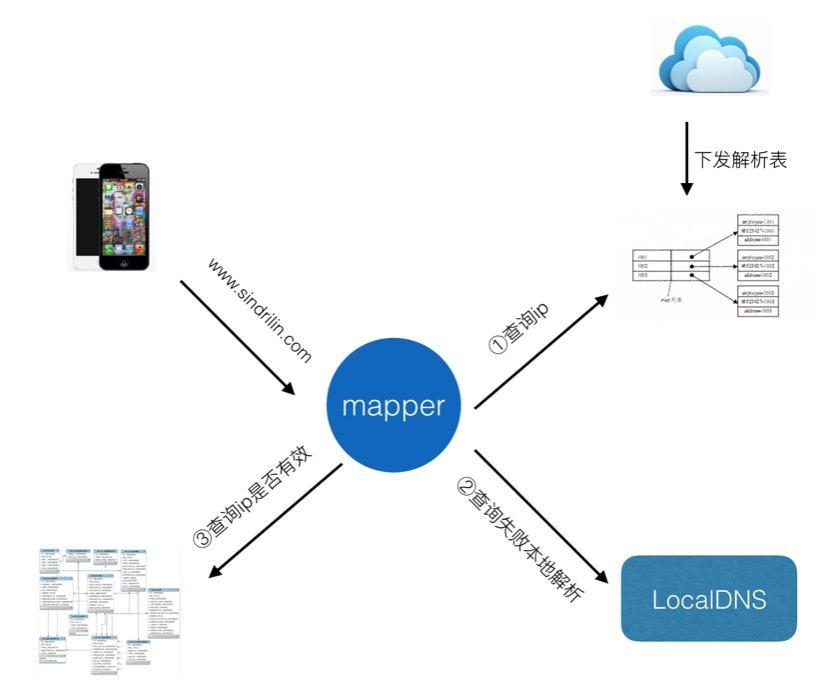
If your app also lacks a server-provided DNS resolution-list service, directly use Local DNS resolution may produce an invalid ip invalid-address issue. Currently, the code above handles it by checking whether ip is invalid, invoke a callback to make webView reload. Another approach is to store a local table of required domains and resolve them asynchronously after startup. Refer to Handling DNS Resolution Failure, with IPv6 Support to prepare for failed resolutions in advance.
WebKit
WKWebView is Apple's UIWebView replacement. However, the former is not yet good enough to eliminate widespread use of the latter. Also, using NSURLProtocol to protect against DNS劫持 functionality, when invoking canInitWithRequest: there was no further progress. Research showed that implementing WebKit request interception requires calling some private methods, Adding NSURLProtocol Support to WKWebView article already handles this well. Building on it, I added another layer to protocol registration, since Apple can be unforgiving with its surprises:
static inline NSString * lxd_scheme_selector_suffix() {
    return @"SchemeForCustomProtocol:";
}

static inline SEL lxd_register_scheme_selector() {
    const NSString * const registerPrefix = @"register";
    return NSSelectorFromString([registerPrefix stringByAppendingString: lxd_scheme_selector_suffix()]);
}

static inline SEL lxd_unregister_scheme_selector() {
    const NSString * const unregisterPrefix = @"unregister";
    return NSSelectorFromString([unregisterPrefix stringByAppendingString: lxd_scheme_selector_suffix()]);
}
NSURLSession
After AFNetworking switched to NSURLSession, conventional NSURLProtocol interception no longer worked. Enable support for the intercepting class in NSURLSessionConfiguration to continue intercepting:
NSURLSessionConfiguration * configuration = [NSURLSessionConfiguration defaultSessionConfiguration];
configuration.protocolClasses = @[LXDDNSInterceptor class];
Both AFNetworking and SDWebImage initialize sessions with the default defaultSessionConfiguration, so a hook of that method can adapt interception:
+ (NSURLSessionConfiguration *)lxd_defaultSessionConfiguration {
    NSURLSessionConfiguration * configuration = [self lxd_defaultSessionConfiguration];
    configuration.protocolClasses = @[LXDDNSInterceptor class];
    return configuration;
}
However, code may use the shorter [NSURLSessionConfiguration new] construction form. A hook of the previous method therefore cannot guarantee interception. I shifted the hook target to NSURLSession and found a class factory method that creates instances:
+ (NSURLSession *)sessionWithConfiguration: (NSURLSessionConfiguration *)configuration delegate: (id<NSURLSessionDelegate>)delegate delegateQueue: (NSOperationQueue *)queue;
5. hook this class method. But after outputting the method list with class_getClassMethod, I found that the class method was absent; an init constructor appeared instead:

I wonder whether Apple deliberately made this misleading for developers. (Apple: I make the rules.) Code completion did not expose this function directly either, so I used category to expose the method name, and hook removed:
/// h文件
@interface NSURLSession (LXDIntercept)

- (instancetype)initWithConfiguration: (NSURLSessionConfiguration *)configuration delegate: (id<NSURLSessionDelegate>)delegate delegateQueue: (NSOperationQueue *)queue;

@end

/// m文件
@implementation NSURLSession (LXDIntercept)

+ (void)load {
    Method origin = class_getClassMethod([NSURLSession class], @selector(initWithConfiguration:delegate:delegateQueue:));
    Method custom = class_getClassMethod([NSURLSession class], @selector(lxd_initWithConfiguration:delegate:delegateQueue:));
    method_exchangeImplementations(origin, custom);
}

- (NSURLSession *)lxd_initWithConfiguration: (NSURLSessionConfiguration *)configuration delegate: (id<NSURLSessionDelegate>)delegate delegateQueue: (NSOperationQueue *)queue {
    if (lxd_url_session_configure) {
        lxd_url_session_configure(configuration);
    }
    return [self lxd_initWithConfiguration: configuration delegate: delegate delegateQueue: queue];
}

@end
We can now happily use network interception in the project again.
Article demo: LXDAppMonitor
References
NSURLProtocol Optimizing iOS Network Requests with DNS Mapping Supporting IPV6 in an iOS App: The Essentials Adding NSURLProtocol Support to WKWebView
Recommended reading: Implement an iOS launch-screen advertisement in minutes