
Web & development notesHistorical technical note
A technical blog can be more than a website
Records an experiment in wrapping a personal technical blog as an iOS app. UIWebView displays the home and category pages and handles loading callbacks, while search and interaction-stutter issues remain documented as unresolved at the time.
Originally credited to Bison. Content is retained as published.
On this page
"iOS technical sharing, iOS development, iOS development tips, iOS development blog" Bison
A technical blog can be more than a website. What else could it become? Let's see.
Having recently left my job and been looking for work at home, I could put work aside, visit an internet café, play games, and clear my head.
As an iOS developer, I often needed to show app s I had built during interviews.
So why not turn my technical blog into an app too? The idea stayed with me, and I tend to act on my ideas.
I did not know backend development or how to write the essential APIs ordinary users never see. All I had was my own technical blog...
Then a simple implementation occurred to me. Some of you have probably guessed it: yes, the powerful UIWebView.
First, here is the finished result.

This is the home page. It looks all right, does it not?
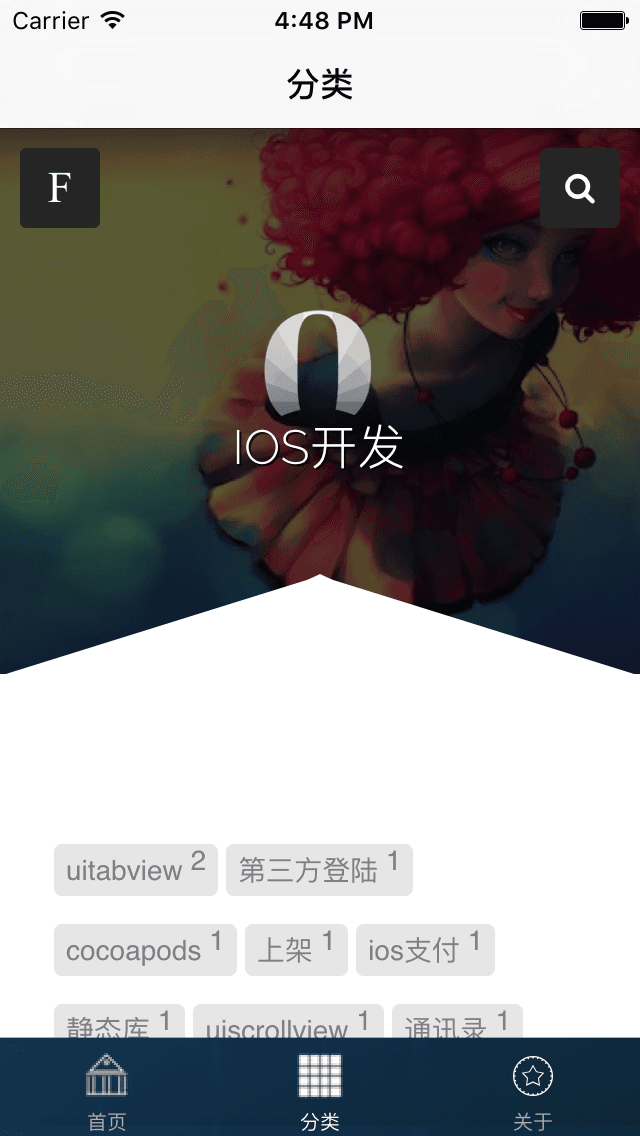
This is the category page. It looks quite good and fits perfectly!
Here is the core code.
UIWebView *webView = [[UIWebView alloc]initWithFrame:CGRectMake(0, 0, self.view.frame.size.width, self.view.frame.size.height)];
webView.delegate = self;
[self.view addSubview:webView];

NSURL *url = [NSURL URLWithString:@"http://allluckly.cn"];

NSString *str = [NSString stringWithContentsOfURL:url usedEncoding:nil error:nil];
[webView loadHTMLString:str baseURL:url];
webView.opaque = NO;
webView.backgroundColor = [UIColor clearColor];
Next come the UIWebView delegate methods.
-(BOOL)webView:(UIWebView*)webView shouldStartLoadWithRequest:(NSURLRequest*)request navigationType:(UIWebViewNavigationType)navigationType{

    //判断是否是单击
    if (navigationType == UIWebViewNavigationTypeLinkClicked)
    {
        NSURL *url = [request URL];
        NSString *curUrl= [url absoluteString];
        LBArticle_VC *vc = [[LBArticle_VC alloc]init];
        vc.url = curUrl;
        [self.navigationController pushViewController:vc animated:YES];
        return NO;
    }

    return YES;
}
However, tapping F and searching seem to lag a little. I have not resolved this yet; I will revisit it when I have time. If you know a good solution, please contact me!
The experience is slightly below that of a native APP, but it is simple, convenient, and saves time and effort!
Recommended reading: An illustrated guide to implementing iOS in-app purchases
Copyright © Bison. Please retain a hyperlink to the original article when reproducing it.