
Data & networkingHistorical technical note
OCR for debit and credit cards in iOS development
Introduces card.io SDK integration for scanning card numbers, including linker settings, delegates and recognition callbacks. Objective-C and Swift examples accompany the workflow; the article specifies that the selected implementation is for credit-card scanning.
Originally credited to Bison. Content is retained as published.
On this page
"iOS technical sharing, iOS development, iOS development tips, iOS development blog" Bison
Recently our company needed to scan bank cards and obtain card numbers. I searched many related resources online; full bank-card scanning
solutions that retrieve card numbers were extremely expensive, and the price only covered licensing. So I looked for an alternative and found one that can
a third-party framework that scans credit cards. I am sharing it here, but it only scans credit cards… o.0.
The framework is called CardIO
Download URL
Here I mainly demonstrate the integration process, so watch these steps carefully.
I am using xcode 7.1. First, drag the whole framework into your project, then under
TARGETS—Build Phases—Link Binary With Libraries
Add the following frameworks there.
Accelerate.framework
MobileCoreServices.framework
CoreMedia.framework
AudioToolbox.framework
AVFoundation.framework
Also add the following under TARGETS → Build Settings → Other Linker Flags:-ObjC and -lc++
In the VC where it will be called, import these headers:
#import "CardIO.h"
#import "CardIOPaymentViewControllerDelegate.h"
Then add the CardIOPaymentViewControllerDelegate delegate.
Then implement the methods.
Objective-C version
- (void)viewDidLoad {
    [super viewDidLoad];

    [CardIOUtilities preload];
}

//开始调用扫描
- (IBAction)begin:(id)sender {

    CardIOPaymentViewController *scanViewController = [[CardIOPaymentViewController alloc] initWithPaymentDelegate:self];

    [self presentViewController:scanViewController animated:YES completion:nil];
}


//取消扫描
- (void)userDidCancelPaymentViewController:(CardIOPaymentViewController *)scanViewController

{


    [scanViewController dismissViewControllerAnimated:YES completion:nil];

}

//扫描完成
-(void)userDidProvideCreditCardInfo:(CardIOCreditCardInfo *)info inPaymentViewController:(CardIOPaymentViewController *)scanViewController

{

    //扫描结果
    NSLog(@"Received card info. Number: %@, expiry: %02i/%i, cvv: %@.", info.redactedCardNumber, info.expiryMonth, info.expiryYear, info.cvv);

    [scanViewController dismissViewControllerAnimated:YES completion:nil];

}
SWIFT version
import UIKit

class ViewController: UIViewController, CardIOPaymentViewControllerDelegate {

@IBOutlet weak var resultLabel: UILabel!
override func viewDidLoad() {
    super.viewDidLoad()

    CardIOUtilities.preload()
}

//开始调用扫描
@IBAction func scanCard(sender: AnyObject) {
    let cardIOVC = CardIOPaymentViewController(paymentDelegate: self)
    cardIOVC.modalPresentationStyle = .FormSheet
    presentViewController(cardIOVC, animated: true, completion: nil)
}
//取消扫描
func userDidCancelPaymentViewController(paymentViewController: CardIOPaymentViewController!) {
    resultLabel.text = "user canceled"
    paymentViewController?.dismissViewControllerAnimated(true, completion: nil)
}
//扫描完成
func userDidProvideCreditCardInfo(cardInfo: CardIOCreditCardInfo!, inPaymentViewController paymentViewController: CardIOPaymentViewController!) {
    if let info = cardInfo {
        let str = NSString(format: "Received card info.\n Number: %@\n expiry: %02lu/%lu\n cvv: %@.", info.redactedCardNumber, info.expiryMonth, info.expiryYear, info.cvv)
        resultLabel.text = str as String
    }
        paymentViewController?.dismissViewControllerAnimated(true, completion: nil)
    }
}
That completes it. This framework by an overseas developer is very effective; I hope to find a similarly useful third-party bank-card scanner.
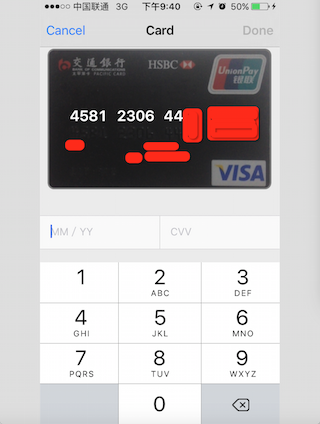
The final result recognises the number very accurately.
Recommended reading: An illustrated guide to implementing iOS in-app purchases
Copyright © Bison. Please retain a hyperlink to the original article when reproducing it.