
Data & networkingHistorical technical note
Building a WeChat-style iOS app, part 4
Adds cloud-storage and instant-messaging dependencies, wraps sign-in and registration methods, and records troubleshooting while querying user data. An early experiment with a password field is included as part of this historical development account.
Originally credited to WzxJiang; edited and archived by Bison.
Source listed in the originalOn this page
Editor: Bison
Contributor: WzxJiang
"I only got home today and attended banquets at both lunchtime and evening. LearnCloud also caused real difficulties, so today’s additions are limited:"

Completed today
– Import the LeadCloud storage and IM dynamic libraries; I do not know backend development and wanted to try IM.
– Write login and registration methods, beginning the networking work.
For an independent iOS developer without backend experience, LearnCloud is useful: free enough and simple enough. I will skip importing its dynamic libraries and describe my login and registration implementation and the pitfalls encountered.
- Let’s proceed step by step.
Create an NSObject class called WWeChatApi.
- Create a singleton.
+ (WWeChatApi *)giveMeApi
{
    static WWeChatApi * api = nil;
    if (api == nil) {
        api = [[WWeChatApi alloc]init];
    }
    return api;
}- Write the login method first; this is where the pitfall appears.
- (void)loginWithUserName:(NSString *)userName andPassWord:(NSString *)passWord andSuccess:(void (^)(id))successBlock andFailure:(void (^)(NSError *))failureBlock
{
    AVQuery *query = [AVQuery queryWithClassName:@"_User"];

    [query whereKey:@"username" equalTo:userName];

    [query whereKey:@"password" equalTo:passWord];

    [query findObjectsInBackgroundWithBlock:^(NSArray *objects, NSError *error) {
        if (!error) {
            if (objects.count>0)
            {
                successBlock(nil);
            }
        } else {
            failureBlock(error);
        }
    }];
}
AVQuery here is a LearnCloud method; ignore it for now.
//这里也是LearnCloud动态库的方法
//@"username"的值等于@"WzxJiang" And @"password"的值等于@"123456"
[query whereKey:@"username" equalTo:@“WzxJiang”];

[query whereKey:@"password" equalTo:@"123456"];
//然后通过这个方法获取符合的AVObject Arr
[query findObjectsInBackgroundWithBlock:^(NSArray *objects, NSError *error) {
    if (!error) {
        if (objects.count>0)
        {
            successBlock(nil);
        }
    } else {
        failureBlock(error);
    }
}];
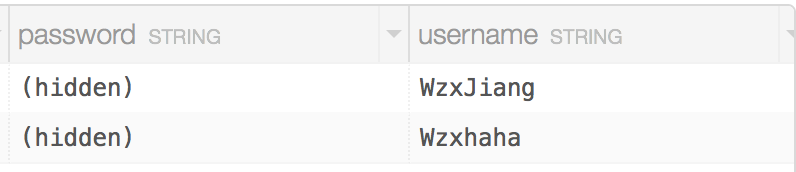
In principle this should return the one matching AVObject, but it actually returns nothing!
After considerable debugging, I found that
[query whereKey:@"password" equalTo:@"123456"]
password cannot be queried using whereKey:equalTo here.
Surely this is a joke! If the built-in password cannot be checked, how can I validate login?
Solution: add a passWord class in the LearnCloud backend and use it to store the password. The built-in password cannot even be deleted.
- Registration
- (void)registerWithUserName:(NSString *)userName andPassWord:(NSString *)passWord andSuccess:(void (^)(id response))successBlock andFailure:(void (^)(NSError * error))failureBlock
{
    AVObject * user = [AVObject objectWithClassName:@"_User"];

    user[@"username"] = userName;

    user[@"password"] = @"123";

    user[@"passWord"] = passWord;

    AVQuery *query = [AVQuery queryWithClassName:@"_User"];

    [query whereKey:@"username" equalTo:userName];

    [query findObjectsInBackgroundWithBlock:^(NSArray *objects, NSError *error) {
        if (!error) {
            if (objects.count == 0)
            {
                [user saveInBackgroundWithBlock:^(BOOL succeeded, NSError *error) {
                    if (successBlock)
                    {
                    successBlock(nil);
                    }
                    else
                    {
                    failureBlock(error);
                    }
                }];

            }
            else
            {
                failureBlock(nil);
            }
            } else {
                failureBlock(error);
            }
        }];
}
Registration has another pitfall here:
user[@"password"] = @"123",password
It refuses registration unless a value is supplied.
That is all for today!
Current code, to be updated until the project is complete
GitHub:WzxJiang
If you have suggestions or questions, please leave a comment!
Recommended reading: A beginner developer's review of 2015