
Data & networkingHistorical technical note
Building a WeChat-style iOS app, part 5
Continues the profile and Moments screens, using AVUser for registration and sign-in and AVFile for avatar uploads. Image compression reduces transfer size, while notes document issues with a pull-down header image and refresh components.
Originally credited to WzxJiang; edited and archived by Bison.
Source listed in the originalOn this page
Editor: Bison
Contributor: WzxJiang
“I feel busier at home than at work…”

Tasks completed over the last two days:
– Editing profile information, including changing the avatar
– Some Moments features
Result:
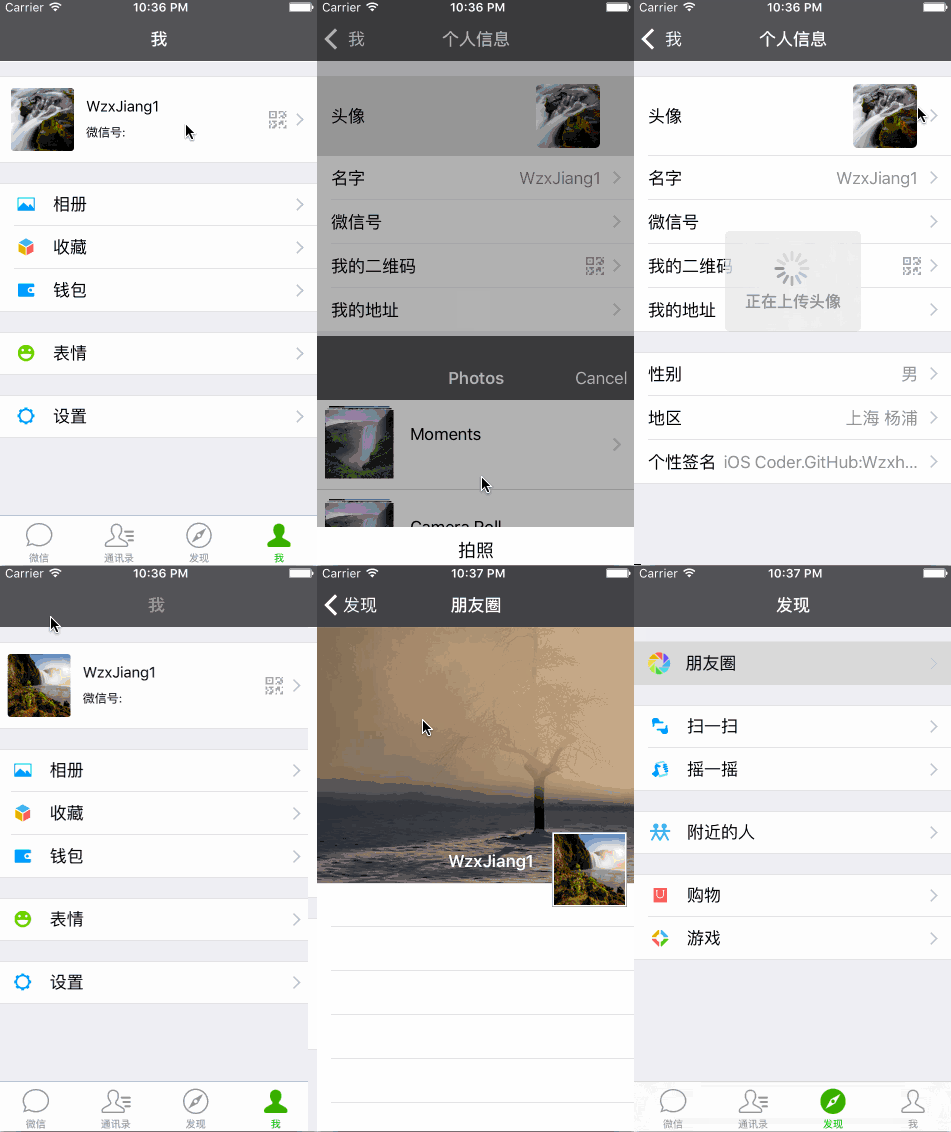
First, I finally understand part of LearnCloud. Replacing AVObject with AVUser made things much easier, and I can now write all the profile-update methods.
Let's focus on the important parts. This section is entirely about LearnCloud usage.
- AVUser
The registration code is now this simple. LearnCloud handles duplicate names and similar checks—very convenient!
AVUser * user = [AVUser user];
user.username = userName;
user.password = passWord;

[user signUpInBackgroundWithBlock:^(BOOL succeeded, NSError *error) {
    if (succeeded)
    {
        successBlock(nil);
    }
    else
    {
        failureBlock(error);
    }
}];
Login is much simpler too. Cache a copy of the returned values locally to save the user's data allowance.
[AVUser logInWithUsernameInBackground:userName password:passWord block:^(AVUser *user, NSError *error) {
    if (user != nil)
    {
        //存入objectId
        NSString * objectId = [user objectForKey:@"objectId"];
        [[NSUserDefaults standardUserDefaults]setObject:objectId forKey:wUserID];
        NSLog(@"objectId:%@",objectId);

        NSDictionary * userDic = @{
                                 @"username":user.username,
                                 @"sex":[user objectForKey:@"sex"] == nil ?@"":[user objectForKey:@"sex"],
                                 @"wxID":[user objectForKey:@"wxID"] == nil?@"":[user objectForKey:@"wxID"],
                                 @"avaterUrl":[user objectForKey:@"avaterUrl"] == nil?@"":[user objectForKey:@"avaterUrl"]
                                 };

        [[NSUserDefaults standardUserDefaults]setObject:userDic forKey:wUserInfo];

        [[NSUserDefaults standardUserDefaults]synchronize];
        successBlock(nil);
    }
    else
    {
        failureBlock(error);
    }
}];
AVFile, used to store images
NSData *imageData = UIImagePNGRepresentation(img);
AVFile *imageFile = [AVFile fileWithName:@"image.png" data:imageData];
[imageFile saveInBackgroundWithBlock:^(BOOL succeeded, NSError *error) {

    if (succeeded)
    {
        AVUser *currentUser = [AVUser currentUser];
        currentUser[@"avaterUrl"] = imageFile.url;
        [currentUser saveInBackgroundWithBlock:^(BOOL succeeded, NSError *error){
            if (succeeded)
            {
                successBlock(imageFile.url);
            }
            else
            {
                failureBlock(error);
            }
        }];

    }

    } progressBlock:^(NSInteger percentDone) {

}];
Next, a problem encountered while uploading avatars.
When I first tried uploading, I encountered a problem: even my home fiber connection took more than ten seconds to upload an avatar!
Eventually, I realized that the image loaded from local storage had not been compressed. Of course, uploading the original image to the server was not suitable.
Compression method, found through Baidu
- (UIImage*)imageWithImageSimple:(UIImage*)image scaledToSize:(CGSize)newSize
{
    // Create a graphics image context
    UIGraphicsBeginImageContext(newSize);

    // Tell the old image to draw in this new context, with the desired
    // new size
    [image drawInRect:CGRectMake(0,0,newSize.width,newSize.height)];

    // Get the new image from the context
    UIImage* newImage = UIGraphicsGetImageFromCurrentImageContext();

    // End the context
    UIGraphicsEndImageContext();

    // Return the new image.
    return newImage;
}
The image-selection method; I also use MBProgressHUD as a progress indicator.
//当选择一张图片后进入这里
-(void)imagePickerController:(UIImagePickerController*)picker didFinishPickingMediaWithInfo:(NSDictionary *)info

{

    NSString *type = [info objectForKey:UIImagePickerControllerMediaType];

    //当选择的类型是图片
    if ([type isEqualToString:@"public.image"])
    {
        //        //先把图片转成NSData
        UIImage* image = [info objectForKey:@"UIImagePickerControllerOriginalImage"];
        UIImage * smallImage = [self imageWithImageSimple:image scaledToSize:CGSizeMake(128, 128)];
        //        //关闭相册界面
        [picker dismissViewControllerAnimated:YES completion:^{

        MBProgressHUD *hud = [MBProgressHUD showHUDAddedTo:self.view animated:YES];
        hud.label.text = @"正在上传头像";
        [[WWeChatApi giveMeApi]updataAvaterWithImg:smallImage andSuccess:^(id response) {

        NSDictionary * dic = [[NSUserDefaults standardUserDefaults]objectForKey:wUserInfo];
        NSMutableDictionary * muDic = [[NSMutableDictionary alloc]initWithDictionary:dic];
        [muDic setObject:response forKey:@"avaterUrl"];
        [[NSUserDefaults standardUserDefaults]setObject:[muDic copy] forKey:wUserInfo];
        [[NSUserDefaults standardUserDefaults]synchronize];

        [self preData];

    } andFailure:^(NSError *error) {

        NSLog(@"error:%@",error.localizedDescription);

        }];
    }];
    }
}
The rest is not particularly difficult. The view shown when tapping the avatar is custom but fairly basic: I could not obtain its viewcontroller from the view, so I prioritized functionality and used a simple implementation. Read the code if you are interested.
Some Moments features

The refresh component has a serious issue: it does not rotate with the displacement. I do not know why, but when I use
_refreshView.transform = CGAffineTransformMakeRotation(<#CGFloat angle#>)
Anything other than values such as M_PI twists around and flies off-screen.
If anyone knows why this happens, please explain it to me!
- The pull-down image effect
Look closely: part of the tableview header is hidden beneath the navigation bar, but the scroll indicator is also beneath it. Moving the whole tableview upward therefore cannot solve the problem. Here is how I handled it:
- (UIView *)tableView:(UITableView *)tableView viewForHeaderInSection:(NSInteger)section
{
    UIView * view = [[UIView alloc]initWithFrame:CGRectMake(0, 0, self.view.frame.size.width, WGiveHeight(256))];

    //背景部分
    UIImageView * realView = [[UIImageView alloc]initWithFrame:CGRectMake(0, - WGiveHeight(64), self.view.frame.size.width, WGiveHeight(320))];
    realView.image = [UIImage imageNamed:@"Quan"];
    [view addSubview:realView];

    return view;
}
Add an UIImageView to the header with a frame of
CGRectMake(0, - WGiveHeight(64), self.view.frame.size.width, WGiveHeight(320))
UIImageView to achieve this effect.
- I will discuss the refresh component after resolving the rotation problem.
The profile screen also uses only native UITableViewCells. If you are interested, the code explains it. The height of the final personal-signature field has not been handled yet.
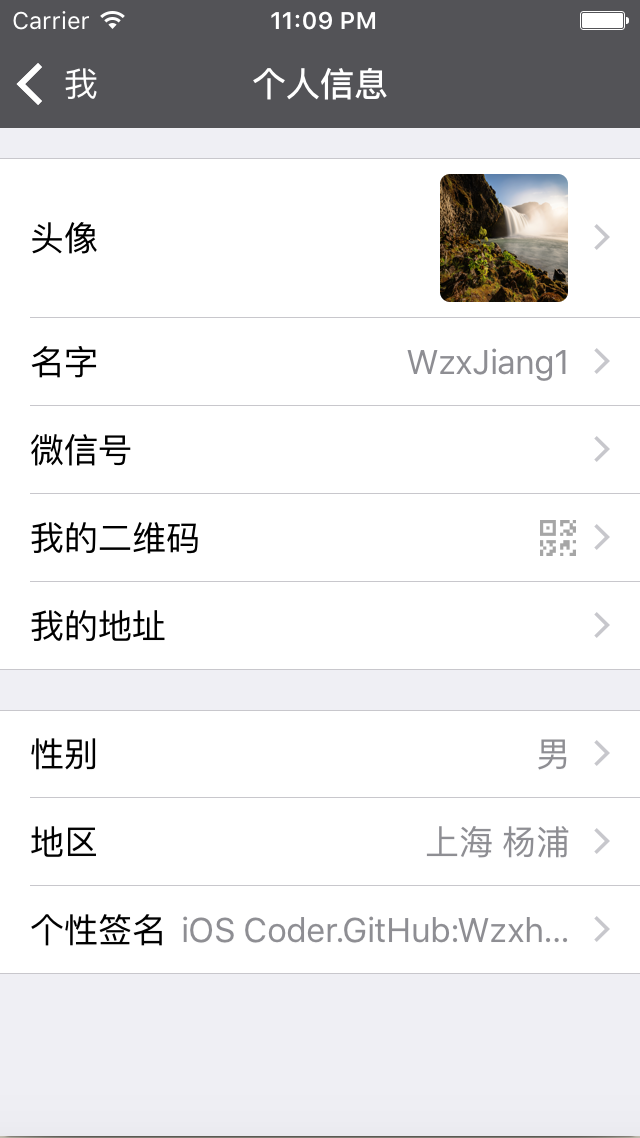
cell = [[UITableViewCell alloc]initWithStyle:UITableViewCellStyleValue1 reuseIdentifier:identifier];
The back button's color can be changed by adding this method in Appdelegate.m.
//返回按钮的颜色
[[UINavigationBar appearance] setTintColor:[UIColor whiteColor]];
That's all for today!
If you have suggestions or questions, please leave a comment!
Recommended reading: A beginner developer's review of 2015