
Data & networkingHistorical technical note
Building a Swift local-cache library step by step
First distinguishes Documents, Caches, Preferences and temporary directories, then wraps a local file cache for objects, images and audio. Offline-browsing scenarios explain directory management and the approach to reading and writing cached content.
Originally credited to 大石头布; edited and archived by Bison.
Source listed in the originalOn this page
Editor: Bison
Contributor: 大石头布
"Before wrapping a useful local-cache library, first understand the local directory structure clearly."
This article covers only local, file-based caching.
Background knowledge
A good tool begins with understanding its materials. Before wrapping a useful local-cache library, understand the local directory structure clearly.
- Sandbox root: the system generates a dedicated sandbox path while the program runs. The app’s non-code files are stored within it.
let homePath = NSHomeDirectory()
print(homePath)
Copy the console path and use Finder’s Go to Folder to inspect the directory structure.
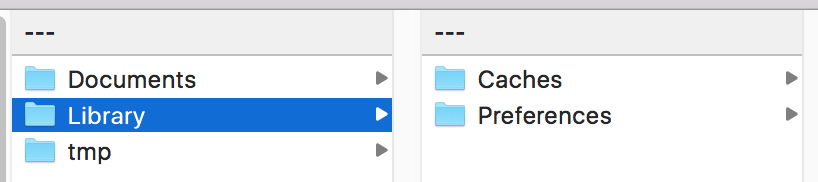
- Documents: stores persistent data and essential runtime files, such as databases. iTunes automatically backs up its contents.
//Document 主目录
let documentPaths = NSSearchPathForDirectoriesInDomains(NSSearchPathDirectory.DocumentationDirectory, NSSearchPathDomainMask.AllDomainsMask, true)
let path = documentPaths.first
- Library: stores files generated while the program runs.
//Libaray目录
let libPaths = NSSearchPathForDirectoriesInDomains(NSSearchPathDirectory.LibraryDirectory, NSSearchPathDomainMask.AllDomainsMask, true)
let libPath = libPaths.first
- Caches: stores cache files generated while the program runs.
//Cache目录
let cachePaths = NSSearchPathForDirectoriesInDomains(NSSearchPathDirectory.CachesDirectory, NSSearchPathDomainMask.AllDomainsMask, true)
let cachePath = cachePaths.first
- Preferences: mainly stores user-preference settings. Normally we do not open it directly, but use NSUserDefaults to read and write preferences.
NSUserDefaults is simple. I added a small wrapper with several global methods.
func setDefault(key:String,value:AnyObject?){
    if value == nil{
        NSUserDefaults.standardUserDefaults().removeObjectForKey(key)
    }else{
        NSUserDefaults.standardUserDefaults().setObject(value, forKey: key)
        NSUserDefaults.standardUserDefaults().synchronize() //同步
    }
}

func removeUserDefault(key:String?){
    if key != nil{
        NSUserDefaults.standardUserDefaults().removeObjectForKey(key!)
        NSUserDefaults.standardUserDefaults().synchronize()
    }
}

func getDefault(key:String) ->AnyObject?{
    return NSUserDefaults.standardUserDefaults().valueForKey(key)
}
- tmp: temporary folder. Files created temporarily while the program runs are stored here. It is usually cleared after a download finishes or the app exits. iTunes does not back it up.
Tip: because the system may clear this folder, promptly move downloaded or temporary files elsewhere if they must persist.
A local-cache library
With that file-storage background, let’s build the cache.
First, why do it? Mainly for user experience. Suppose someone browses Jianshu’s homepage and several detail pages, then wants to revisit them on the subway with poor or no connectivity. Saving those pages locally makes that experience comfortable. Previously viewed pages can load locally first, retrieving updates from the server only when needed, avoiding repeated waits.
My current app needs local storage on every page, and its chat images and audio need storage too.
Let’s build a convenient library for these cases.
Because this is cached data, I use the Caches folder. For management by category, I create separate subfolders. Page caches contain objects; images and audio each get their own folder. An enum manages these types and makes later additions easy.
//会在cache下创建目录管理
enum CacheFor:String{
    case Object = "zzObject"     //页面对象缓存 (缓存的对象)
    case Image = "zzImage"  //图片缓存 (缓存NSData)
    case Voice = "zzVoice"  //语音缓存 (缓存NSData)
}
File management uses NSFileManager, so define a private file-manager variable. Writes run asynchronously on a serial queue, requiring a queue object. We also need a path. Define prefixes to avoid duplicate file or queue names, plus a default cache name and a private cache-type variable.
public class ZZDiskCache {

    private let defaultCacheName = "zz_default"
    private let cachePrex = "com.zz.zzdisk.cache."
    private let ioQueueName = "com.zz.zzdisk.cache.ioQueue."

    private var fileManager: NSFileManager!
    private let ioQueue: dispatch_queue_t
    var diskCachePath:String
    private var storeType:CacheFor
}
Next, initialise these variables. Since initialisation depends on cache type, pass the corresponding type in.
init(type:CacheFor) {
    self.storeType = type
    let cacheName = cachePrex+type.rawValue
    ioQueue = dispatch_queue_create(ioQueueName+type.rawValue, DISPATCH_QUEUE_SERIAL)
    //获取缓存目录
    let paths = NSSearchPathForDirectoriesInDomains(.CachesDirectory, NSSearchPathDomainMask.UserDomainMask, true)
    //缓存目录下创建一个子目录
    diskCachePath = (paths.first! as NSString).stringByAppendingPathComponent(cacheName)

    dispatch_sync(ioQueue) { () -> Void in
        self.fileManager = NSFileManager()
        //创建子目录对应的文件夹
        do {
            try self.fileManager.createDirectoryAtPath(self.diskCachePath, withIntermediateDirectories: true, attributes: nil)
        } catch _ {}
    }
}
Create the corresponding queue name, directory and folder by type.
I usually need only three types, so define three objects for convenient use.
Declare three private global objects.
private let page = ZZDiskCache(type:.Object)
private let image = ZZDiskCache(type:.Image)
private let voice = ZZDiskCache(type:.Voice)
Publicly accessible variables
// 针对Page
public class var sharedCacheObj: ZZDiskCache {
    return page
}

// 针对Image
public class var sharedCacheImage: ZZDiskCache {
    return image
}

// 针对Voice
public class var sharedCacheVoice: ZZDiskCache {
    return voice
}
Preparation is complete; now we can store and retrieve data.
Page caches usually contain an object or object array, possibly nil, so use AnyObject?.
Objects are cached by archiving and unarchiving. Every object must support serialisation and deserialisation by implementing
NSCoding的encodeWithCoder:和init?(coder aDecoder: NSCoder)
For example, a new Student class should look like this:
import Foundation

class Student: NSObject,NSCoding {

    var id:NSNumber?
    var name:String?

    //MARK: -序列化
    func encodeWithCoder(aCoder: NSCoder) {
        aCoder.encodeObject(self.name, forKey: "name")
        aCoder.encodeObject(self.id, forKey: "id")
    }

    //MARK: -反序列化
    required init?(coder aDecoder: NSCoder) {
        self.id = aDecoder.decodeObjectForKey("id") as? NSNumber
        self.name = aDecoder.decodeObjectForKey("name") as? String
    }
}
Storing objects requires a path and key. These two methods manage the key, which serves both as the path and retrieval key and is MD5-hashed.
extension ZZDiskCache{
    func cachePathForKey(key: String) -> String {
        let fileName = cacheFileNameForKey(key)     //对name进行MD5加密
        return (diskCachePath as NSString).stringByAppendingPathComponent(fileName)
    }

    func cacheFileNameForKey(key: String) -> String {
        return key.zz_MD5()
    }
}
key.zz_MD5() is a String extension. I will provide the source link later so you can inspect it. Hashing is optional here.
When a path is needed, just supply a key.
let path = self.cachePathForKey(key)
Write a private method for archiving objects.
/**
对象存储 归档操作后写入文件

- parameter key:   键
- parameter value: 值
- parameter path: 路径
- parameter completeHandler: 完成后回调
*/
private func stroeObject(key:String,value:AnyObject?,path:String,completeHandler:(()->())? = nil){
    dispatch_async(ioQueue){
        let data = NSMutableData()  //声明一个可变的Data对象
        //创建归档对象
        let keyArchiver = NSKeyedArchiver(forWritingWithMutableData: data)
        //开始归档
        keyArchiver.encodeObject(value, forKey: key.zz_MD5())  //对key进行MD5加密
        //完成归档
        keyArchiver.finishEncoding() //归档完毕

        do {
            //写入文件
            try data.writeToFile(path, options: NSDataWritingOptions.DataWritingAtomic)  //存储
            //完成回调
            completeHandler?()
        }catch let err{
            print("err:\(err)")
        }
    }
}
These operations run on our defined serial queue. The comments explain them clearly, so I will not repeat them.
Similarly, write two private storage methods for UIImage and NSData, the latter holding audio.
/**
图像存储

- parameter image:           image
- parameter key:             键
- parameter path:            路径
- parameter completeHandler: 完成回调
*/
private func storeImage(image:UIImage,forKey key:String,path:String,completeHandler:(()->())? = nil){
    dispatch_async(ioQueue) {
        let data = UIImagePNGRepresentation(image.zz_normalizedImage())
        if let data = data {
            self.fileManager.createFileAtPath(path, contents: data, attributes: nil)
        }
    }
}

/**
存储声音

- parameter data:            data
- parameter key:             键
- parameter path:            路径
- parameter completeHandler: 完成回调
*/
private func storeVoice(data:NSData?,forKey key:String,path:String,completeHandler:(()->())? = nil){
    dispatch_async(ioQueue) {
        if let data = data {
            self.fileManager.createFileAtPath(path, contents: data, attributes: nil)
        }
    }
}
zz_normalizedImage in image storage is a UIImage extension to handle incorrect orientation. Download the source to inspect it. A real image cache should also add memory caching when reading; NSCache works and is simple, but this article focuses on disk caching.
Then expose one storage method that selects a private method according to the current type.
/**
存储

- parameter key:             键
- parameter value:           值
- parameter image:           图像
- parameter data:            data
- parameter completeHandler: 完成回调
*/
public func stroe(key:String,value:AnyObject? = nil,image:UIImage?,data:NSData?,completeHandler:(()->())? = nil){
    let path = self.cachePathForKey(key)
    switch storeType{
    case .Object:
        print("save Object ")
        self.stroeObject(key, value: value,path:path,completeHandler:completeHandler)
    case .Image:
        print("save Image ")
        if let image = image{
            self.storeImage(image, forKey: key, path: path, completeHandler: completeHandler)
        }
    case .Voice:
        print("save Voice ")
        self.storeVoice(data, forKey: key, path: path, completeHandler: completeHandler)
    }
}
Write retrieval methods in the same way.
/**
获取数据的方法

- parameter key:              键
- parameter objectGetHandler: 对象完成回调
- parameter imageGetHandler:  图像完成回调
- parameter voiceGetHandler:  音频完成回调
*/
public func retrieve(key:String,objectGetHandler:((obj:AnyObject?)->())? = nil,imageGetHandler:((image:UIImage?)->())? = nil,voiceGetHandler:((data:NSData?)->())?){
    let path = self.cachePathForKey(key)
    switch storeType{
        case .Object:
            self.retrieveObject(key.zz_MD5(), path: path, objectGetHandler: objectGetHandler)
        case .Image:
            self.retrieveImage(path,imageGetHandler:imageGetHandler)
        case .Voice:
            self.retrieveVoice(path, voiceGetHandler: voiceGetHandler)
    }
}


/**
获取文件归档对象

- parameter key:              键
- parameter path:             路径
- parameter objectGetHandler: 获得后回调闭包
*/
private func retrieveObject(key:String,path:String,objectGetHandler:((obj:AnyObject?)->())?){
    //反归档 获取
    dispatch_async(dispatch_get_global_queue(DISPATCH_QUEUE_PRIORITY_DEFAULT, 0)) { () -> Void in
        if self.fileManager.fileExistsAtPath(path){
            let mdata = NSMutableData(contentsOfFile:path)  //声明可变Data
            let unArchiver = NSKeyedUnarchiver(forReadingWithData: mdata!) //反归档对象
            let obj = unArchiver.decodeObjectForKey(key)    //反归档
            objectGetHandler?(obj:obj)  //完成回调
        }
        objectGetHandler?(obj:nil)
    }
}

/**
获取图片

- parameter path:            路径
- parameter imageGetHandler: 获得后回调闭包
*/
private func retrieveImage(path:String,imageGetHandler:((image:UIImage?)->())?){
    dispatch_async(dispatch_get_global_queue(DISPATCH_QUEUE_PRIORITY_DEFAULT, 0)) { () -> Void in
        if let data = NSData(contentsOfFile: path){
            if let image = UIImage(data: data){
            imageGetHandler?(image: image)
            }
            }
            imageGetHandler?(image: nil)
        }
}

/**
获取音频数据

- parameter path:            路径
- parameter voiceGetHandler: 获得后回调闭包
*/
private func retrieveVoice(path:String,voiceGetHandler:((data:NSData?)->())?){
    dispatch_async(dispatch_get_global_queue(DISPATCH_QUEUE_PRIORITY_DEFAULT, 0)) { () -> Void in
        if let data = NSData(contentsOfFile: path){
            voiceGetHandler?(data: data)
        }
            voiceGetHandler?(data: nil)
    }
}
The class now reads objects, images and NSData locally and manages them in separate folders. Calling it remains cumbersome, so add another wrapper.
Create a structure wrapping storage and retrieval methods.
public struct ZZDiskCacheHelper {

    /**
    本地缓存对象
    */
    static func saveObj(key:String,value:AnyObject?,completeHandler:(()->())? = nil){

        ZZDiskCache.sharedCacheObj.stroe(key, value: value, image: nil, data: nil, completeHandler: completeHandler)

    }

    /**
    本地缓存图片
    */
    static func saveImg(key:String,image:UIImage?,completeHandler:(()->())? = nil){

        ZZDiskCache.sharedCacheImage.stroe(key, value: nil, image: image, data: nil, completeHandler: completeHandler)

    }

    /**
    本地缓存音频 或者其他 NSData类型
    */
    static func saveVoc(key:String,data:NSData?,completeHandler:(()->())? = nil){

        ZZDiskCache.sharedCacheVoice.stroe(key, value: nil, image: nil, data: data, completeHandler: completeHandler)

    }

    /**
    获得本地缓存的对象
    */
    static func getObj(key:String,compelete:((obj:AnyObject?)->())){

        ZZDiskCache.sharedCacheObj.retrieve(key, objectGetHandler: compelete, imageGetHandler: nil, voiceGetHandler: nil)

    }

    /**
    获得本地缓存的图像
    */
    static func getImg(key:String,compelete:((image:UIImage?)->())){

        ZZDiskCache.sharedCacheImage.retrieve(key, objectGetHandler: nil, imageGetHandler: compelete, voiceGetHandler: nil)

    }

    /**
    获得本地缓存的音频数据文件
    */
    static func getVoc(key:String,compelete:((data:NSData?)->())){

        ZZDiskCache.sharedCacheVoice.retrieve(key, objectGetHandler: nil, imageGetHandler: nil, voiceGetHandler: compelete)

    }

}
With the wrapper, usage is convenient. We only need:
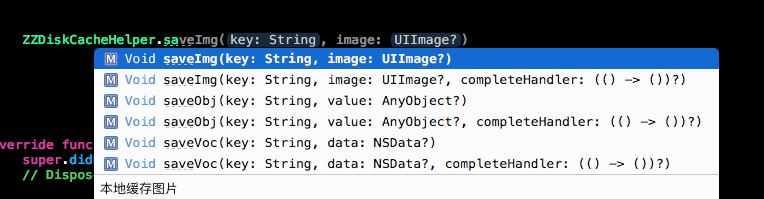
However, repeatedly typing ZZDiskCacheHelper is still cumbersome.
Add one more line of code.
typealias $ = ZZDiskCacheHelper
This is now convenient.
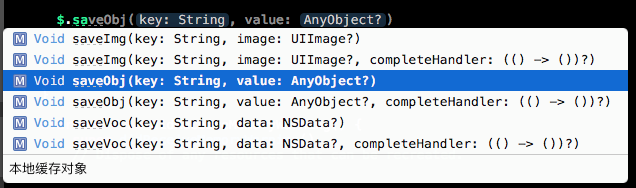
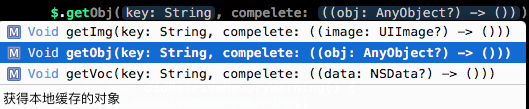
Wherever storage or retrieval is needed, simply call save or get. Folder handling, queueing and asynchronous work are encapsulated in the class.
Here is an object-storage test. I have tested this class in my project; feel free to download it.
An empty project’s Caches folder contains only screenshots.

Add this code in viewDidLoad.
let stu = Student()
stu.name = "小王"
stu.id = 1
$.saveObj("xxxx", value: stu)

The folders and files we created are all present.
Retrieval is even simpler.
$.getObj("xxxx") { (obj) -> () in
    if let obj = obj as? Student{
        print("\(obj.id) , \(obj.name)")
    }
}
Output: Optional(1), Optional(“Xiao Wang”)
I will not demonstrate images and NSData here; download the code to inspect them. Everyday coding offers many opportunities for encapsulation: doing it once makes future work easier.
GitHub download:
Recommended reading: A beginner developer's review of 2015