
Tools & releasesHistorical technical note
Adding iOS 10 Push Notification Extensions in Xcode 8
Records the process of adding iOS 10 notification extensions to an existing app in Xcode 8. It covers push capabilities, signing, Swift versions, architecture settings, and debugging and submission issues for Service and Content extensions.
Originally credited to zhao0; edited and archived by Bison.
Source listed in the originalOn this page
After iOS10 was released, Jianshu prioritized support for its new notifications. This article shares the issues encountered while developing that feature.
1. Project configuration
Xcode8 changed significantly. Simply opening, building, and running the old project no longer obtains a Push token. Printing the error in didFailToRegisterForRemoteNotificationsWithError shows the following
fail to register with error Error Domain=NSCocoaErrorDomain Code=3000
"no valid 'aps-environment' entitlement string found for application"
UserInfo={
    NSLocalizedDescription=no valid 'aps-environment'
    entitlement string found for application
}
A Google search revealed this Xcode8 change: entitlements come from the local entitlements file. Push Notification was off under the main Target's Capabilities and had to be enabled manually.
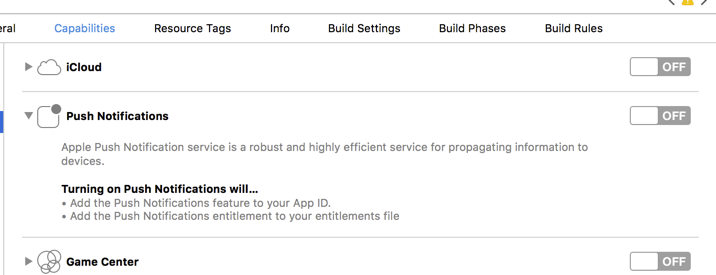
2, Code Sign
The project adds Notification Content and Notification Service extensions. Signing defaults to automatic mode.
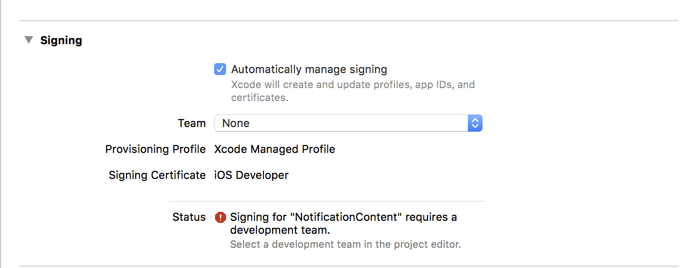
Online reports said Xcode8 managed signing more intelligently than Xcode7, so I tried it. Selecting a Team generated a provisioning profile automatically. However, Xcode8 also generated a new certificate, effectively adding a developer. My current certificate was therefore absent from the old profiles, so the manually configured profiles had to be regenerated.

To return to manual signing, uncheck Automatically manage signing, delete the newly generated certificate from Key Chains, and generate the provisioning profile on the website. If using Automatically manage signing, it is best to use the same approach for every Target.
3. Swift version
Choosing Swift when creating a Target defaults to Swift3.0. Xcode8 supports both 3.0 and 2.3. If you have not yet learned the 3.0 API changes and want to keep using 2.3, set Use Legacy Swift Language Version to YES in that Target's Build Setting.
4, Architectures
With the project configured and only template code present, I tried a Hello World run. Command+R produced a build error.
Check dependencies
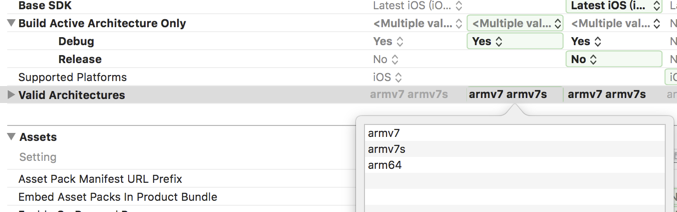
No architectures to compile for (ONLY_ACTIVE_ARCH=YES, active arch=x86_64, VALID_ARCHS=i386).
The corresponding active arch is missing from VALID_ARCHS.
Add arm64 to Valid Architectures in the relevant Target's Build Setting.
5, Notification Service
Next came implementation, based mainly on 喵神's article and demo, “A Refactoring We Never Expected to See — An Analysis of the iOS 10 UserNotifications Framework,” plus WWDC 708 Advanced Notifications and its PDF. In the service, we download the image supplied in the back-end push payload to a local folder and use it as an attachment. Previously, our notifications displayed only a single alert. The JSON alert field can be a string or dictionary; a string corresponds to the dictionary's body. After iOS8.2, the dictionary can include title, subtitle, and other fields. We wanted to turn the old body into a title and put an article summary in the body. But changing aps.alert directly would make pre-8.2 devices display the summary. We found another solution: Notification Service can modify the content. Leave aps.alert unchanged and add separate title and body fields to the JSON. When the service receives the notification, read them and assign them to bestAttemptContent.title and bestAttemptContent.body.
{
  "aps":{
        "alert":"test test",
        "mutable-content":1
  },
  "title": "new title",
  "body": "new body"
}
6, Notification Content
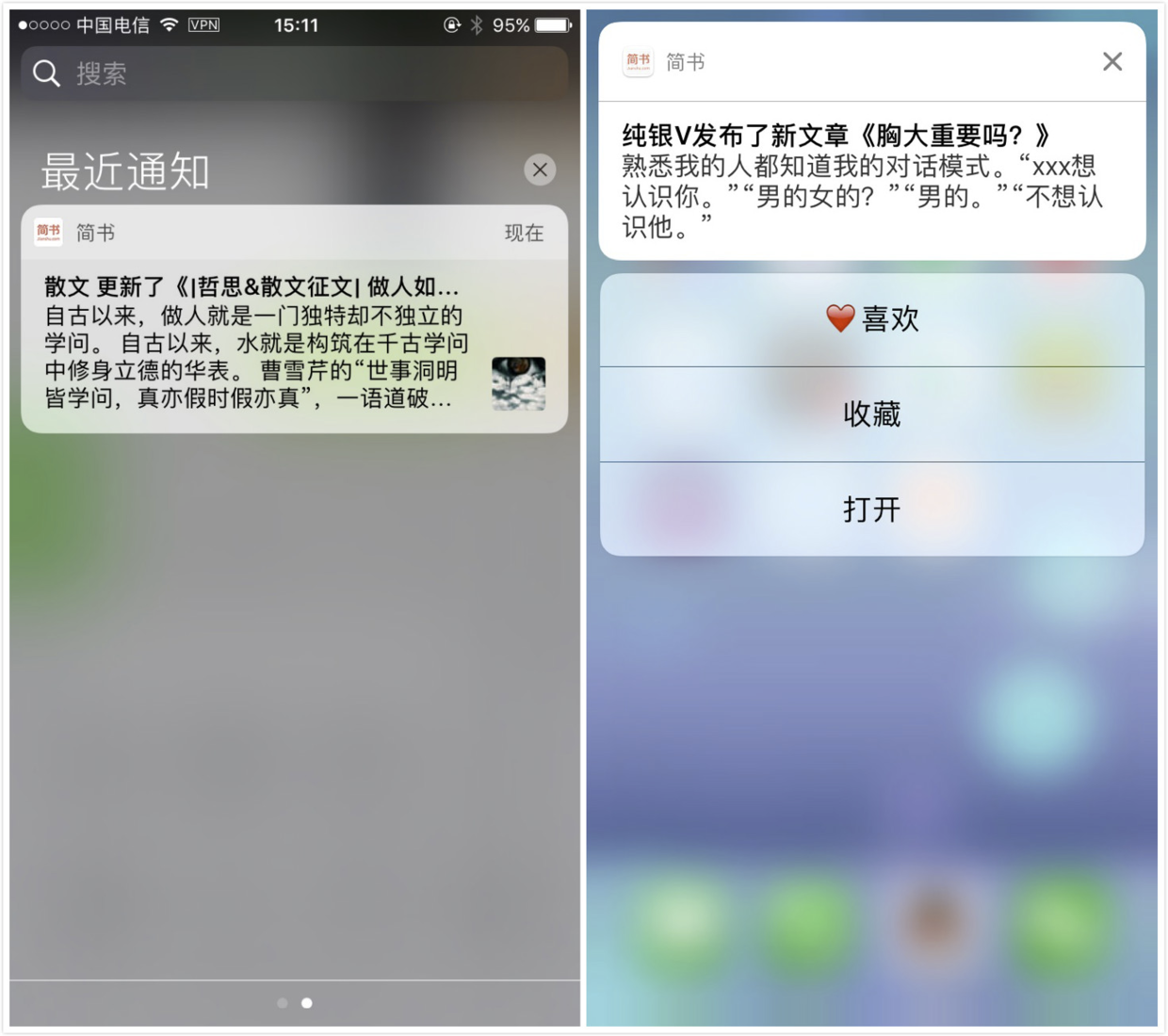
For a notification with attachments, a long press normally shows the image or video. We felt such a large image looked unattractive and also wanted action buttons, as shown below, so we needed Notification Content.
Result
We do not actually customize the notification UI here; we hide this view. In Info.plist, UNNotificationExtensionInitialContentSizeRatio specifies its initial height/width ratio; see WWDC for the other properties. Set it to 0.001, not 0, and set self.preferredContentSize = CGSizeZero; in viewDidload to hide the view.
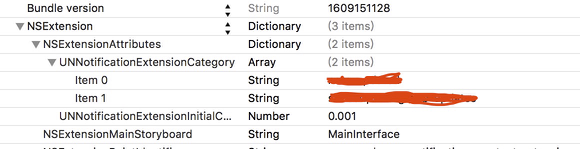
The extension can respond to multiple categories, each with its own action buttons. Action buttons and the customUI view are therefore independent, although buttons can update that view. Normally, an action button opens the APP and its delegate handles the response. With Notification Content, we can handle it directly inside the extension without opening the APP, or forward it to the APP's delegate.
5. Debugging on a physical device
Once most of the code was written, I began debugging. Extension debugging sometimes produced “Could not attach to process ID”.
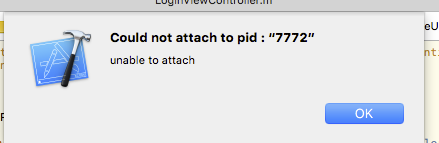
Restarting Xcode sometimes helps, but not always. Another method is to click OK when this window appears, then choose Debug > Attach to Process > your Extension. Breakpoints can then be caught.
6. Submitting to TestFlight
After testing, we prepared to submit to TestFlight, but validation failed.
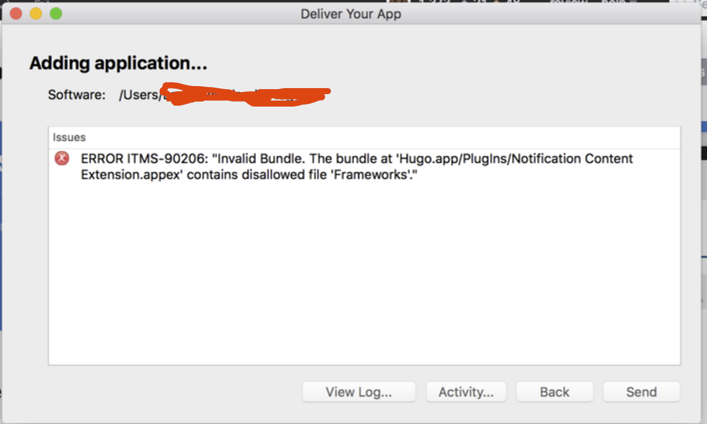
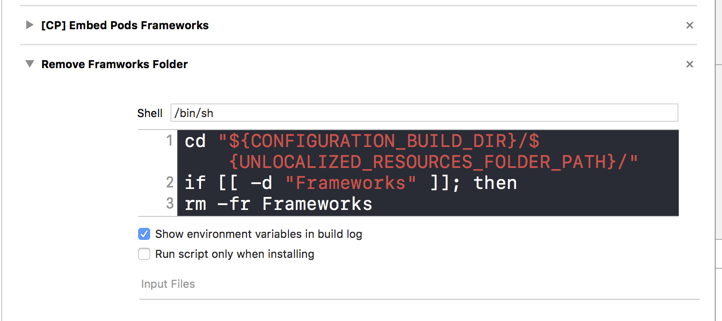
The error is clear: Extension.appex contains a Frameworks folder. CocoaPods creates it when used by the extension, but it is not actually needed here. Add a final Build Phase that runs a shell script to delete that Frameworks folder.
cd "${CONFIGURATION_BUILD_DIR}/${UNLOCALIZED_RESOURCES_FOLDER_PATH}/"
if [[ -d "Frameworks" ]]; then
rm -fr Frameworks
fi
Every Jianshu release has a public beta. See the beta details if you would like to download and try it early.
7. Closing thoughts
Jianshu is a community for quality original content, offering a strong reading and writing experience that attracts writers and programmers. The technical team shares its experiences here in the hope of encouraging more developers to record, share, and discuss their own work. This collection will receive occasional articles from the team covering Android, iOS, front-end, back-end, and other topics. Please follow along.
Recommended reading: Implement an iOS launch-screen advertisement in minutes