
Tools & releasesHistorical technical note
Xcode 8 and iOS 10 Compatibility Notes
Collects migration notes on notifications, ATS, privacy permissions, and interface changes in Xcode 8 and iOS 10. It also records issues involving logging, fonts, list performance, plugins, and xib warnings, with links to official documentation.
Originally credited to 判若两人丶; edited and archived by Bison.
Source listed in the originalOn this page
1. Notification
Apple has continually refined Notification since its introduction, but earlier changes were modest. iOS 10 brings a substantial redesign, making UserNotifications easier to use and much more capable.
Notifications before iOS 9
1. Some notification methods are difficult to distinguish and easy to confuse, frustrating developers.
2. Notifications follow different delivery paths depending on whether the application is running.
3. An app in the foreground cannot display remote notifications directly; additional handling is required.
4. Delivered notifications cannot be updated, their contents cannot be changed after sending, and presentation is limited to plain text, offering little extensibility.
Notifications from iOS 10 onward
1. Notification-related functionality is unified in UserNotifications.framework.
2. Notifications can now be revoked or updated, and their contents modified in transit.
3. Notifications are no longer limited to plain text: they can include video, images, and custom presentation.
4. iOS 10 notifications are easier to use and manage, with substantial improvements for developers.
5. iOS 10 simplifies permission requests by combining local and remote notification authorization in one method.
Resources for learning iOS 10 notifications:
UserNotifications: Apple's official documentation
– Apple's official video 1
– Apple's official video 2
– Apple's official video 3
A Long-Awaited Redesign: Understanding iOS 10 UserNotifications
WWDC2016 Session Notes: New Notification Features in iOS 10
2. ATS issues
iOS 9 discourages HTTP by default, although NSAllowsArbitraryLoads can be set to YES to disable ATS. For iOS 10, Apple will no longer allow this ATS bypass from 2017-1-1, effectively requiring HTTPS; otherwise, an App may be rejected. NSExceptionDomains can still allow HTTP for specific domains and help the app pass review.
Further reading:
3. iOS 10 privacy permissions
iOS 10 is stricter about privacy permissions. Without the required settings, the app crashes. Many reported crashes can generally be resolved by adding the corresponding Key-Value entries to info.plist.
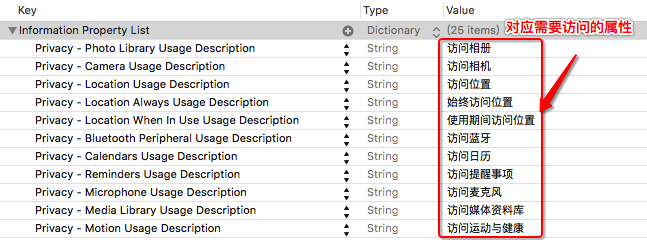
The red-underlined Value text above is shown to users. Provide an appropriate explanation; it must not be empty. Most current solutions are similar. See these references:
Supporting iOS 10: Declaring permissions for private data
4. Suppressing irrelevant logs when running with Xcode 8
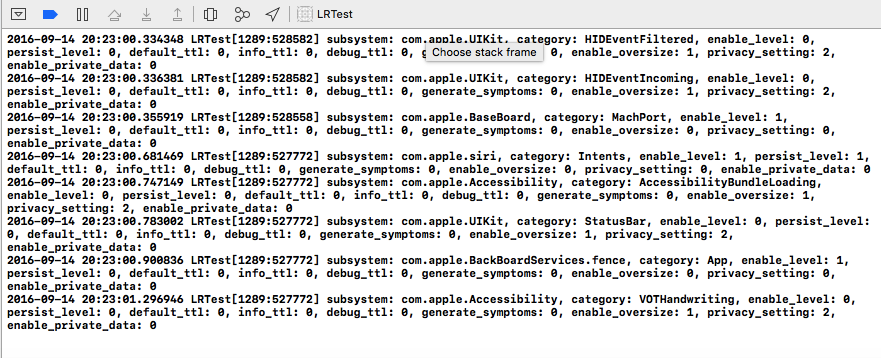
The image shows numerous irrelevant messages from a newly created, untouched project. I suspect an Xcode 8 issue but have not investigated closely. Set OS_ACTIVITY_MODE : disable as shown:
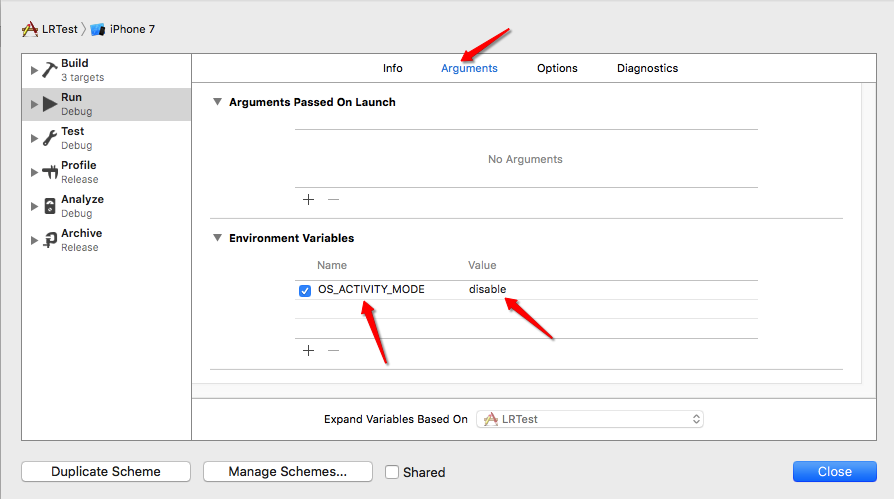
Related discussions:
5. Deprecated UIStatusBar methods in iOS 10
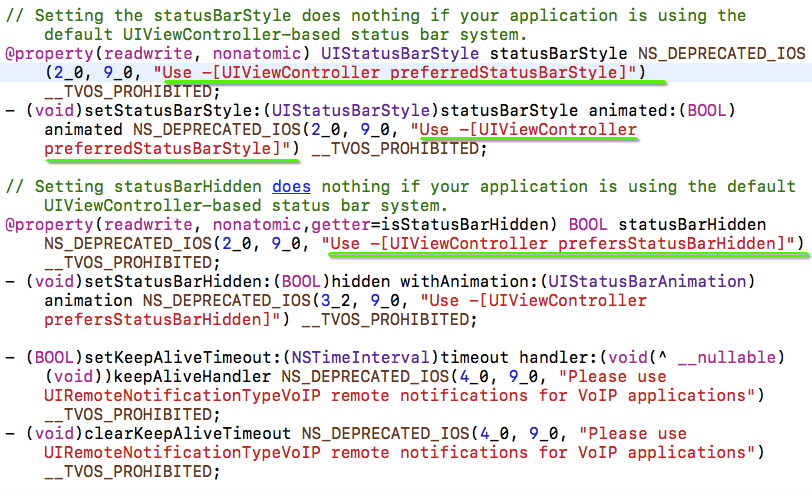
Some projects use UIStatusBar properties or methods that are deprecated in iOS 10 and require adaptation. As the image shows, use preferredStatusBar in iOS 10, for example:
//iOS 10
- (UIStatusBarStyle)preferredStatusBarStyle {
    return UIStatusBarStyleDefault;
}
6. UICollectionView performance improvements in iOS 10
Developers increasingly rely on UICollectionView, but issues such as stuttering and slow loading remain. iOS 10 further optimizes it. A full explanation would be lengthy, so here are references for further study: WWDC2016 Session Notes: New UICollectionView Features in iOS 10
7. New UIColor methods in iOS 10
The official documentation states:
Most graphics frameworks throughout the system, including Core Graphics, Core Image, Metal, and AVFoundation, have substantially improved support for extended-range pixel formats and wide-gamut color spaces. By extending this behavior throughout the entire graphics stack, it is easier than ever to support devices with a wide color display. In addition, UIKit standardizes on working in a new extended sRGB color space, making it easy to mix sRGB colors with colors in other, wider color gamuts without a significant performance penalty.

Here are some best practices to adopt as you start working with Wide Color.

In iOS 10, the UIColor class uses the extended sRGB color space and its initializers no longer clamp raw component values to between 0.0 and 1.0. If your app relies on UIKit to clamp component values (whether you’re creating a color or asking a color for its component values), you need to change your app’s behavior when you link against iOS 10.
When performing custom drawing in a UIView on an iPad Pro (9.7 inch), the underlying drawing environment is configured with an extended sRGB color space.
If your app renders custom image objects, use the new UIGraphicsImageRenderer class to control whether the destination bitmap is created using an extended-range or standard-range format.
If you are performing your own image processing on wide-gamut devices using a lower level API, such as Core Graphics or Metal, you should use an extended range color space and a pixel format that supports 16-bit floating-point component values. When clamping of color values is necessary, you should do so explicitly.
Core Graphics, Core Image, and Metal Performance Shaders provide new options for easily converting colors and images between color spaces.
Previously, we used RGB to define colors, with relatively limited variety. The new methods seem intended to improve this. In iOS 10, Apple recommends sRGB for better performance and richer colors. If you have a UIColor category, consider adapting it to sRGB. UIColor adds these two Api methods:
+ (UIColor *)colorWithDisplayP3Red:(CGFloat)displayP3Red green:(CGFloat)green blue:(CGFloat)blue alpha:(CGFloat)alpha NS_AVAILABLE_IOS(10_0);

- (UIColor *)initWithDisplayP3Red:(CGFloat)displayP3Red green:(CGFloat)green blue:(CGFloat)blue alpha:(CGFloat)alpha NS_AVAILABLE_IOS(10_0);
## 8.iOS 10 UITextContentType
// The textContentType property is to provide the keyboard with extra information about the semantic intent of the text document.

@property(nonatomic,copy) UITextContentType textContentType NS_AVAILABLE_IOS(10_0); // default is nil
In iOS 10, UITextField adds textContentType to indicate the expected semantic meaning of input.
This property tells the keyboard and system what kind of content the user is expected to enter. For example, identify an email-address field with uitextcontenttypeemailaddress. Providing this semantic information lets the system sometimes choose an appropriate keyboard automatically and improve correction and proactive integration with other text-entry opportunities.
9. Fonts following the system text size in iOS 10
Making app labels follow changes to the system text size previously required considerable code. iOS 10 provides adjustsFontForContentSizeCategory for this. I have not implemented it on a physical device because I do not have one; please correct any misunderstanding.
  UILabel *myLabel = [UILabel new];

   /*
    UIFont 的preferredFontForTextStyle: 意思是指定一个样式,并让字体大小符合用户设定的字体大小。
   */
    myLabel.font =[UIFont preferredFontForTextStyle: UIFontTextStyleHeadline];

 /*
 Indicates whether the corresponding element should automatically update its font when the device’s UIContentSizeCategory is changed.
 For this property to take effect, the element’s font must be a font vended using +preferredFontForTextStyle: or +preferredFontForTextStyle:compatibleWithTraitCollection: with a valid UIFontTextStyle.
 */
     //是否更新字体的变化
    myLabel.adjustsFontForContentSizeCategory = YES;
10. UIScrollView adds refreshControl in iOS 10
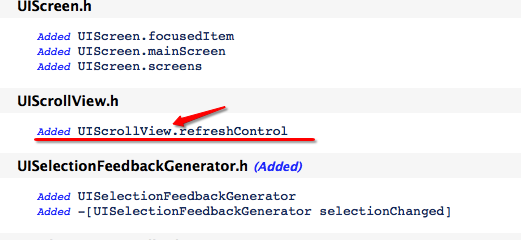
From iOS 10 onward, UIScrollView subclasses support refresh functionality:
@property (nonatomic, strong, nullable) UIRefreshControl *refreshControl NS_AVAILABLE_IOS(10_0) __TVOS_PROHIBITED;
11. Checking the system version correctly in iOS 10
Checking the system version is common, especially when adapting to iOS 10. But an issue appears, as shown below:
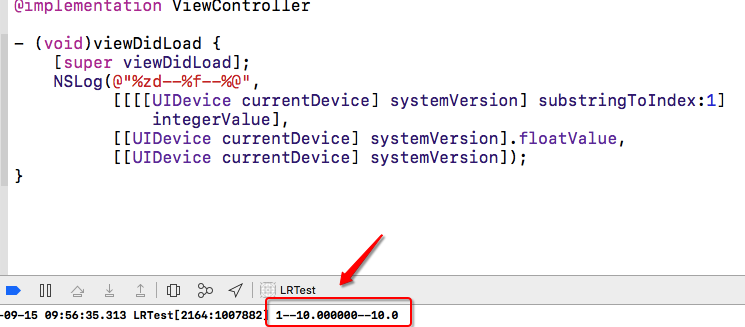
The answer is:
//值为 1
[[[[UIDevice currentDevice] systemVersion] substringToIndex:1] integerValue]
//值为10.000000
[[UIDevice currentDevice] systemVersion].floatValue,
//值为10.0
[[UIDevice currentDevice] systemVersion]
Use one of the latter two methods to check the system version. I forgot to mention that [[UIDevice currentDevice] systemVersion].floatValue is unreliable too. I vaguely remember 8.3 producing 8.2; regardless, it was unreliable. I recommend [[UIDevice currentDevice] systemVersion].
In Swift, check as follows:
if #available(iOS 10.0, *) { // iOS 10.0 print(“iOS 10.0”); } else { }
Reference articles:
Common Macro Definitions for Everyday iOS Development
12. Plugins no longer working in Xcode 8
Everyone has upgraded to Xcode 8, but developers dependent on plugins are searching online for a solution. Here is one: Continuing to use plugins in Xcode8
The explanation at the article's end warns that plugins may introduce security issues and cause App Store rejection. I therefore recommend avoiding them. Alternatives exist; adding comment code snippets in Xcode is convenient, for example.
13. Truncated text in projects starting with iOS 10
I tested with Xcode 8 and Xcode 7.3, as shown below:
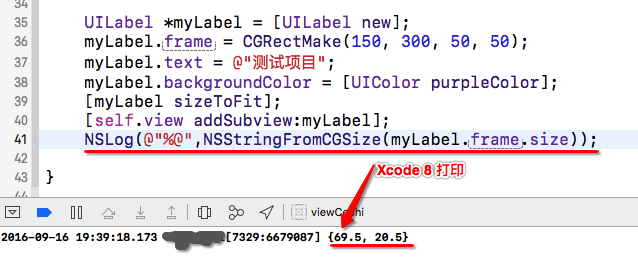
Xcode 8
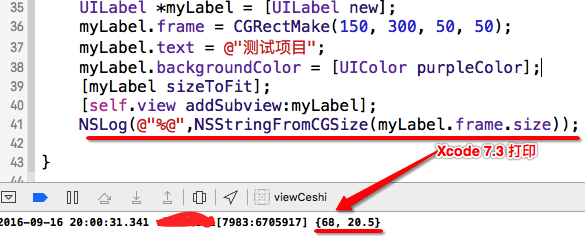
Xcode 7: create a Label and size it to fit, using font size 17 in both cases. The resulting widths differ. The following values explain why some text is truncated after upgrading to iOS 10:
Xcode 8打印   Xcode 7.3打印
1个文字宽度:17.5 1个文字宽度:17
2个文字宽度:35   2个文字宽度:34
3个文字宽度:52   3个文字宽度:51
4个文字宽度:69.5 4个文字宽度:68
5个文字宽度:87   5个文字宽度:85
6个文字宽度:104  6个文字宽度:102
7个文字宽度:121.5    7个文字宽度:119
8个文字宽度:139  8个文字宽度:136
9个文字宽度:156  9个文字宽度:153
10个文字宽度:173.5   10个文字宽度:170
I also tested English letters and found no issue; only Chinese characters were affected. For now, the only solution I know is to adjust the controls individually.
14. The Xib awakeFromNib warning in Xcode 8
Updated: 2016-09-18. Before Xcode 8, writing - (void)awakeFromNib {} for Xib initialization this way caused no issue. Xcode 8, however, produces this warning:

To remove the warning, explicitly add [super awakeFromNib];. Here is the official explanation:
You must call the super implementation of awakeFromNib to give parent classes the opportunity to perform any additional initialization they require. Although the default implementation of this method does nothing, many UIKit classes provide non-empty implementations. You may call the super implementation at any point during your own awakeFromNib method.
15. Slow compilation in Xcode 8
Updated: 2016-09-20. Many people report slower compilation in Xcode 8, sometimes dramatically slower. Mine feels similar to before. I suspect the computer's state matters: some developers leave machines running for months with many background threads and unnecessary processes. Here are compilation-speed tips if you are interested:
16. ImagePickerController.cameraViewTransform issues in iOS 10
Updated: 2016-09-21. Many developers report problems with custom cameras and cameraViewTransform no longer working. Information online is limited; here is a reference approach:
Resolve it by observing AVCaptureSessionDidStartRunningNotification.
  //#import <AVFoundation/AVFoundation.h>
  //监听
   [[NSNotificationCenter defaultCenter] addObserver:self selector:@selector(cameraNotification:) name:AVCaptureSessionDidStartRunningNotification object:nil];
  //监听方法
  - (void)cameraNotification:(NSNotification *)notification {
    dispatch_async(dispatch_get_main_queue(), ^{
          // 这里实现
          imagePickerController.cameraViewTransform = CGAffineTransformMakeTranslation(50,  50);
      });
  }
- Use AVFoundation
UIImagePickerController appears unsuitable for iOS 10, so AVFoundation may solve the problem. References follow: UIImagePickerController’s cameraViewTransform
This article collects iOS 10 resources and draws on other online articles. I will continue adding iOS 10 material and issues encountered during development. Apple's official iOS 10 documentation
Recommended reading: Implement an iOS launch-screen advertisement in minutes