
Tools & releasesHistorical technical note
Practical Automated Testing for iOS
Compares unit tests with UI automation and introduces XCTest, Quick, Nimble, KIF, and Appium. It discusses waiting, stubs and mocks, command-line execution, and testable code structure as foundations for maintainable tests.
Originally credited to 黄文臣; edited and archived by Bison.
Source listed in the originalOn this page
Introduction:
Testing experts are welcome to correct mistakes; I will update them promptly.
Editor: Bison
Source: 黄文臣
Most iOS apps without CI iterate like this:
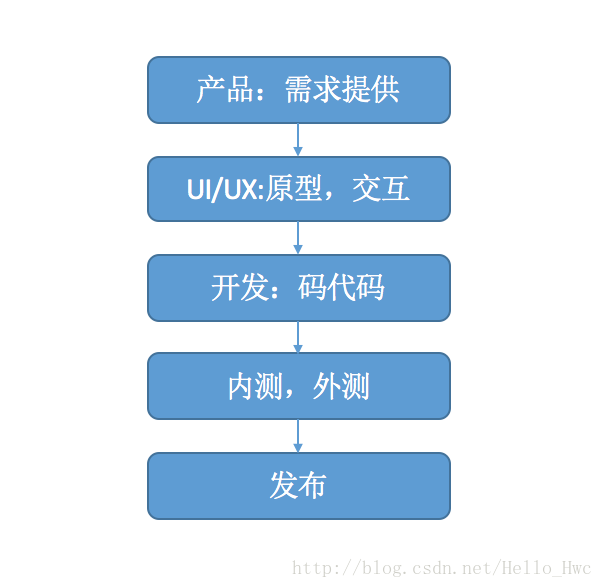
Testing is the final gate before release. Bugs missed there reach users, so coverage and reliability matter greatly.
Most apps still rely on manual testing. It has the lowest initial cost, checks core functionality and requires no programming knowledge from testers.
Manual testing is inefficient and error-prone in many situations. Two common examples:
-
Before each release, all core-feature cases run regardless of whether their business logic changed: work on feature A might affect B. If testing finds another bug, testers repeat the same work at the next release.
-
A developer omitted defensive handling in API code. Manual tests used valid data and passed. After release, a small backend data-configuration error caused widespread crashes—boom.
Then the boss comes looking for you.

This article uses XCode 8.2.1. Some concepts may not apply to earlier versions.
Automated testing
Automated testing replaces manual module and workflow testing with code. Whether a developer or tester, whenever work repeats continually, ask whether there is a more efficient approach.
Automated testing has many advantages:
-
Fast execution and less repetitive work
-
Prevent regressions and give developers confidence to modify and refactor code—personally, the greatest benefit.
-
Consistency.
-
Automation makes continuous integration, CI, more reliable.
-
Encourage higher-quality code: code cannot merge when automated tests fail.
Automation also has disadvantages.
-
High development and maintenance costs.
-
It cannot replace manual testing completely.
-
Accuracy cannot be fully guaranteed. Code can easily check a logical result, but judging whether a control is displayed correctly is harder.
Before automating, ask yourself:
-
Does this business logic change frequently?
-
Is the tested logic a core feature?
-
What does writing the tests cost?
-
Can automation guarantee accurate results?
Usually automate stable business logic that needs frequent testing and test the rest manually. Manual testing remains indispensable in iOS development.
Test categories
By source access, tests are black-box or white-box. Gray-box combines both and is not discussed here.
White-box testers directly access app source. Typically unit tests analyse possible inputs and outputs for each unit. iOS developers usually write this code.
Black-box testers need no source access. They verify app behaviour and UI correctness from outside; iOS testers perform this work.
At the business level, the testing pyramid is:
iOS testing usually has only these two levels:
-
Unit tests ensure each class works correctly.
-
UI tests, also called integration tests, check business workflows at the application level.
Choosing a framework
After all that explanation, automated-testing efficiency still depends heavily on the framework. How should one be chosen? Frameworks fall into two groups: Xcode’s built-in tools and third-party libraries.
Consider several factors when choosing a framework.
- Cost of writing test code
- Can it be debugged?
- Framework stability
- Test reports: screenshots, code coverage and so on
- WebView support; many apps use HTML5.
- Testing custom controls
- Is source code required?
- Must a computer remain connected?
- Does it support CI?
- ….
First, Xcode’s built-in XCTest, divided into Unit Test and UI Test. Some third-party libraries build on it, as discussed later. Being Apple’s framework, it continues to improve.
Mature third-party frameworks provide many friendly wrappers. After comparing them, I recommend:
Unit testing:
All three frameworks below use BDD (Behavior-driven development), behaviour-driven development. Define behaviour, then test cases, then implementation. In practice there is often little time to define behaviour first, but BDD’s domain-specific language, DSL, describes test behaviour well.
Kiwi An established testing framework
specta Another excellent BDD framework
Quick The most starred of the three, supporting Objective-C and Swift; my first recommendation.
UI testing:
KIF An XCTest-based framework using private APIs to control UI, with tests written in Objective-C or Swift.
appium A client–server testing framework. The app acts as server, test code as client, and JSON commands operate the app. Tests can use any language, with Android and iOS supported.
Given limited space, this article introduces XCTest, uses Quick for third-party unit testing and focuses on KIF for UI testing, explaining only Appium’s principles.
XCTest
XCTest ultimately produces a bundle, which cannot execute independently and needs a host process. My earlier article covers Xcode usage, asynchronous tests, performance tests and coverage, so I will not repeat those basics.
iOS unit testing: XCTest explained
Unit-test cases
For example, consider this function:
//验证一段Text是否有效。(不能以空字符开头,不能为空)
- (BOOL)validText:(NSString *)text error:(NSError *__autoreleasing *)error{
}
How should this function be unit-tested? Typically consider:
1. Input beginning with whitespace or a newline: error is non-nil and the result is NO.
2. Valid input: error is nil and the result is YES.
3. nil input: error is non-nil and the result is NO. This is a boundary case.
4. Non-NSString input: validation fails and returns NO. This is invalid input.
5. Special input characters, such as punctuation and non-English text
UI testing
UI tests simulate user actions to test workflows. For XCTest UI testing, see this WWDC 2015 video:
Several core UI-testing classes are important:
- XCUIApplication A proxy for the tested app
- XCUIElement A visible UI view object
- XCUIElementQuery Find XCUIElement
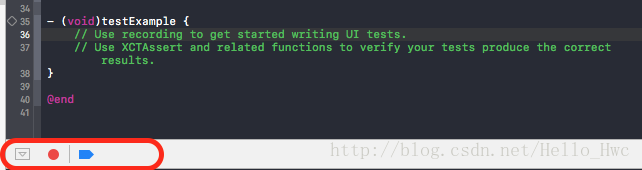
UI Recording is another central feature. Select a UI test and click the small red button shown to start recording. You will see:
Clicking in the simulator records test code automatically. Usually it still needs manual adjustment.
When writing UI tests, test behaviour rather than implementation code. For example:
Open the ToDo homepage, tap Add, enter text on the new-item screen and tap Save.
The test runs as follows:

Corresponding test code:
- (void)testAddNewItems{
    //获取app代理
    XCUIApplication *app = [[XCUIApplication alloc] init];
    //找到第一个tabeview,就是我们想要的tableview
    XCUIElement * table = [app.tables elementBoundByIndex:0];
    //记录下来添加之前的数量
    NSInteger oldCount = table.cells.count;
    //点击Add
    [app.navigationBars[@"ToDo"].buttons[@"Add"] tap];
    //找到Textfield
    XCUIElement *inputWhatYouWantTodoTextField = app.textFields[@"Input what you want todo"];
    //点击Textfield
    [inputWhatYouWantTodoTextField tap];
    //输入字符
    [inputWhatYouWantTodoTextField typeText:@"somethingtodo"];
    //点击保存
    [app.navigationBars[@"Add"].buttons[@"Save"] tap];
    //获取当前的数量
    NSInteger newCount = table.cells.count;
    //如果cells的数量加一,则认为测试成功
    XCTAssert(newCount == oldCount + 1);
}
Here success or failure is asserted from the change in tableView row count.
Wait
Transitions usually animate, so wait for animation completion before continuing. Otherwise a query may not find the intended control.
For example, this waits for a controller transition to finish and proceeds only when the query finds one table.
[self expectationForPredicate:[NSPredicate predicateWithFormat:@"self.count = 1"]
          evaluatedWithObject:app.tables
                      handler:nil];
[self waitForExpectationsWithTimeout:2.0 handler:nil];
//后续代码....
Tip: complex UI hierarchies, such as nested childViewControllers, produce long XCUIElementQuery expressions that are difficult to maintain.
UI tests also capture every operation, helping verify reports.
View test results
XCTest-based frameworks display results in Xcode’s report navigator.
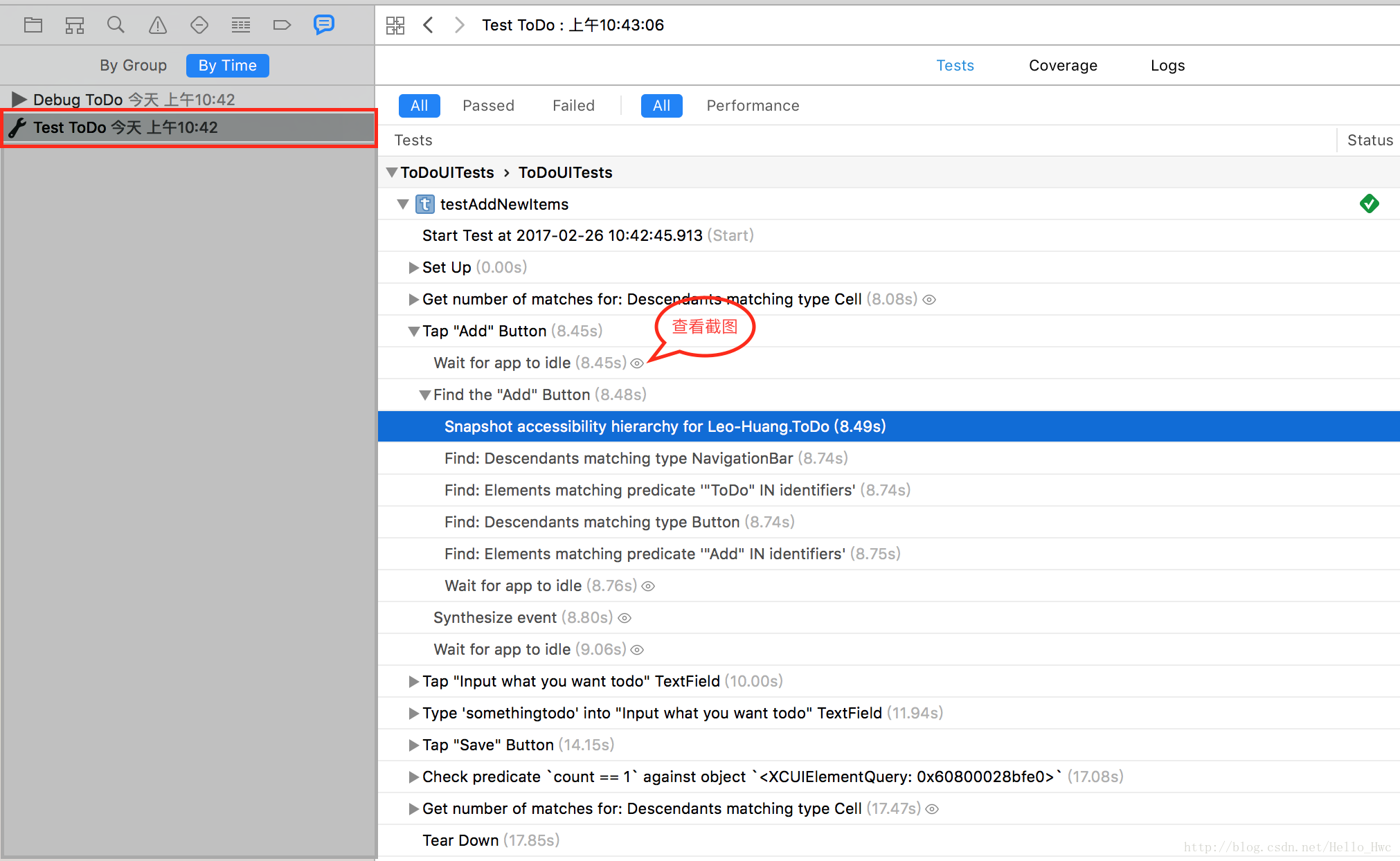
Here:
-
Tests shows the detailed testing process.
-
Coverage shows code coverage.
-
Logs shows test logs.
-
Click the icon indicated by the red box to see screenshots of each UI operation.
Besides Xcode’s GUI, the command-line tools mentioned later can run tests and inspect results.
Stub/Mock
First, two terms:
-
A mock is a simulated object.
-
A stub tracks calls and returns specified values when invoked.
With plain XCTest, OCMock is recommended for mocks and stubs. Third-party unit-test frameworks often include both already.
How are mocks used? Here is an official example:
//mock一个NSUserDefaults对象
id userDefaultsMock = OCMClassMock([NSUserDefaults class]);
//在调用stringForKey的时候,返回http://testurl
OCMStub([userDefaultsMock
stringForKey:@"MyAppURLKey"]).andReturn(@"http://testurl");
For example, how do we verify that opening another app actually succeeded?
id app = OCMClassMock([UIApplication class]);
OCMStub([app sharedInstance]).andReturn(app);
OCMVerify([app openURL:url]
Stubs make this convenient.
For OCMock usage, read this objc.io article.
Quick
Quick uses XCTestSuite to create test cases dynamically, so Xcode’s testing GUI and command-line tools remain available.
Quick tests look like this:
import Quick
import Nimble

class TableOfContentsSpec: QuickSpec {
  override func spec() {
    describe("the 'Documentation' directory") {
      it("has everything you need to get started") {
        let sections = Directory("Documentation").sections
        expect(sections).to(contain("Organized Tests with Quick Examples and Example Groups"))
        expect(sections).to(contain("Installing Quick"))
      }

      context("if it doesn't have what you're looking for") {
        it("needs to be updated") {
          let you = You(awesome: true)
          expect{you.submittedAnIssue}.toEventually(beTruthy())
        }
      }
    }
  }
}
BDD makes case intent and pass/fail outcomes clearer. Quick cases fall into two categories:
Individual cases: describe them with it.
it takes two parameters,
-
Behaviour description
-
Behaviour-test code
For example, test a Dolphin with is friendly and is smart behaviours.
//Swift代码
class DolphinSpec: QuickSpec {
  override func spec() {
    it("is friendly") {
      expect(Dolphin().isFriendly).to(beTruthy())
    }

    it("is smart") {
      expect(Dolphin().isSmart).to(beTruthy())
    }
  }
}
BDD centres on behaviour: focus on what a class does. Use describe and context for case groups.
For example, testing a dolphin’s click behaviour requires two cases: is loud and has a high frequency. Group them with describe.
class DolphinSpec: QuickSpec {
  override func spec() {
    describe("a dolphin") {
      describe("its click") {
        it("is loud") {
          let click = Dolphin().click()
          expect(click.isLoud).to(beTruthy())
        }

        it("has a high frequency") {
          let click = Dolphin().click()
          expect(click.hasHighFrequency).to(beTruthy())
        }
      }
    }
  }
}
context specifies case conditions:
For example,
describe("its click") {
    context("when the dolphin is not near anything interesting") {
      it("is only emitted once") {
        expect(dolphin!.click().count).to(equal(1))
      }
    }
}
Quick also offers hooks for pre-test setup:
-
beforeEach
-
afterEach
-
beforeAll
-
afterAll
-
beforeSuite
-
afterSuite
Nimble
Quick is based on XCTest, so assertions still determine success or failure. Nimble provides a friendlier framework for those assertions.
A typical XCTest assertion is:
XCTAssertTrue(ConditionCode, "FailReason")
An error reports
XCAssertTrue failed, balabala
Set a breakpoint and inspect the context to identify the failure’s cause.
With Nimble, assertions look like
expect(1 + 1).to(equal(2))
expect(3) > 2
expect("seahorse").to(contain("sea"))
expect(["Atlantic", "Pacific"]).toNot(contain("Mississippi"))
On failure, messages include contextual values, making the cause easier to find.
Make code easier to unit-test
Test accuracy and workload depend heavily on implementation quality.
To improve unit-test accuracy, borrow functional-programming ideas when writing methods. The most important is
- Pure function
A pure function always produces the same output for the same input.
This function is not pure, because it depends on the external variable value.
static NSInteger value = 0;

- (NSInteger)function_1{
    value = value + 1;
    return value;
}
This is a pure function: given its input, the output is always the same.
- (NSInteger)function_2:(NSInteger)base{
    NSInteger value = base + 1;
    return value;
}
If a method has no parameters or no return value, beware: it may be difficult to test.
About MVC
In a well-structured MVC app,
-
Views should only display content, forwarding user interactions outward through suitable mechanisms.
-
Models should handle data storage only.
-
Controllers connect views and models and often interact with many of both, making them difficult to automate and maintain.
Slimming controllers is important in iOS architecture. Common techniques include:
Extract logic:
-
Keep network requests independent. Encapsulate each as an object using the Command pattern rather than calling AFNetworking directly from a controller.
-
Separate persistence and caching into an independent Store class.
-
Expose shared data, such as login status, through services and protocols. Providers ensure service quality; consumers trust the results.
Decouple controllers and views
-
Introduce a ViewModel so controllers interact only with it.
-
Create a UIView container subclass, put views inside it, then add that container as the controller’s subview.
-
Build a reusable layout layer, whether using Auto Layout or manual positioning.
Decouple controllers from each other
- Create page routing. Represent each screen as a URL and navigate through Intent or URL, keeping controllers independent.
For Swift apps, protocol-oriented programming and immutable value types make code easier to test.
Componentising iOS apps also helps automation: infrastructure and business components can be tested independently. Componentisation is a large topic beyond this article.
KIF
KIF means Keep It Functional. Built on XCTest, it locates controls through accessibility and operates them with private APIs. Its XCTest foundation allows full use of Xcode testing tools, including command-line scripts.
I strongly recommend KIF: it is simple and easy to use.
KIF requires accessibility support. If unfamiliar, read Apple’s documentation.
Accessibility lets people with visual impairments use an app. Each control has an AccessibilityLabel. With VoiceOver enabled, tapping selects the control and speaks its description.
UIKit controls normally support accessibility. Custom controls can configure it in code or Storyboard.
Set this in Storyboard:
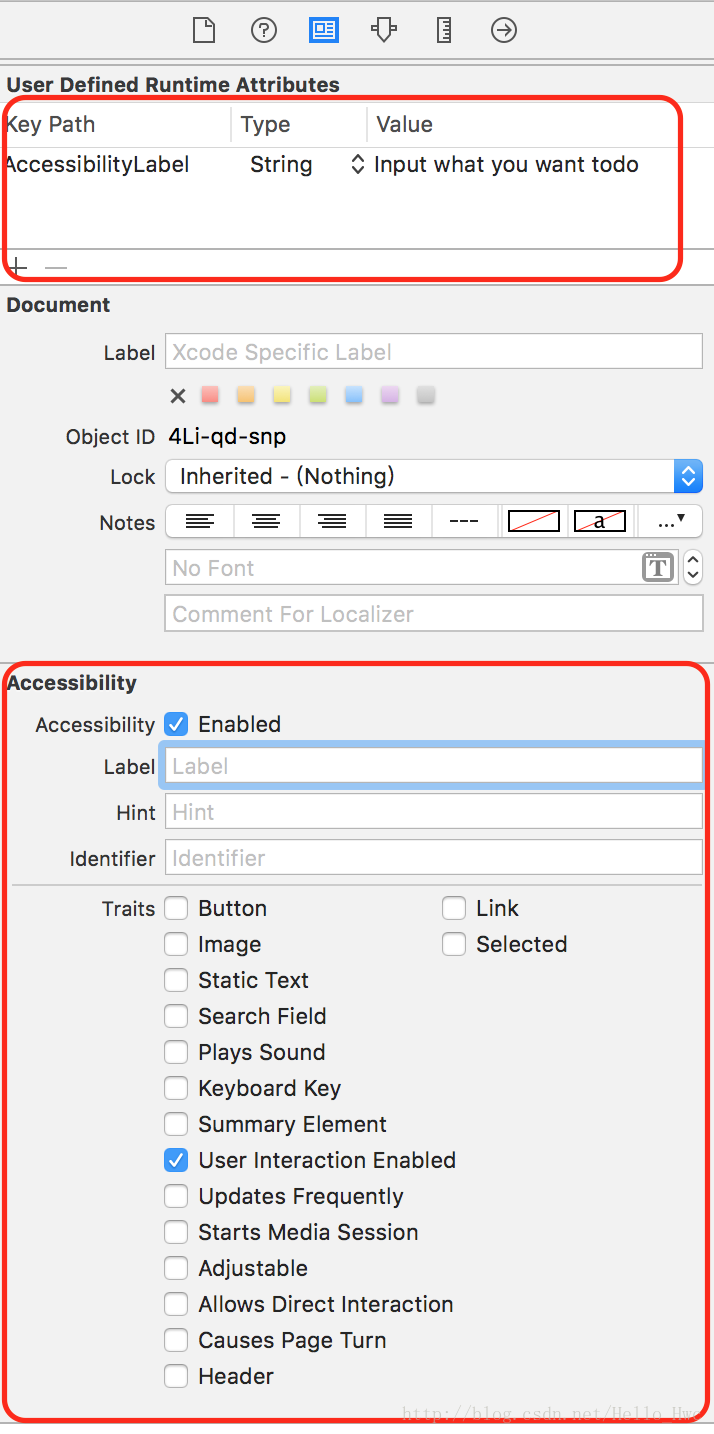
The upper example uses Runtime Attributes through KVC. The lower uses the GUI. Configure it in code:
[alert setAccessibilityLabel:@"Label"];
[alert setAccessibilityValue:@"Value"];
[alert setAccessibilityTraits:UIAccessibilityTraitButton];
With accessibility experience, you know containers such as TableView should not themselves support VoiceOver here. Conditional compilation can enable this only for the test target:
#ifdef DEBUG
[tableView setAccessibilityValue:@"Main List Table"];
#endif

#ifdef KIF_TARGET (这个值需要在build settings里设置)
[tableView setAccessibilityValue:@"Main List Table"];
#endif
KIF has two central classes:
-
KIFTestCase is an XCTestCase subclass.
-
KIFUITestActor controls UI. Three common actions are tapping a view, entering text and waiting for a view to appear.
Use KIF to test adding a new ToDo.
- (void)testAddANewItem{
    [tester tapViewWithAccessibilityLabel:@"Add"];
    [tester enterText:@"Create a test to do item" intoViewWithAccessibilityLabel:@"Input what you want todo"];
    [tester tapViewWithAccessibilityLabel:@"Save"];
    [tester waitForTimeInterval:0.2];
    [tester waitForViewWithAccessibilityLabel:@"Create a test to do item"];
}
Command line
For command-line automation, use Facebook’s open-source project:
This extends xcodebuild and is useful for iOS automation and CI. Its -parallelize option tests multiple bundles concurrently, greatly improving efficiency.
Install XCTool.
brew install xctool
Use
path/to/xctool.sh \
  -workspace YourWorkspace.xcworkspace \
  -scheme YourScheme \
  -reporter plain:/path/to/plain-output.txt \
  run-test
xctool also helps CI. Two commonly used iOS CI servers are:
- Travis CI Free for public repositories such as GitHub projects; paid for private repositories.
- Jenkins Free
Optimise test code
Accurate test cases
Test cases usually have three parts:
-
Configure the initial test state.
-
Execute code on the target under test.
-
Assert whether the result is successful or unsuccessful.
Test-code structure
With many cases, writing and maintaining tests becomes a technical discipline. Usually consider:
-
Do not test private methods. Encapsulation is central to OOP; do not break it merely for testing.
-
Group cases with related functionality or business logic.
-
Keep every case independent, unaffected by preceding tests and not influencing later ones. This is central to accuracy.
-
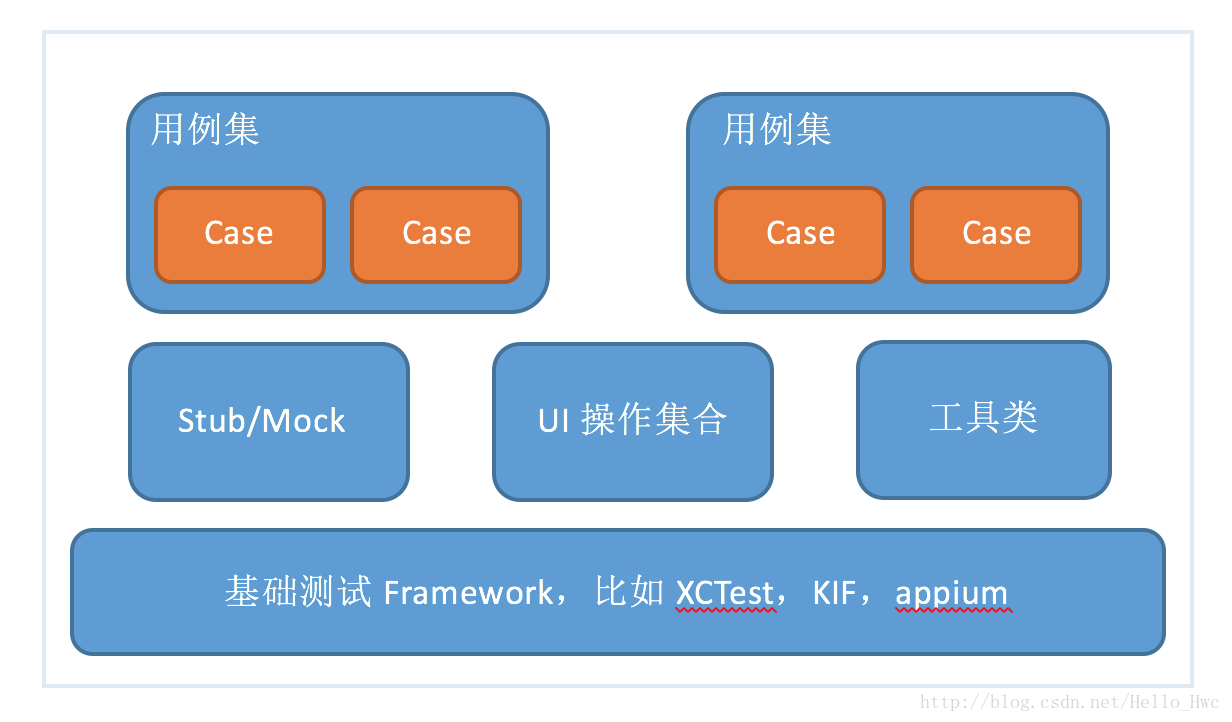
Extract shared code and operations to reduce copying and pasting. Cases should be high-level calls concerned with business logic, not internal implementation.
A common test structure is:
appium
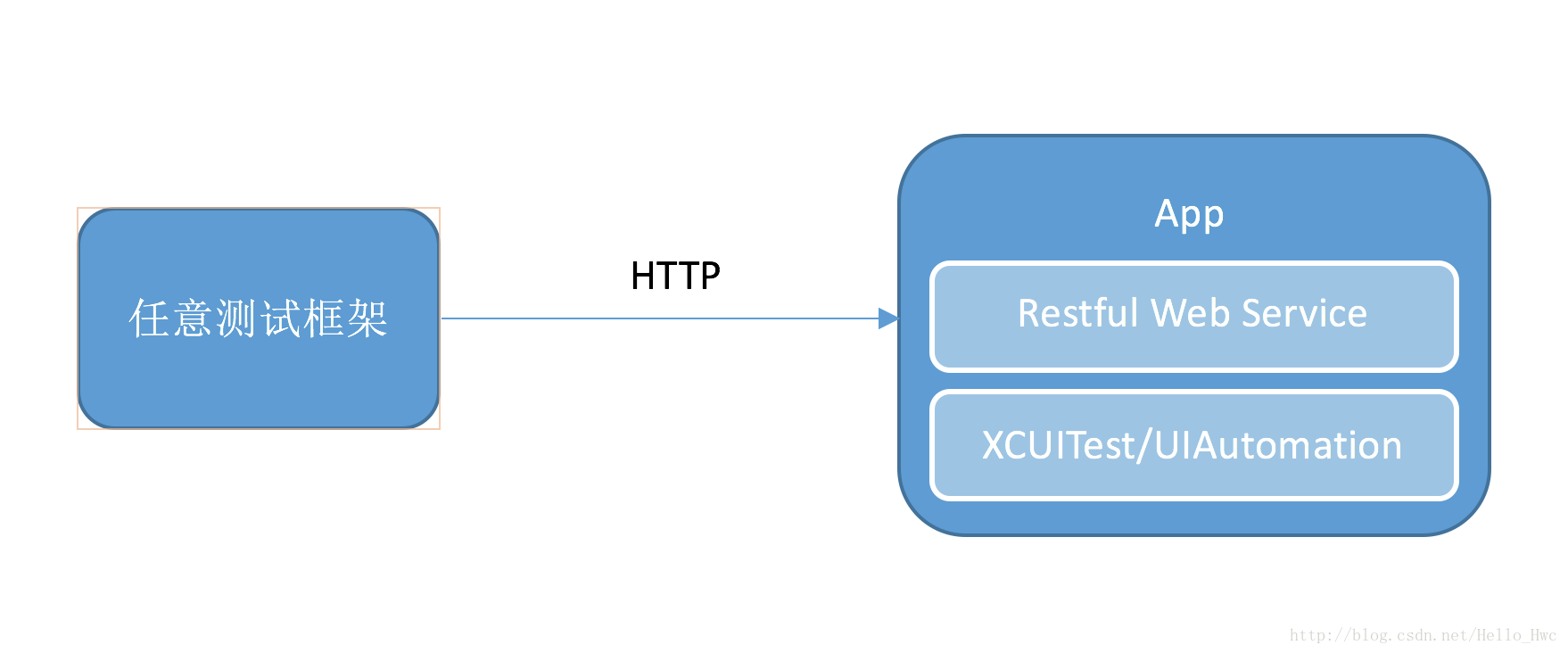
Appium uses a client–server architecture. The app is a server based on WebDriver JSON wire protocol It wraps the actual UI-driving library behind a RESTful interface. Tests send HTTP requests. The underlying UI driver varies with system version:
< 9.3 采用UIAutomation
>= 9.3 XCUITest
The reason is simple: after 10.0, Apple removed UIAutomation support and supports only XCUITest.
Compared with KIF, Appium has these advantages:
跨平台,支持iOS,Android
测试代码可以由多种语言编写,这对测试来说门槛更低
测试脚本独立与源代码和测试框架
Every framework also has drawbacks:
自定义控件支持不好
WebView的支持不好
Summary
I am not a professional iOS tester, but here are my observations:
-
For unit testing, I prefer a BDD framework for readability and recommend Quick(Swift), Kiwi(Objective C)
-
For UI testing, first consider KIF. If Android also needs testing or testers are unfamiliar with Objective-C/Swift, use appium
References
Testing with Xcode Official documentation explaining XCTest and Xcode in detail objc.io Testing resources supplementing the official documentation Tencent Mobile Quality Centre Tencent’s Mobile Quality Centre has many excellent articles and is highly recommended. KIF-based iOS UI automation and continuous integration A post by the Meituan-Dianping technical team testing-in-swift Automated testing for the WeChat Read typesetting engine
Recommended reading: Implement an iOS launch-screen advertisement in minutes