
Data & networkingHistorical technical note
iOS 10 Push Notifications: The Basics
Starts with enabling push capabilities and checking an existing project's configuration, then introduces iOS 10 notification registration, notification-center delegates, and callbacks. Third-party push integration illustrates the API changes involved in migrating older code.
Originally credited to 徐不同; edited and archived by Bison.
Source listed in the originalOn this page
iOS10 made some notification changes. I will explain them carefully below and hope the article helps.
Part 1: a simple introduction sufficient for basic adaptation
I will skip the relatively simple certificate and environment issues and focus on adapting an existing project. 1. First enable this switch. Every push platform, including JPush, requires it to receive notifications.
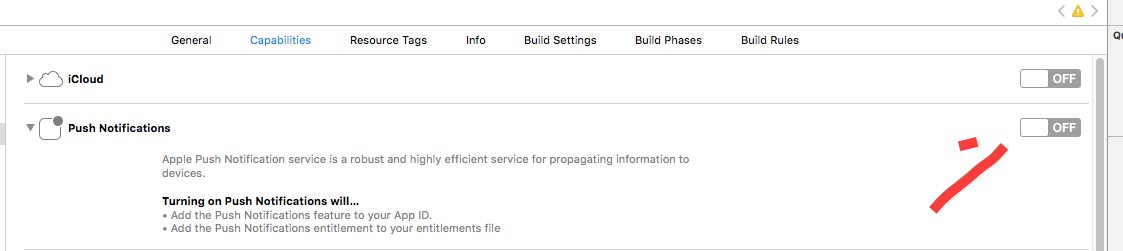
, the system generates a previously unseen file, shown below:

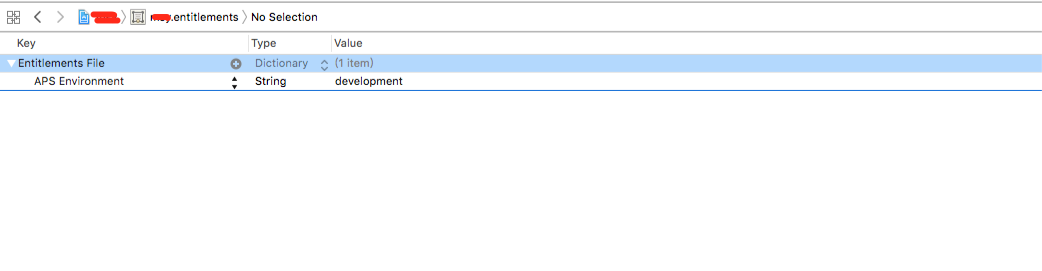
Potential issue: someone reported that switching the environment from development to production caused an error at this toggle, as shown:

After clicking Fix issue, APS Environment surprisingly changes from production back to development.
Solution: my recommendation is to make no changes.
In my tests, the packaged ipa did not contain the .entitlements file, yet notifications arrived normally. Here is the test method for you to try.
Test by packaging and installing the ipa, then sending a production-environment notification through JPush. After these steps, adaptation is complete and iOS10 can receive notifications normally.
Part 2: intermediate topics
I will explain iOS10 push registration, required delegates, available methods and methods no longer usable.
1. System-provided methods
Whether using a third-party push platform or the system directly, first understand the system’s remote-notification implementation.
Step 1: import #import <UserNotifications/UserNotifications.h>.
and conform to
Note that it is best written in this form:
#ifdef NSFoundationVersionNumber_iOS_9_x_Max
#import <UserNotifications/UserNotifications.h>
#endif
Step 2: in
(BOOL)application:(UIApplication *)application didFinishLaunchingWithOptions:(NSDictionary *)launchOptions
register notifications as follows:
   - (BOOL)application:(UIApplication *)application didFinishLaunchingWithOptions:(NSDictionary *)launchOptions {

      if ([[UIDevice currentDevice].systemVersion floatValue] >= 10.0) {
          //iOS10特有
          UNUserNotificationCenter *center = [UNUserNotificationCenter currentNotificationCenter];
          // 必须写代理,不然无法监听通知的接收与点击
          center.delegate = self;
          [center requestAuthorizationWithOptions:(UNAuthorizationOptionAlert | UNAuthorizationOptionBadge | UNAuthorizationOptionSound) completionHandler:^(BOOL granted, NSError * _Nullable error) {
              if (granted) {
                  // 点击允许
                  NSLog(@"注册成功");
                  [center getNotificationSettingsWithCompletionHandler:^(UNNotificationSettings * _Nonnull settings) {
                      NSLog(@"%@", settings);
                  }];
              } else {
                  // 点击不允许
                  NSLog(@"注册失败");
              }
          }];
      }else if ([[UIDevice currentDevice].systemVersion floatValue] >8.0){
          //iOS8 - iOS10
          [application registerUserNotificationSettings:[UIUserNotificationSettings settingsForTypes:UIUserNotificationTypeAlert | UIUserNotificationTypeSound | UIUserNotificationTypeBadge categories:nil]];

      }else if ([[UIDevice currentDevice].systemVersion floatValue] < 8.0) {
          //iOS8系统以下
          [application registerForRemoteNotificationTypes:UIRemoteNotificationTypeBadge | UIRemoteNotificationTypeAlert | UIRemoteNotificationTypeSound];
      }
      // 注册获得device Token
      [[UIApplication sharedApplication] registerForRemoteNotifications];
The method for obtaining the Device Token is unchanged.
  // 获得Device Token
   - (void)application:(UIApplication *)application
  didRegisterForRemoteNotificationsWithDeviceToken:(NSData *)deviceToken {
      NSLog(@"%@", [NSString stringWithFormat:@"Device Token: %@", deviceToken]);
  }
  // 获得Device Token失败
  - (void)application:(UIApplication *)application
  didFailToRegisterForRemoteNotificationsWithError:(NSError *)error {
      NSLog(@"did Fail To Register For Remote Notifications With Error: %@", error);
  }
iOS10 provides two delegate methods for receipt and tap handling, defined in
Put simply,
1. UNPushNotificationTrigger: the remote push-notification trigger type.
2. UNTimeIntervalNotificationTrigger: a local notification delivered after an interval, repeated or not. Set timeInterval and repeats.
3. UNCalendarNotificationTrigger: a local notification after a specified date, repeated or not. For example, to notify at 8 each day, set dateComponents to 8 and repeats to YES.
4. UNLocationNotificationTrigger: a local notification triggered when the user enters or leaves a geographic region. CLRegion identifiers must be unique; using the same identifier for different regions in UNNotificationRequests causes undefined behaviour.
Notification-receiving code:
  // iOS 10收到通知
  - (void)userNotificationCenter:(UNUserNotificationCenter *)center willPresentNotification:(UNNotification *)notification withCompletionHandler:(void (^)(UNNotificationPresentationOptions options))completionHandler{
      NSDictionary * userInfo = notification.request.content.userInfo;
      UNNotificationRequest *request = notification.request; // 收到推送的请求
      UNNotificationContent *content = request.content; // 收到推送的消息内容
      NSNumber *badge = content.badge;  // 推送消息的角标
      NSString *body = content.body;    // 推送消息体
      UNNotificationSound *sound = content.sound;  // 推送消息的声音
      NSString *subtitle = content.subtitle;  // 推送消息的副标题
      NSString *title = content.title;  // 推送消息的标题

      if([notification.request.trigger isKindOfClass:[UNPushNotificationTrigger class]]) {
          NSLog(@"iOS10 前台收到远程通知:%@", [self logDic:userInfo]);

      }
      else {
          // 判断为本地通知
          NSLog(@"iOS10 前台收到本地通知:{\\\\nbody:%@,\\\\ntitle:%@,\\\\nsubtitle:%@,\\\\nbadge:%@,\\\\nsound:%@,\\\\nuserInfo:%@\\\\n}",body,title,subtitle,badge,sound,userInfo);
      }
      completionHandler(UNNotificationPresentationOptionBadge|UNNotificationPresentationOptionSound|UNNotificationPresentationOptionAlert); // 需要执行这个方法,选择是否提醒用户,有Badge、Sound、Alert三种类型可以设置
  }
Notification-tap handling code:
  // 通知的点击事件
  - (void)userNotificationCenter:(UNUserNotificationCenter *)center didReceiveNotificationResponse:(UNNotificationResponse *)response withCompletionHandler:(void(^)())completionHandler{

      NSDictionary * userInfo = response.notification.request.content.userInfo;
      UNNotificationRequest *request = response.notification.request; // 收到推送的请求
      UNNotificationContent *content = request.content; // 收到推送的消息内容
      NSNumber *badge = content.badge;  // 推送消息的角标
      NSString *body = content.body;    // 推送消息体
      UNNotificationSound *sound = content.sound;  // 推送消息的声音
      NSString *subtitle = content.subtitle;  // 推送消息的副标题
      NSString *title = content.title;  // 推送消息的标题
      if([response.notification.request.trigger isKindOfClass:[UNPushNotificationTrigger class]]) {
          NSLog(@"iOS10 收到远程通知:%@", [self logDic:userInfo]);

      }
      else {
          // 判断为本地通知
          NSLog(@"iOS10 收到本地通知:{\\\\nbody:%@,\\\\ntitle:%@,\\\\nsubtitle:%@,\\\\nbadge:%@,\\\\nsound:%@,\\\\nuserInfo:%@\\\\n}",body,title,subtitle,badge,sound,userInfo);
      }

      // Warning: UNUserNotificationCenter delegate received call to -userNotificationCenter:didReceiveNotificationResponse:withCompletionHandler: but the completion handler was never called.
      completionHandler();  // 系统要求执行这个方法

  }
In the tap handler, omitting completionHandler() may produce the following error. Please note it.
Warning: UNUserNotificationCenter delegate received call to -userNotificationCenter:didReceiveNotificationResponse:withCompletionHandler: but the completion handler was never called.
Finally, here are older-version methods to extend iOS10 notification handling without changing existing logic.
  - (void)application:(UIApplication *)application
  didReceiveRemoteNotification:(NSDictionary *)userInfo {
      NSLog(@"iOS6及以下系统,收到通知:%@", [self logDic:userInfo]);
  }

  - (void)application:(UIApplication *)application
  didReceiveRemoteNotification:(NSDictionary *)userInfo
  fetchCompletionHandler:
  (void (^)(UIBackgroundFetchResult))completionHandler {

      NSLog(@"iOS7及以上系统,收到通知:%@", [self logDic:userInfo]);
      completionHandler(UIBackgroundFetchResultNewData);
  }
2. JPush; download the latest version.
Third-party push platforms make implementation simpler.
1. Notification registration code:
  if ([[UIDevice currentDevice].systemVersion floatValue] >= 10.0) {
  #ifdef NSFoundationVersionNumber_iOS_9_x_Max
      JPUSHRegisterEntity * entity = [[JPUSHRegisterEntity alloc] init];
      entity.types = UNAuthorizationOptionAlert|UNAuthorizationOptionBadge|UNAuthorizationOptionSound;
      [JPUSHService registerForRemoteNotificationConfig:entity delegate:self];
  #endif
    } else if ([[UIDevice currentDevice].systemVersion floatValue] >= 8.0) {
        //可以添加自定义categories
        [JPUSHService registerForRemoteNotificationTypes:(UIUserNotificationTypeBadge |
                                                          UIUserNotificationTypeSound |
                                                          UIUserNotificationTypeAlert)
                                              categories:nil];
    } else {
        //categories 必须为nil
        [JPUSHService registerForRemoteNotificationTypes:(UIRemoteNotificationTypeBadge |
                                                          UIRemoteNotificationTypeSound |
                                                          UIRemoteNotificationTypeAlert)
                                              categories:nil];
    }
After registration, add the two newly introduced JPush methods, available in
  /*
   * @brief handle UserNotifications.framework [willPresentNotification:withCompletionHandler:]
   * @param center [UNUserNotificationCenter currentNotificationCenter] 新特性用户通知中心
   * @param notification 前台得到的的通知对象
   * @param completionHandler 该callback中的options 请使用UNNotificationPresentationOptions
   */
  - (void)jpushNotificationCenter:(UNUserNotificationCenter *)center willPresentNotification:(UNNotification *)notification withCompletionHandler:(void (^)(NSInteger options))completionHandler;
  /*
   * @brief handle UserNotifications.framework [didReceiveNotificationResponse:withCompletionHandler:]
   * @param center [UNUserNotificationCenter currentNotificationCenter] 新特性用户通知中心
   * @param response 通知响应对象
   * @param completionHandler
   */
  - (void)jpushNotificationCenter:(UNUserNotificationCenter *)center didReceiveNotificationResponse:(UNNotificationResponse *)response withCompletionHandler:(void(^)())completionHandler;
Just add JPush handling to the code above, as shown:
  if([response.notification.request.trigger isKindOfClass:[UNPushNotificationTrigger class]]) {
      // 这个方法,不管是收到通知代理还是点击通知的代理,如果使用极光推送,我们都是需要增加这个方法的。
      [JPUSHService handleRemoteNotification:userInfo];

      NSLog(@"iOS10 收到远程通知:%@", [self logDic:userInfo]);
      [rootViewController addNotificationCount];
    }
    else {
      // 判断为本地通知
      NSLog(@"iOS10 收到本地通知:{\\\\nbody:%@,\\\\ntitle:%@,\\\\nsubtitle:%@,\\\\nbadge:%@,\\\\nsound:%@,\\\\nuserInfo:%@\\\\n}",body,title,subtitle,badge,sound,userInfo);
    }
After the article above, you should have a basic understanding of handling notifications in the new version.
Later I will update these topics; thanks for your support: UNNotificationContentExtension — notification content extension UNNotificationServiceExtension — notification service extension UNNotificationAction — notification response actions UNErrorCode — notification errors UNNotificationAttachment — notification attachments I will also upload the demo link.
If you like the article, please follow me. Thank you! Please credit the source when republishing. I will keep writing useful articles in return.
Recommended reading: Implement an iOS launch-screen advertisement in minutes