
UIKit & graphicsHistorical technical note
Practical UITextField Input Rules and Keyboard Handling
Addresses text length, numeric and currency input, Chinese input composition, and keyboard overlap. Categories and runtime features organize extensible input rules, while keyboard notifications are used to adjust the interface position.
Originally credited to Sindri; edited and archived by Bison.
Source listed in the originalOn this page
UITextField is an important control for collecting user information, but practical use has pitfalls. Setting keyboardType restricts the keyboard type without easily restricting third-party keyboard input. Delegate limits on length and content may not withstand Chinese predictive input. When the keyboard covers the field, we must receive show/hide notifications, calculate coordinates, and animate movement.
Editor: Bison
Source: Sindri’s Notes
Apple supplies text fields without solutions to those problems, so this article addresses them through category+runtime. It assumes you already understand the event sequence from a UITextField becoming first responder through editing completion.
Input restrictions
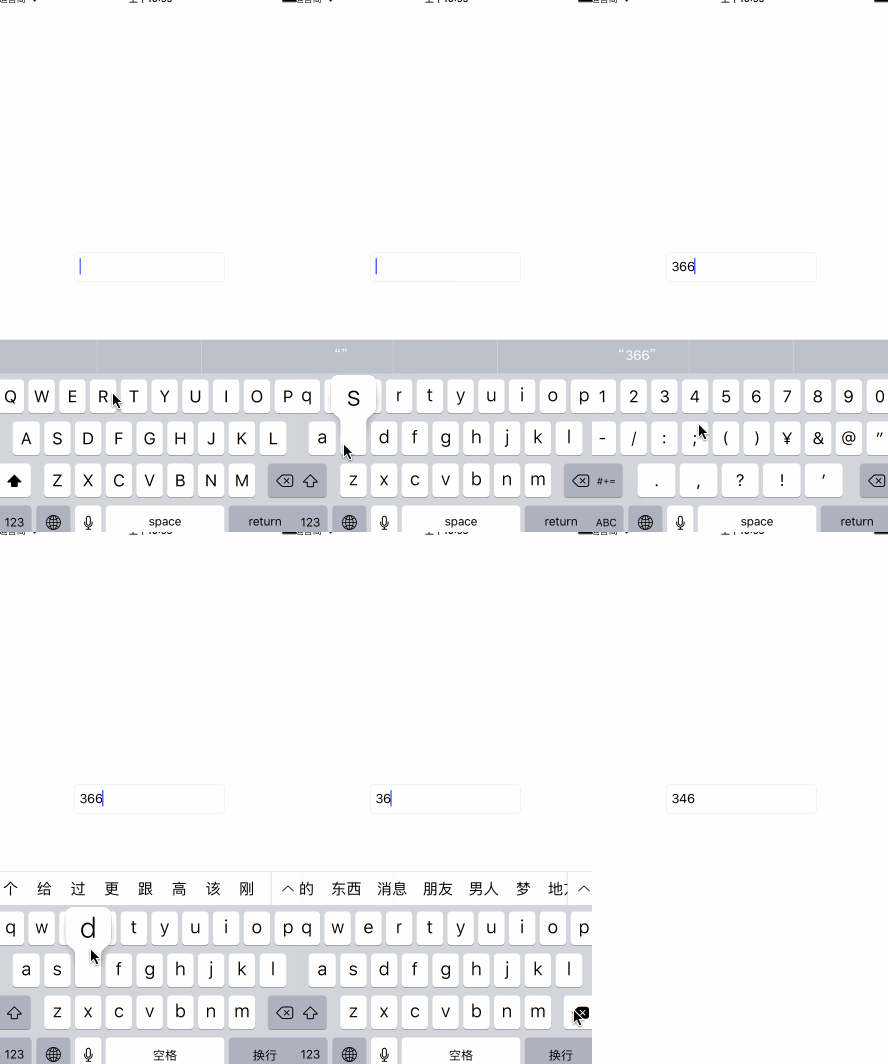
The most common restrictions are phone numbers and monetary amounts. The former permits only digits; the latter also permits a decimal point. I initially define three enumeration cases for three text restrictions:
typedef NS_ENUM(NSInteger, LXDRestrictType)
{
    LXDRestrictTypeOnlyNumber = 1,      ///< 只允许输入数字
    LXDRestrictTypeOnlyDecimal = 2,     ///<  只允许输入实数,包括.
    LXDRestrictTypeOnlyCharacter = 3,  ///<  只允许非中文输入
};
Text input has two callbacks: the delegate's replace replacement method and the manually registered EditingChanged editing-change event. The former cannot accurately obtain final text during Chinese composition. The latter is called once the input is confirmed, making it suitable for filtering. This code removes every nondigit:
- (void)viewDidLoad
{
    [textField addTarget: self action: @selector(textDidChanged:) forControlEvents: UIControlEventEditingChanged];
}

- (void)textDidChanged: (UITextField *)textField
{
    NSMutableString * modifyText = textField.text.mutableCopy;
    for (NSInteger idx = 0; idx < modifyText.length; idx++) {
        NSString * subString = [modifyText substringWithRange: NSMakeRange(idx, 1)];
        // 使用正则表达式筛选
        NSString * matchExp = @"^\\d$";
        NSPredicate * predicate = [NSPredicate predicateWithFormat: @"SELF MATCHES %@", matchExp];
        if ([predicate evaluateWithObject: subString]) {
            idx++;
        } else {
            [modifyString deleteCharactersInRange: NSMakeRange(idx, 1)];
        }
    }
}
Extending restrictions
Repeating that code every time input needs limiting would be unpleasant. How can we encapsulate it and support custom restrictions? I use a factory, with a separate class for each restriction type. Extract a parent class exposing one text-change interface and an integer property of type NSUInteger for the maximum length:
#pragma mark - h文件
@interface LXDTextRestrict : NSObject

@property (nonatomic, assign) NSUInteger maxLength;
@property (nonatomic, readonly) LXDRestrictType restrictType;

// 工厂
+ (instancetype)textRestrictWithRestrictType: (LXDRestrictType)restrictType;
// 子类实现来限制文本内容
- (void)textDidChanged: (UITextField *)textField;

@end


#pragma mark - 继承关系
@interface LXDTextRestrict ()

@property (nonatomic, readwrite) LXDRestrictType restrictType;

@end

@interface LXDNumberTextRestrict : LXDTextRestrict
@end

@interface LXDDecimalTextRestrict : LXDTextRestrict
@end

@interface LXDCharacterTextRestrict : LXDTextRestrict
@end

#pragma mark - 父类实现
@implementation LXDTextRestrict

+ (instancetype)textRestrictWithRestrictType: (LXDRestrictType)restrictType
{
    LXDTextRestrict * textRestrict;
    switch (restrictType) {
        case LXDRestrictTypeOnlyNumber:
            textRestrict = [[LXDNumberTextRestrict alloc] init];
            break;

        case LXDRestrictTypeOnlyDecimal:
            textRestrict = [[LXDDecimalTextRestrict alloc] init];
            break;

        case LXDRestrictTypeOnlyCharacter:
            textRestrict = [[LXDCharacterTextRestrict alloc] init];
            break;

        default:
            break;
    }
    textRestrict.maxLength = NSUIntegerMax;
    textRestrict.restrictType = restrictType;
    return textRestrict;
}

- (void)textDidChanged: (UITextField *)textField
{

}

@end
All subclasses iterate strings and validate regular expressions during filtering, so encapsulate that shared logic. Following EOC principles, prefer a static inline function to a macro:
typedef BOOL(^LXDStringFilter)(NSString * aString);
static inline NSString * kFilterString(NSString * handleString, LXDStringFilter subStringFilter)
{
    NSMutableString * modifyString = handleString.mutableCopy;
    for (NSInteger idx = 0; idx < modifyString.length;) {
        NSString * subString = [modifyString substringWithRange: NSMakeRange(idx, 1)];
        if (subStringFilter(subString)) {
            idx++;
        } else {
            [modifyString deleteCharactersInRange: NSMakeRange(idx, 1)];
        }
    }
    return modifyString;
}

static inline BOOL kMatchStringFormat(NSString * aString, NSString * matchFormat)
{
    NSPredicate * predicate = [NSPredicate predicateWithFormat: @"SELF MATCHES %@", matchFormat];
    return [predicate evaluateWithObject: aString];
}


#pragma mark - 子类实现
@implementation LXDNumberTextRestrict

- (void)textDidChanged: (UITextField *)textField
{
    textField.text = kFilterString(textField.text, ^BOOL(NSString *aString) {
        return kMatchStringFormat(aString, @"^\\d$");
    });
}

@end

@implementation LXDDecimalTextRestrict

- (void)textDidChanged: (UITextField *)textField
{
    textField.text = kFilterString(textField.text, ^BOOL(NSString *aString) {
        return kMatchStringFormat(aString, @"^[0-9.]$");
    });
}

@end

@implementation LXDCharacterTextRestrict

- (void)textDidChanged: (UITextField *)textField
{
    textField.text = kFilterString(textField.text, ^BOOL(NSString *aString) {
        return kMatchStringFormat(aString, @"^[^[\\u4e00-\\u9fa5]]$");
    });
}

@end
With restriction classes ready, create a UITextField category to add the input-limiting feature, mainly through three new properties:
@interface UITextField (LXDRestrict)

/// 设置后生效
@property (nonatomic, assign) LXDRestrictType restrictType;
/// 文本最长长度
@property (nonatomic, assign) NSUInteger maxTextLength;
/// 设置自定义的文本限制
@property (nonatomic, strong) LXDTextRestrict * textRestrict;

@end
Because these properties are added in a category, implement their getter and setter methods manually. Here, the dynamic association mechanism objc_associate provides the implementation. The core methods follow:
- (void)setRestrictType: (LXDRestrictType)restrictType
{
    objc_setAssociatedObject(self, LXDRestrictTypeKey, @(restrictType), OBJC_ASSOCIATION_RETAIN_NONATOMIC);
    self.textRestrict = [LXDTextRestrict textRestrictWithRestrictType: restrictType];
}

- (void)setTextRestrict: (LXDTextRestrict *)textRestrict
{
    if (self.textRestrict) {
        [self removeTarget: self.text action: @selector(textDidChanged:) forControlEvents: UIControlEventEditingChanged];
    }
    textRestrict.maxLength = self.maxTextLength;
    [self addTarget: textRestrict action: @selector(textDidChanged:) forControlEvents: UIControlEventEditingChanged];
    objc_setAssociatedObject(self, LXDTextRestrictKey, textRestrict, OBJC_ASSOCIATION_RETAIN_NONATOMIC);
}
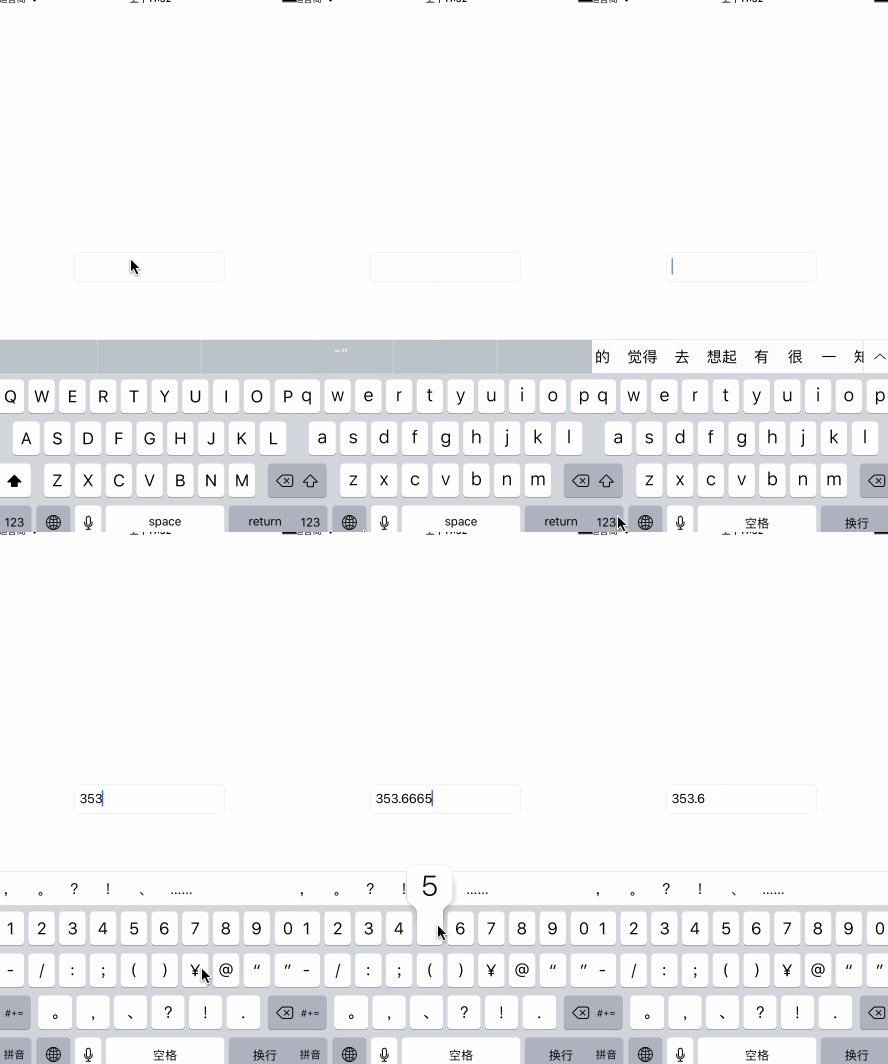
With that work complete, one line limits input in a UITextField:
self.textField.restrictType = LXDRestrictTypeOnlyDecimal;
Custom restrictions
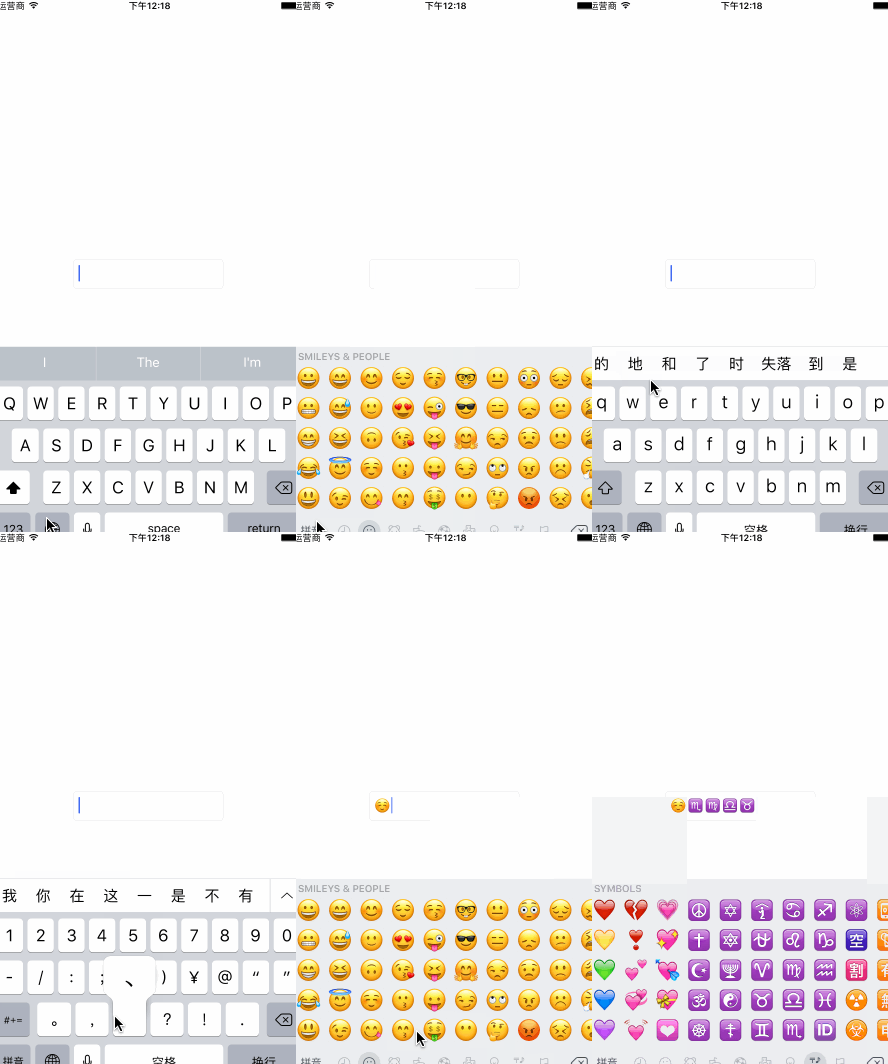
Suppose a field must accept only emoji, which none of the three enum options supports. Create a custom subclass to meet that requirement.
@interface LXDEmojiTextRestrict : LXDTextRestrict

@end

@implementation LXDEmojiTextRestrict

- (void)textDidChanged: (UITextField *)textField
{
    NSMutableString * modifyString = textField.text.mutableCopy;
    for (NSInteger idx = 0; idx < modifyString.length;) {
        NSString * subString = [modifyString substringWithRange: NSMakeRange(idx, 1)];
        NSString * emojiExp = @"^[\\ud83c\\udc00-\\ud83c\\udfff]|[\\ud83d\\udc00-\\ud83d\\udfff]|[\\u2600-\\u27ff]$";
        NSPredicate * predicate = [NSPredicate predicateWithFormat: @"SELF MATCHES %@", emojiExp];
        if ([predicate evaluateWithObject: subString]) {
            idx++;
        } else {
            [modifyString deleteCharactersInRange: NSMakeRange(idx, 1)];
        }
    }
    textField.text = modifyString;
}

@end
The regular expression for emoji in this code is incomplete, so many emoji inputs are filtered out in practice. The result is shown below:
Keyboard overlap
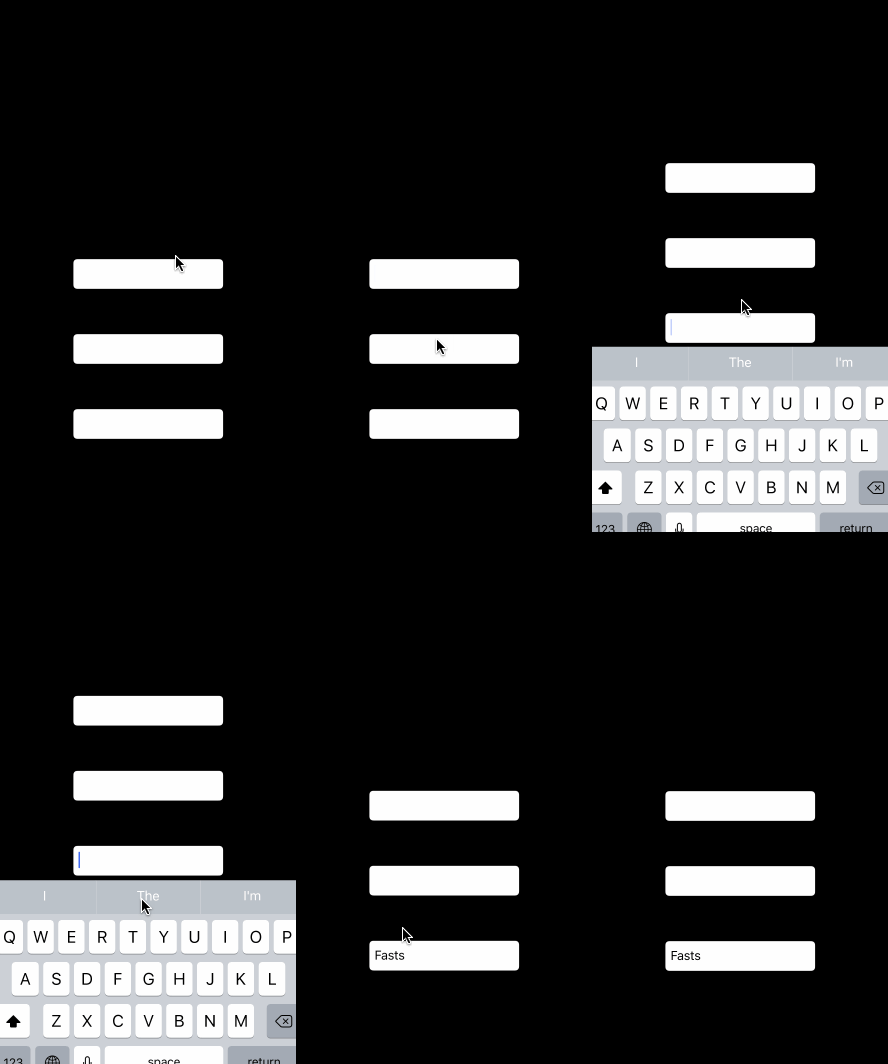
Another headache is the keyboard covering an input field. Add keyboard notifications in the category to move the entire window. This method obtains the field's relative coordinates inside keyWindow:
- (CGPoint)convertPoint:(CGPoint)point toView:(nullable UIView *)view
Provide an interface that enables automatic adjustment for an input field:
@interface UITextField (LXDAdjust)

/// 自动适应
- (void)setAutoAdjust: (BOOL)autoAdjust;

@end

@implementation UITextField (LXDAdjust)

- (void)setAutoAdjust: (BOOL)autoAdjust
{
    if (autoAdjust) {
        [[NSNotificationCenter defaultCenter] addObserver: self selector: @selector(keyboardWillShow:) name: UIKeyboardWillShowNotification object: nil];
        [[NSNotificationCenter defaultCenter] addObserver: self selector: @selector(keyboardWillHide:) name: UIKeyboardWillHideNotification object: nil];
    } else {
        [[NSNotificationCenter defaultCenter] removeObserver: self];
    }
}

- (void)keyboardWillShow: (NSNotification *)notification
{
    if (self.isFirstResponder) {
        CGPoint relativePoint = [self convertPoint: CGPointZero toView: [UIApplication sharedApplication].keyWindow];

        CGFloat keyboardHeight = [notification.userInfo[UIKeyboardFrameBeginUserInfoKey] CGRectValue].size.height;
        CGFloat actualHeight = CGRectGetHeight(self.frame) + relativePoint.y + keyboardHeight;
        CGFloat overstep = actualHeight - CGRectGetHeight([UIScreen mainScreen].bounds) + 5;
        if (overstep > 0) {
            CGFloat duration = [notification.userInfo[UIKeyboardAnimationDurationUserInfoKey] doubleValue];
            CGRect frame = [UIScreen mainScreen].bounds;
            frame.origin.y -= overstep;
            [UIView animateWithDuration: duration delay: 0 options: UIViewAnimationOptionCurveLinear animations: ^{
                [UIApplication sharedApplication].keyWindow.frame = frame;
            } completion: nil];
        }
    }
}

- (void)keyboardWillHide: (NSNotification *)notification
{
    if (self.isFirstResponder) {
        CGFloat duration = [notification.userInfo[UIKeyboardAnimationDurationUserInfoKey] doubleValue];
        CGRect frame = [UIScreen mainScreen].bounds;
        [UIView animateWithDuration: duration delay: 0 options: UIViewAnimationOptionCurveLinear animations: ^{
            [UIApplication sharedApplication].keyWindow.frame = frame;
        } completion: nil];
    }
}

- (void)dealloc
{
    [[NSNotificationCenter defaultCenter] removeObserver: self];
}

@end
If the project has a custom UITextField subclass, the dealloc implementation above should use method_swillzing to remove notification observers.
Closing thoughts
Small refinements often require only a little code, but implementing them well means understanding the full event flow. Also, yesterday WeChat's 小程序 filled my feed. To fellow iOS developers: rather than worrying whether you will keep your job, focus on doing it well and learn some js to keep up with the trend.Demo for this article
Recommended reading: Implement an iOS launch-screen advertisement in minutes