UIKit & graphicsHistorical technical note
Building a UICollectionView programmatically in Swift
Starts with data-source and delegate setup, then builds UICollectionView cells, loads network data and adds reusable headers. These steps bring together the structure of a collection-view interface implemented entirely in Swift code.
Originally credited to Bison. Content is retained as published.
On this page
“Enrich yourself and increase your value by continuing to learn.” Bison
As a new iOS programming language, Swift was bound to rise in prominence.
We experienced programmers must inevitably learn new skills too.
Anyone who refuses to learn new skills will be left behind by this community.
So I am happy to embrace this seemingly immature language.
Next, let's discuss a commonly used control in Swift: UICollectionView.
First define a global UICollectionView and a data source.
var colltionView : UICollectionView?
var dataArr = NSMutableArray()
Then set up the 3 protocols for UICollectionView: UICollectionViewDelegate,UICollectionViewDataSource,UICollectionViewDelegateFlowLayout. Next initialize the necessary objects in override func viewDidLoad().
override func viewDidLoad() {
    super.viewDidLoad()
    var layout = UICollectionViewFlowLayout()
    colltionView = UICollectionView(frame: CGRectMake(0, 0, width, height), collectionViewLayout: layout)
    //注册一个cell
    colltionView! .registerClass(Home_Cell.self, forCellWithReuseIdentifier:"cell")
    //注册一个headView
    colltionView! .registerClass(Home_HeadView.self, forSupplementaryViewOfKind:UICollectionElementKindSectionHeader, withReuseIdentifier: "headView")
    colltionView?.delegate = self;
    colltionView?.dataSource = self;

    colltionView?.backgroundColor = UIColor.whiteColor()
    //设置每一个cell的宽高
    layout.itemSize = CGSizeMake((width-30)/2, 250)
    self.view .addSubview(colltionView!)
    self .getData()
}
Then implement the delegate methods for UICollectionView.
//返回多少个组
func numberOfSectionsInCollectionView(collectionView: UICollectionView) -> Int {

    return 1
}
//返回多少个cell
func collectionView(collectionView: UICollectionView, numberOfItemsInSection section: Int) -> Int {
    return dataArr.count
}
//返回自定义的cell
func collectionView(collectionView: UICollectionView, cellForItemAtIndexPath indexPath: NSIndexPath) -> UICollectionViewCell {


    let cell = collectionView.dequeueReusableCellWithReuseIdentifier("cell", forIndexPath: indexPath) as! Home_Cell
    var model = GoodsModel()
    model = dataArr[indexPath.row] as! GoodsModel
    let url : NSURL = NSURL(string: model.image_url as String)!
    cell.imgView!.hnk_setImageFromURL(url)
    cell.layer.borderWidth = 0.3;
    cell.layer.borderColor = UIColor.lightGrayColor().CGColor
    cell.titleLabel!.text = model.short_name
    cell.priceLabel!.text = "¥"+model.p_price
    cell.readLabel!.text = "💗"+model.like_count
    return cell
}
//返回HeadView的宽高
func collectionView(collectionView: UICollectionView, layout collectionViewLayout: UICollectionViewLayout, referenceSizeForHeaderInSection section: Int) -> CGSize{

    return CGSize(width: width, height: height/1.6)
}

//返回自定义HeadView或者FootView,我这里以headview为例
func collectionView(collectionView: UICollectionView, viewForSupplementaryElementOfKind kind: String, atIndexPath indexPath: NSIndexPath) -> UICollectionReusableView{
    var v = Home_HeadView()
    if kind == UICollectionElementKindSectionHeader{

    v = colltionView!.dequeueReusableSupplementaryViewOfKind(kind, withReuseIdentifier: "headView", forIndexPath: indexPath) as! Home_HeadView
    }
    return v
}
//返回cell 上下左右的间距
func collectionView(collectionView: UICollectionView, layout collectionViewLayout: UICollectionViewLayout, insetForSectionAtIndex section: Int) -> UIEdgeInsets{
    return UIEdgeInsetsMake(5, 10, 5, 10)
}
Next retrieve the data. I use Alamofire for the network request here; I cannot disclose the URL.
//获取数据
func getData(){
    Alamofire.request(.GET, GoodsUrl).responseJSON() { (req, _, JSON, _) -> Void in

        if let j = JSON as? NSDictionary{
            var data = j.valueForKey("data")as! NSArray

            for dict in data{
                var model = GoodsModel()
                model.Analytical(dict as! NSDictionary)
                self.dataArr.addObject(model)
            }

            self.colltionView!.reloadData()
        }
    }
}
Next, let's see what is actually inside the cell.
class Home_Cell: UICollectionViewCell {

    let width = UIScreen.mainScreen().bounds.size.width//获取屏幕宽
    var imgView : UIImageView?//cell上的图片
    var titleLabel:UILabel?//cell上title
    var priceLabel:UILabel?//cell上价格
    var readLabel:UILabel?//cell上的阅读量


override init(frame: CGRect) {

    super.init(frame: frame)
    //初始化各种控件
    imgView = UIImageView(frame: CGRectMake(0, -10, (width-30)/2, 200))
    self .addSubview(imgView!)
    titleLabel = UILabel(frame: CGRectMake(5, CGRectGetMaxY(imgView!.frame)-12, (width-40)/2, 50))
    titleLabel?.numberOfLines = 0
    titleLabel?.font = UIFont.boldSystemFontOfSize(14.0)
    titleLabel?.textColor = UIColor.lightGrayColor()
    self .addSubview(titleLabel!)

    priceLabel = UILabel(frame: CGRectMake(5, CGRectGetMaxY(titleLabel!.frame), (width-40)/2/2, 20))
    priceLabel?.numberOfLines = 0
    priceLabel?.font = UIFont.boldSystemFontOfSize(14.0)
    priceLabel?.textColor = UIColor.lightGrayColor()
    self .addSubview(priceLabel!)

    readLabel = UILabel(frame: CGRectMake((width-30)/2/2, CGRectGetMaxY(titleLabel!.frame), (width-40)/2/2, 20))
    readLabel?.numberOfLines = 0
    readLabel?.textAlignment = NSTextAlignment.Right
    readLabel?.font = UIFont.boldSystemFontOfSize(14.0)
    readLabel?.textColor = UIColor.lightGrayColor()
    self .addSubview(readLabel!)


}

required init(coder aDecoder: NSCoder) {
    fatalError("init(coder:) has not been implemented")
}

}
Does something still seem missing? Yes, we have not created the header view yet. Let's see how to set up the header for UICollectionView. The key is that it must inherit from UICollectionReusableView. However, this .m file has no method like override func viewDidLoad(), so what should we do? Let's inspect the methods in our superclass, UICollectionReusableView. After some searching, I finally found one we can use. 😄
override func applyLayoutAttributes(layoutAttributes: UICollectionViewLayoutAttributes!){

}
Put custom UI setup, data requests, and similar work in this method. It serves a role like override func viewDidLoad() in our view controller. That concludes the tutorial. Leave a comment with any questions; I will set aside time to reply periodically.
Copyright © Bison. Please credit the source when reproducing this article!
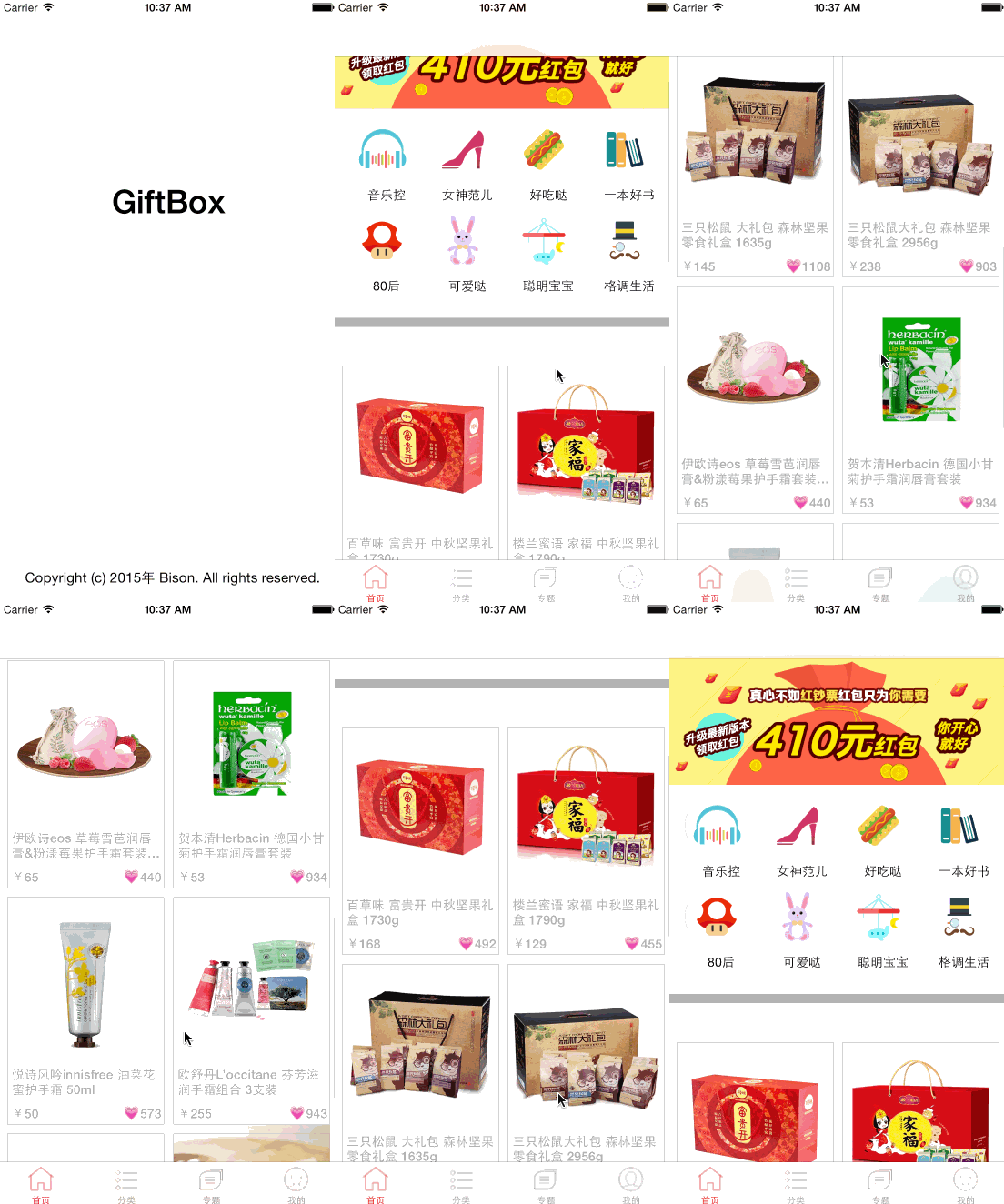
The final result is shown below.