
UIKit & graphicsHistorical technical note
A Windows AliWangWang-style login screen with a paper-feed animation
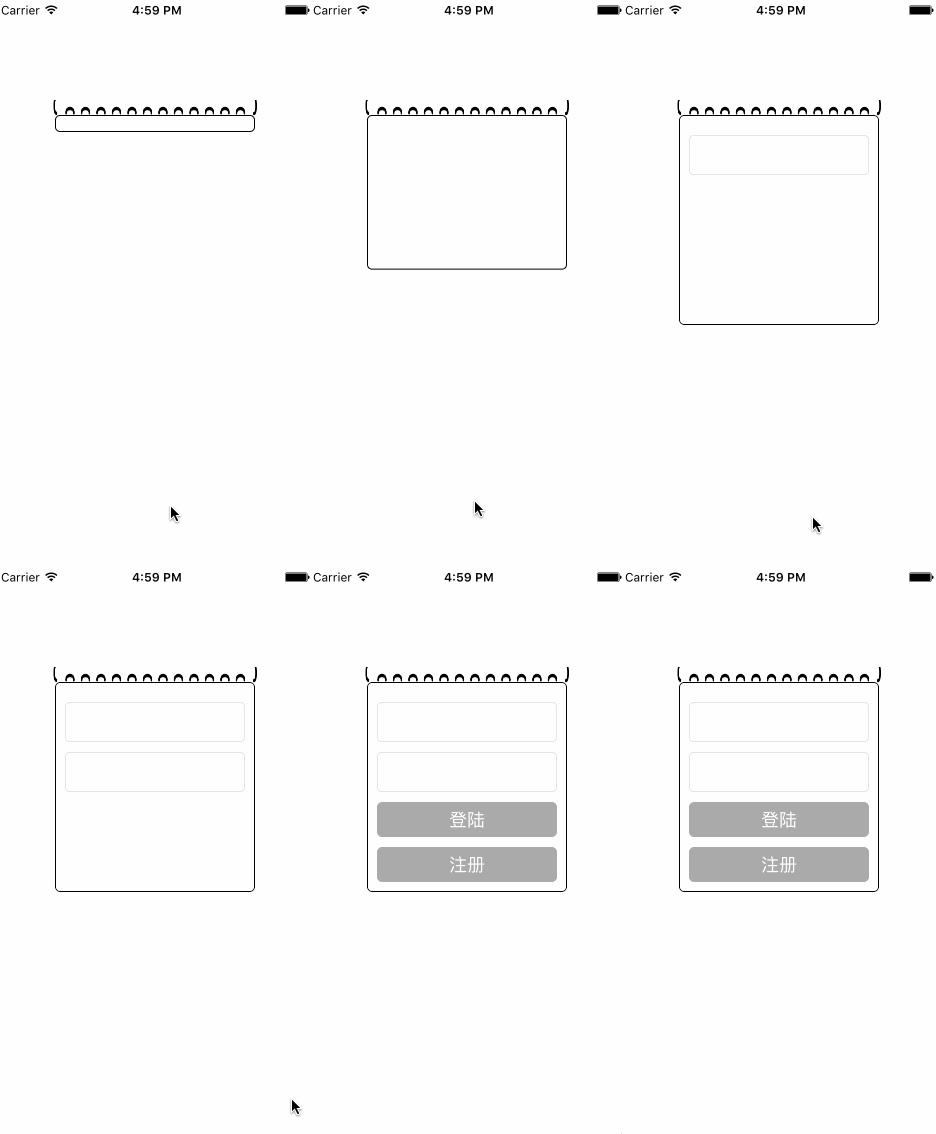
Recreates the printer-paper login animation from Windows AliWangWang. Keeping the view's horizontal position and width fixed while gradually adjusting its height creates the unfolding effect; the LBPrinterPaper project supplies the example.
Originally credited to Bison. Content is retained as published.
On this page
“I happened to notice the interesting login effect in AliWangWang for Windows, so I imitated it with an animation resembling paper coming out of a printer.”
I happened to notice the interesting login effect in AliWangWang for Windows, so I imitated it with an animation resembling paper coming out of a printer.
Something that looks impressive is not necessarily hard to implement. Here is the main source code.
- (void)createUI{
    UIImageView *backimageView=[[UIImageView alloc]init];
    backimageView.image =[UIImage imageNamed:@"1.png"];
    backimageView.frame = CGRectMake(50, 100, LBSCREEN_WIDTH-100, 30);
    [self.view addSubview:backimageView];
    backView = [[UIView alloc]initWithFrame:CGRectMake(60, 115, LBSCREEN_WIDTH-120, 0)];
    backView.layer.cornerRadius = 5;
    backView.backgroundColor = [UIColor whiteColor];
    backView.layer.borderWidth = 1;
    backView.layer.borderColor = [UIColor blackColor].CGColor;
    backView.clipsToBounds = YES;
    [self.view addSubview:backView];
    login_btn = [UIButton buttonWithType:UIButtonTypeCustom];
    login_btn.frame = CGRectMake(10, 120, LBSCREEN_WIDTH-140, 35);
    [login_btn setTitle:@"登陆" forState:UIControlStateNormal];
    login_btn.backgroundColor = [UIColor lightGrayColor];
    login_btn.layer.cornerRadius = 5;
    login_btn.layer.borderWidth = 1;
    login_btn.layer.borderColor = [UIColor lightGrayColor].CGColor;
    [login_btn addTarget:self action:@selector(passwordClick:) forControlEvents:UIControlEventTouchUpInside];
    login_btn.clipsToBounds = YES;
    pass_btn = [UIButton buttonWithType:UIButtonTypeCustom];
    pass_btn.frame = CGRectMake(10, 165, LBSCREEN_WIDTH-140, 35);
    [pass_btn setTitle:@"注册" forState:UIControlStateNormal];
    pass_btn.backgroundColor = [UIColor redColor];
    [pass_btn addTarget:self action:@selector(passwordClick:) forControlEvents:UIControlEventTouchUpInside];
    pass_btn.layer.cornerRadius = 5;
    pass_btn.layer.borderWidth = 1;
    pass_btn.layer.borderColor = [UIColor lightGrayColor].CGColor;
    pass_btn.clipsToBounds = YES;
    Name_textfield = [[UITextField alloc]initWithFrame:CGRectMake(10, 20, LBSCREEN_WIDTH-140, 40)];
    Name_textfield.placeholder = @"帐号";
    Name_textfield.borderStyle = UITextBorderStyleRoundedRect;
    Pass_textfield = [[UITextField alloc]initWithFrame:CGRectMake(10, 70, LBSCREEN_WIDTH-140, 40)];
    Pass_textfield.borderStyle = UITextBorderStyleRoundedRect;
    Pass_textfield.placeholder = @"密码";
    //2秒后开始一个持续一分钟的动画
    [UIView animateWithDuration:1 delay:2 options:UIViewAnimationOptionBeginFromCurrentState animations:^{
        backView.frame=CGRectMake(60, 115, LBSCREEN_WIDTH-120, 210);
    } completion:^(BOOL finished) {

        [backView addSubview:Name_textfield];
        dispatch_after(dispatch_time(DISPATCH_TIME_NOW, (int64_t)(0.3 * NSEC_PER_SEC)), dispatch_get_main_queue(), ^{
            [backView addSubview:Pass_textfield];
            dispatch_after(dispatch_time(DISPATCH_TIME_NOW, (int64_t)(0.3 * NSEC_PER_SEC)), dispatch_get_main_queue(), ^{
                [backView addSubview:login_btn];
                dispatch_after(dispatch_time(DISPATCH_TIME_NOW, (int64_t)(0.3 * NSEC_PER_SEC)), dispatch_get_main_queue(), ^{
                    [backView addSubview:pass_btn];
                });
            });
        });

    }];

}

- (void)passwordClick:(UIButton *)sender{
    NSLog(@"hhhhh....");
}
It is not hard to understand, is it? The main technique is an animation that changes the frame: keep x, y, and width unchanged, and change the height.
Here is the result.
Oh, I almost forgot the source-code download link. Here it is.
Recommended reading: Bison's collection of solutions to common Git errors
Original article: https://allluckly.cn/