
Data & networkingHistorical technical note
Understanding and using Core Data for persistence
Explains the relationship between managed objects, contexts and the persistent store coordinator, then sets up Core Data and an entity model manually. Examples of creating, fetching, updating and deleting objects illustrate the main persistence workflow.
Originally credited to Bison. Content is retained as published.
On this page
“
Care Datais a purely object-oriented framework for persisting entities and the relationships between them—what we usually call data persistence.”
1. Principles
Care Data is a purely object-oriented framework for persisting entities and their relationships. Care Data can use a SQLite database, an XML document, or even memory as its underlying store. The central concept in Care Data is an entity: a model object managed by Care Data, which must be an instance of NSManagedObject or one of its subclasses. Entities can have 1-1, 1-N and N-N relationships. All the entities and their relationships together form the managed object model, NSManagedObiectModel. The core object in Care Data is the managed object context, NSManagedObjectContext, which manages all entities. Every create, delete, fetch or update operation in a Care Data application must go through this context. Applications use NSMannagedObjectContext to perform these operations; NSMannagedObjectContext connects to the persistent store coordinator, which manages the underlying storage format, such as SQLite. The main Care Data objects and API are described below.
Managed object model,
NSManagedObiectModel: manages every entity and the relationships between them. After designing those relationships in theXcodegraphical interface, use this object to load and manage the application's model.
Persistent store coordinator,
NSPeristentStoreCoordinator: manages the underlying storage files, such asSQLitedatabases.
Managed object context,
NSManagedObjectContext: the core object inCare Data. Every operation that creates, deletes, fetches or updates an entity must go through this object.
Entity description,
NSEntityDescription: describes an entity and can be viewed as an abstraction of it. The description defines its name and implementation class, and uses a collection to define all its attributes.
Fetch request,
NSFetchRequest: encapsulates which entities to query, the conditions and the sort rules. It specifies an entity name and expresses the query conditions usingNSPredicate来表示. AnNSArraycollection defines the sort rules.
With these concepts in place, the basic Core Data persistence workflow is as follows.
- Create an
NSManagedObiectModelobject to load and manage the application's model. - Using
NSManagedObiectModelas the basis, create anNSPeristentStoreCoordinatorobject as required. It determines the underlying storage format used byCore Data. - Using
NSManagedObiectModelas the basis, createNSMannagedObjectContext, the core object through whichCore Dataperforms persistent access. - For ordinary create, delete, fetch and update operations, first create, delete or modify the relevant entity. Then call the
NSMannagedObjectContextobject'ssave:method to save the changes to the underlying store. - To query entities, first create an
NSFetchRequestobject. Then call theNSMannagedObjectContextobject'sexecuteFetchRequest:errormethod. The result is anNSArraycontaining all matching entities.
2. Configure the environment manually
When creating an iOS project, selecting “Use Core Data” initializes all the resources that Core Data requires. Here, however, we will initialize a Core Data project ourselves. Starting with an Empty Application, we will configure Core Data manually so that it is clear which resources a Care Data project needs. Next, we will turn this Empty Application into a Core Data project step by step, as follows.
- Add the
CoreData.frameworkframework to the project. - Add an entity model file to the project. In Xcode's main menu, choose “File” → “New” → “File”, as shown below:
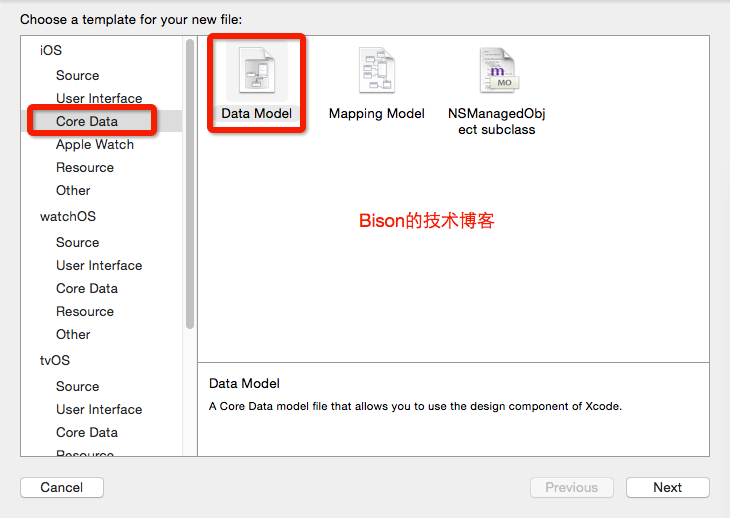
- In
AppDelegate, initialize the core objects required by theCore Dataapplication. TheseAPIobjects areNSManagedObiectModel,NSPeristentStoreCoordinatorandNSManagedObjectContext. In the application delegate's interface, define properties for these 3 coreAPIobjects. Add a method for saving through theNSManagedObjectContextobject and another for obtaining the application'sDocoumentsdirectory. The revised interface code follows.
AppDelegate.h
#import <UIKit/UIKit.h>
#import <CoreData/CoreData.h>
@interface AppDelegate : UIResponder <UIApplicationDelegate>
@property (strong, nonatomic) UIWindow *window;
// 定义Core Data的3个核心API的属性
@property (readonly, strong, nonatomic) NSManagedObjectContext*
managedObjectContext;
@property (readonly, strong, nonatomic) NSManagedObjectModel *managedObjectModel;
@property (readonly, strong, nonatomic) NSPersistentStoreCoordinator*
persistentStoreCoordinator;
- (void)saveContext;
- (NSURL *)applicationDocumentsDirectory;
@end
Next, modify the implementation in AppDelegate.m to initialize the objects and implement saveContext . The applicationDocumentsDirectory method simply obtains the application's Docouments directory. The implementation is shown in AppDelegate.m below.
@synthesize managedObjectContext = _managedObjectContext;
@synthesize managedObjectModel = _managedObjectModel;
@synthesize persistentStoreCoordinator = _persistentStoreCoordinator;

- (BOOL)application:(UIApplication *)application
didFinishLaunchingWithOptions:(NSDictionary *)launchOptions
{
    return YES;
}
- (void)applicationWillTerminate:(UIApplication *)application
{
    // 当应用被中断时候,将所有托管上下文中数据保存起来
    [self saveContext];
}

- (void)saveContext
{
    NSError *error = nil;
    // 获取应用的托管对象上下文
    NSManagedObjectContext *managedObjectContext = self.managedObjectContext;
    if (managedObjectContext != nil)
    {
        // 如果托管对象上下文中包含了未保存的修改,执行保存,如果保存失败记录错误信息
        if ([managedObjectContext hasChanges] &&
        ![managedObjectContext save:&error])
        {
            NSLog(@"保存出现错误:%@, %@", error, [error userInfo]);
            abort();
        }
    }
}
// 初始化应用的托管对象上下文。
- (NSManagedObjectContext *)managedObjectContext
{
    // 如果_managedObjectContext已经被初始化过,直接返回该对象
    if (_managedObjectContext != nil) {
        return _managedObjectContext;
    }
    // 获取持久化存储协调器
    NSPersistentStoreCoordinator *coordinator = [self persistentStoreCoordinator];
    // 如果持久化存储协调器不为nil
    if (coordinator != nil)
    {
        // 创建NSManagedObjectContext对象
        _managedObjectContext = [[NSManagedObjectContext alloc] init];
        // 为NSManagedObjectContext对象设置持久化存储协调器
        [_managedObjectContext setPersistentStoreCoordinator:coordinator];
    }
    return _managedObjectContext;
}
- (NSManagedObjectModel *)managedObjectModel
{
    // 如果_managedObjectModel已经被初始化过,直接返回该对象
    if (_managedObjectModel != nil) {
        return _managedObjectModel;
    }
    // 获取实体模型文件对应的NSURL
    NSURL *modelURL = [[NSBundle mainBundle] URLForResource:@"FKModel"
    withExtension:@"momd"];
    // 加载应用的实体模型文件,并初始化NSManagedObjectModel对象
    _managedObjectModel = [[NSManagedObjectModel alloc]
    initWithContentsOfURL:modelURL];
    return _managedObjectModel;
}
- (NSPersistentStoreCoordinator *)persistentStoreCoordinator
{
    // 如果_persistentStoreCoordinator已经被初始化过,直接返回该对象
    if (_persistentStoreCoordinator != nil) {
        return _persistentStoreCoordinator;
    }
    // 获取SQLite数据库文件的存储目录
    NSURL *storeURL = [[self applicationDocumentsDirectory]
    URLByAppendingPathComponent:@"Books.sqlite"];
    NSError *error = nil;
    // 以持久化对象模型为基础,创建NSPersistentStoreCoordinator对象
    _persistentStoreCoordinator = [[NSPersistentStoreCoordinator alloc]
    initWithManagedObjectModel:[self managedObjectModel]];
    // 设置持久化存储协调器底层采用SQLite存储机制,如果设置失败记录错误信息
    if (![_persistentStoreCoordinator addPersistentStoreWithType:NSSQLiteStoreType
    configuration:nil URL:storeURL options:nil error:&error])
    {
        NSLog(@"设置持久化存储失败:%@, %@", error, [error userInfo]);
        abort();
    }
    return _persistentStoreCoordinator;
}
// 获取应用的Documents目录
- (NSURL *)applicationDocumentsDirectory
{
    return [[[NSFileManager defaultManager] URLsForDirectory:NSDocumentDirectory
    inDomains:NSUserDomainMask] lastObject];
}
The environment required by Core Data is now essentially ready. The application can call managedObjectContext to perform create, delete, fetch and update operations.
3. Design the entity model
In Xcode, find the Core Data file we created and open its entity model for editing, as shown below.
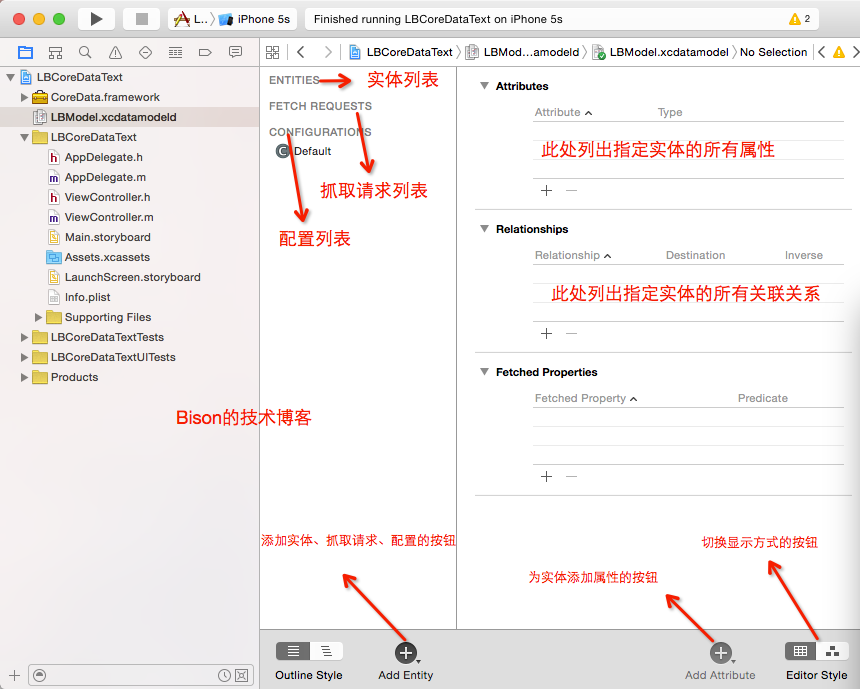
Add a simple entity by clicking Add Entity in the lower-left corner of the view above. The system adds an entity under ENTITIES. Rename it as required by the project; here, we use Bison.
Tip: press and hold Add Entity to choose from Add Entity, Add Fetch Request and Add Configuration, allowing you to add an entity, fetch request or configuration.
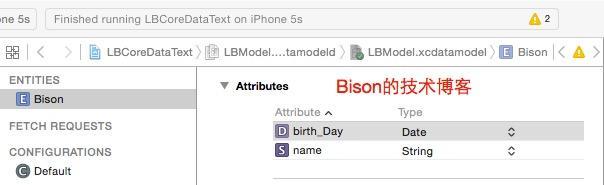
Select the Bison entity and click Add Attribute in the lower-right corner to add a property to Bison. Rename the property to name and choose its type; here, select String. The property's name must not begin with an uppercase letter.
Tip: press and hold Add Attribute to display Add Attribute, Add Relationship, Add Configuration and Add Fetch Property. These add attributes, relationships or fetched properties. You can also use + and — to add and remove items.
Repeat the steps above to add a birthDay attribute, whose type is date type. After designing the entity, it looks as follows:
Then click the following in Xcode's main menu: Editor–>Create NSManagedObject Subclass menu item,
If the system contains more than two entities, Xcode displays a dialog asking which entities to generate these for: NSManagedObject
subclasses, then displays a dialog asking where to save the NSManagedObject subclasses. After making the selection,Create button.
After these steps, we have added a simple Bison entity. It contains two attributes but no relationships.
4.Core Data Creating, deleting, fetching, and updating data
After obtaining the managed object context, NSManagedObjectContext, use it to create, delete, fetch and update entities.
- Adding an entity: call the
NSEntityDescriptionclass'sinsertNewObjectForEntityForName:inManagedObjectContext:static method to create a new entity. Its first argument is the entity name, and its second is anNSManagedObjectContextobject. Set the new entity's properties, then call theNSManagedObjectContextobject'ssave:method to save. The code follows.
// 控制Core Data在托管对象上下文中创建一个新实体
Bison* bison = [NSEntityDescription
insertNewObjectForEntityForName:@"Bison"
inManagedObjectContext:self.appDelegate.managedObjectContext];
// 为新实体设置属性
bison.name = @"linbin";
bison.birth_Day = [NSDate date];
// 定义一个NSError对象,用于接受错误信息
NSError *error;
// 设置完实体属性之后,调用托管对象上下文的`save:`方法将实体写入数据库,如果保存成功
if ([self.appDelegate.managedObjectContext save:&error])
{
    [[[UIActionSheet alloc] initWithTitle:@"保存成功" delegate:nil
    cancelButtonTitle:@"确定" destructiveButtonTitle:nil
    otherButtonTitles: nil] showInView:self.view];
}else{
    NSLog(@"保存FKEvent实体出错: %@,%@" , error ,[error userInfo]);
}- Deleting an entity: first obtain the entity to delete. Call the
NSManagedObjectContextobject'sdeleteObject:method to delete it, then call theNSManagedObjectContextobject'ssave:method to save. The code follows.
// 获取将要删除的实体
Bison* deleteEvent = .....;
// 从托管对象上下文中删除指定对象
[self.appDelegate.managedObjectContext deleteObject:deleteEvent];
NSError *error;
// 保存删除操作,如果出现错误,显示错误信息
if (![self.appDelegate.managedObjectContext save:&error])
{
    NSLog(@"删除FKEvent实体出错:%@,%@",error,[error userInfo]);
}- Updating an entity: obtain the entity to change, which must be managed by
NSManagedObjectContext. Modify its properties, then call theNSManagedObjectContextobject'ssave:method to save. The code follows.
// 获取将要修改的实体
Bison* updateEvent = .....;
//修改实体的属性
.....
//定义一个NSError对象,用于接收错误信息
NSError *error;
// 保存修改操作,如果出现错误,显示错误信息
if (![self.appDelegate.managedObjectContext save:&error])
{
    NSLog(@"删除FKEvent实体出错:%@,%@",error,[error userInfo]);
}- Querying entities: create an
NSFetchRequestobject. UseNSEntityDescriptionto specify which entities theNSFetchRequestshould fetch. If filtering is needed, set the conditions throughNSPredicate. To sort the results, configureNSFetchRequestwith one or moreNSSortDescriptorobjects. Then call theNSManagedObjectContextobject’sexecuteFetchRequest:error:method. It returns anNSArraycontaining all matching entities. The code follows.
// 创建抓取数据的请求对象
NSFetchRequest *request = [[NSFetchRequest alloc] init];
// 设置要抓取哪种类型的实体
NSEntityDescription *entity = [NSEntityDescription entityForName:@"Bison"
inManagedObjectContext:self.appDelegate.managedObjectContext];
// 设置抓取实体
[request setEntity:entity];
NSError *error = nil;
// 执行抓取数据的请求,返回符合条件的数据
eventArray = [[self.appDelegate.managedObjectContext
executeFetchRequest:request error:&error] mutableCopy];
That covers the basic methods. Download the Demo for further details.
Recommended reading: A Windows AliWangWang-style login screen with a paper-feed animation
Original article: https://allluckly.cn/
Copyright © Bison. Please retain a hyperlink to the original article when reproducing it.