
UIKit & graphicsHistorical technical note
Recreating pop-up effects from Jianshu and Taobao on iOS
Separates the effect into content, a dimming overlay and the presented view. Two-stage layer transforms and dismissal animation make the background appear to recede, while the article explains the stacking order when adding views to a window.
Originally credited to WzxJiang; edited and archived by Bison.
Source listed in the originalOn this page
Editor: Bison
Contributor: WzxJiang
“While using the Jianshu App yesterday, I noticed how smooth and appealing this View's popup effect was. I tried implementing it myself and achieved almost the same effect:”
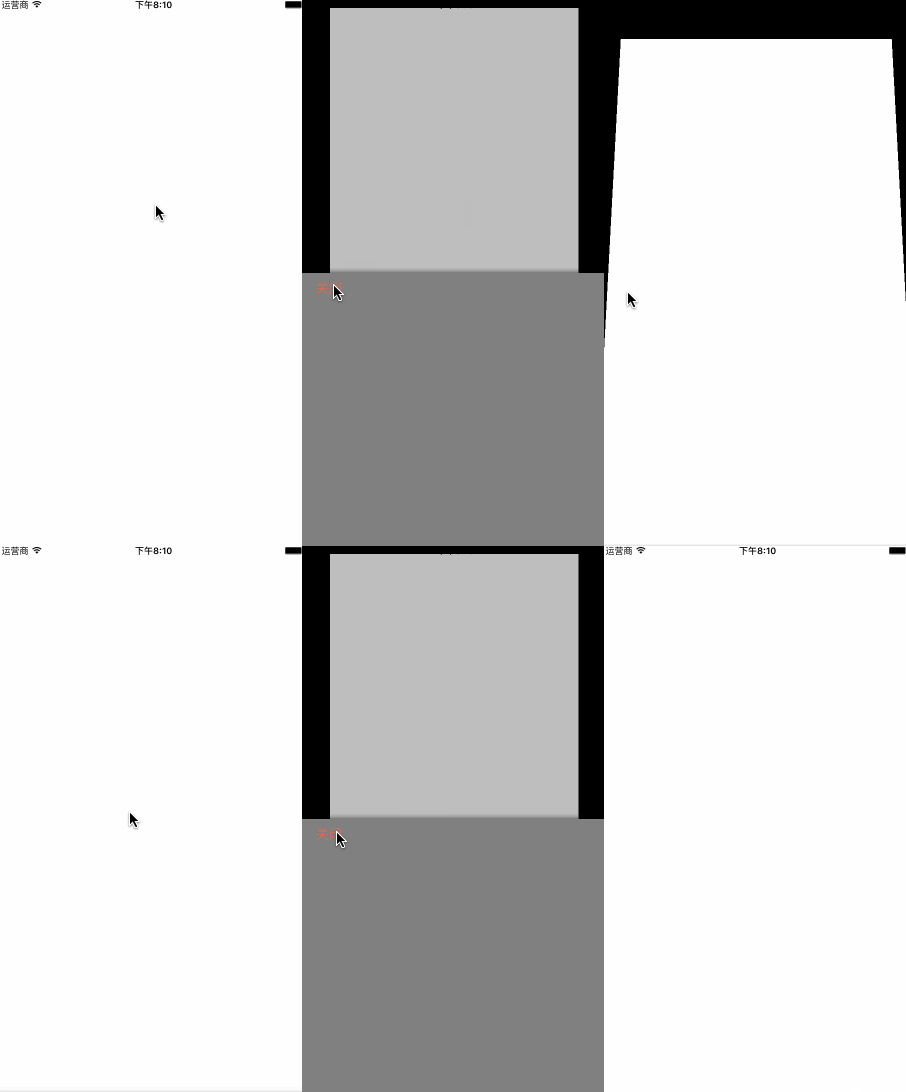
Let's begin: 1. How many views does this screen contain? There are four: self.view; the white view controller's view, rootVC.view; its overlay, maskView ; and the popup, popView. Create them as follows:
self.view.backgroundColor = [UIColor blackColor];

_popView = ({
    UIView * popView = [[UIView alloc]initWithFrame:CGRectMake(0, [UIScreen mainScreen].bounds.size.height, [UIScreen mainScreen].bounds.size.width, [UIScreen mainScreen].bounds.size.height /2.0)];

    popView.backgroundColor = [UIColor grayColor];

    //加个阴影
    popView.layer.shadowColor = [UIColor blackColor].CGColor;
    popView.layer.shadowOffset = CGSizeMake(0.5, 0.5);
    popView.layer.shadowOpacity = 0.8;
    popView.layer.shadowRadius = 5;

    //关闭btn
    UIButton * closeBtn = [UIButton buttonWithType:UIButtonTypeCustom];
    closeBtn.frame = CGRectMake(15, 0, 50, 40);
    [closeBtn setTitle:@"关闭" forState:UIControlStateNormal];
    [closeBtn setTitleColor:[UIColor colorWithRed:217/255.0 green:110/255.0 blue:90/255.0 alpha:1] forState:UIControlStateNormal];
    [closeBtn addTarget:self action:@selector(close) forControlEvents:UIControlEventTouchUpInside];
    [popView addSubview:closeBtn];
    popView;
});

//添加VC的View的方法
_rootVC.view.frame = self.view.bounds;
_rootVC.view.backgroundColor = [UIColor whiteColor];
_rootview = _rootVC.view;
[self addChildViewController:_rootVC];
[self.view addSubview:_rootview];

//rootVC上的maskView
_maskView = ({
    UIView * maskView = [[UIView alloc]initWithFrame:self.view.bounds];
    maskView.backgroundColor = [UIColor colorWithWhite:0 alpha:0.5];
    maskView.alpha = 0;
    maskView;
});

[_rootview addSubview:_maskView];
2. Add a tap event. For convenience, I use touchesBegan directly to trigger the popup.
- (void)show
{
    [[UIApplication sharedApplication].windows[0] addSubview:_popView];

    CGRect frame = _popView.frame;
    frame.origin.y = self.view.frame.size.height/2.0;

    [UIView animateWithDuration:0.3 delay:0 options:UIViewAnimationOptionCurveEaseInOut animations:^{

        [_rootview.layer setTransform:[self firstTransform]];

    } completion:^(BOOL finished) {

        [UIView animateWithDuration:0.3 delay:0 options:UIViewAnimationOptionCurveEaseInOut animations:^{

        [_rootview.layer setTransform:[self secondTransform]];
        //显示maskView
        [_maskView setAlpha:0.5f];
        //popView上升
        _popView.frame = frame;

    } completion:^(BOOL finished) {

    }];

    }];

}
Note that popview is added to the window:
[[UIApplication sharedApplication].windows[0] addSubview:_popView];
Now comes the key layer-transform method.
- (CATransform3D)firstTransform{
    CATransform3D t1 = CATransform3DIdentity;
    t1.m34 = 1.0/-900;
    //带点缩小的效果
    t1 = CATransform3DScale(t1, 0.95, 0.95, 1);
    //绕x轴旋转
    t1 = CATransform3DRotate(t1, 15.0 * M_PI/180.0, 1, 0, 0);
    return t1;

}

- (CATransform3D)secondTransform{

    CATransform3D t2 = CATransform3DIdentity;
    t2.m34 = [self firstTransform].m34;
    //向上移
    t2 = CATransform3DTranslate(t2, 0, self.view.frame.size.height * (-0.08), 0);
    //第二次缩小
    t2 = CATransform3DScale(t2, 0.8, 0.8, 1);
    return t2;
}
At this point, you should be able to see that two transformations take place.
3. Hide animation
- (void)close
{
    _isShow = NO;

    CGRect frame = _popView.frame;
    frame.origin.y += self.view.frame.size.height/2.0;

    [UIView animateWithDuration:0.3 delay:0 options:UIViewAnimationOptionCurveEaseInOut animations:^{

        //maskView隐藏
        [_maskView setAlpha:0.f];
        //popView下降
        _popView.frame = frame;

    } completion:^(BOOL finished) {

        [UIView animateWithDuration:0.3 delay:0 options:UIViewAnimationOptionCurveEaseInOut animations:^{
        //变为初始值
        [_rootview.layer setTransform:CATransform3DIdentity];

    } completion:^(BOOL finished) {

        //移除
        [_popView removeFromSuperview];
    }];

    }];


    [UIView animateWithDuration:0.3 delay:0 options:UIViewAnimationOptionCurveEaseInOut animations:^{

        //和上个动画同时进行 感觉更丝滑
        [_rootview.layer setTransform:[self firstTransform]];

    } completion:^(BOOL finished) {

    }];


}
The important point is that the two animations run simultaneously, producing a very smooth result!
Finally, here is the complete, encapsulated code. Inherit from it and call the creation method to use it.
GitHub: Wzxhaha
Recommended reading: Bison's guide to iOS multithreading, part 1