
UIKit & graphicsHistorical technical note
A League of Legends skin-selection animation with UICollectionViewFlowLayout
Builds a character-skin selection effect with a custom UICollectionViewFlowLayout. It adjusts layout attributes and the final scroll position, then integrates the layout subclass into the collection view to keep the selected card centred.
Originally credited to WzxJiang; edited and archived by Bison.
Source listed in the originalOn this page
Editor: Bison
Contributor: WzxJiang
“I encountered CollectionViewFlowLayout while building a waterfall layout, but never fully understood it. Yesterday, I used some spare time to explore it.”
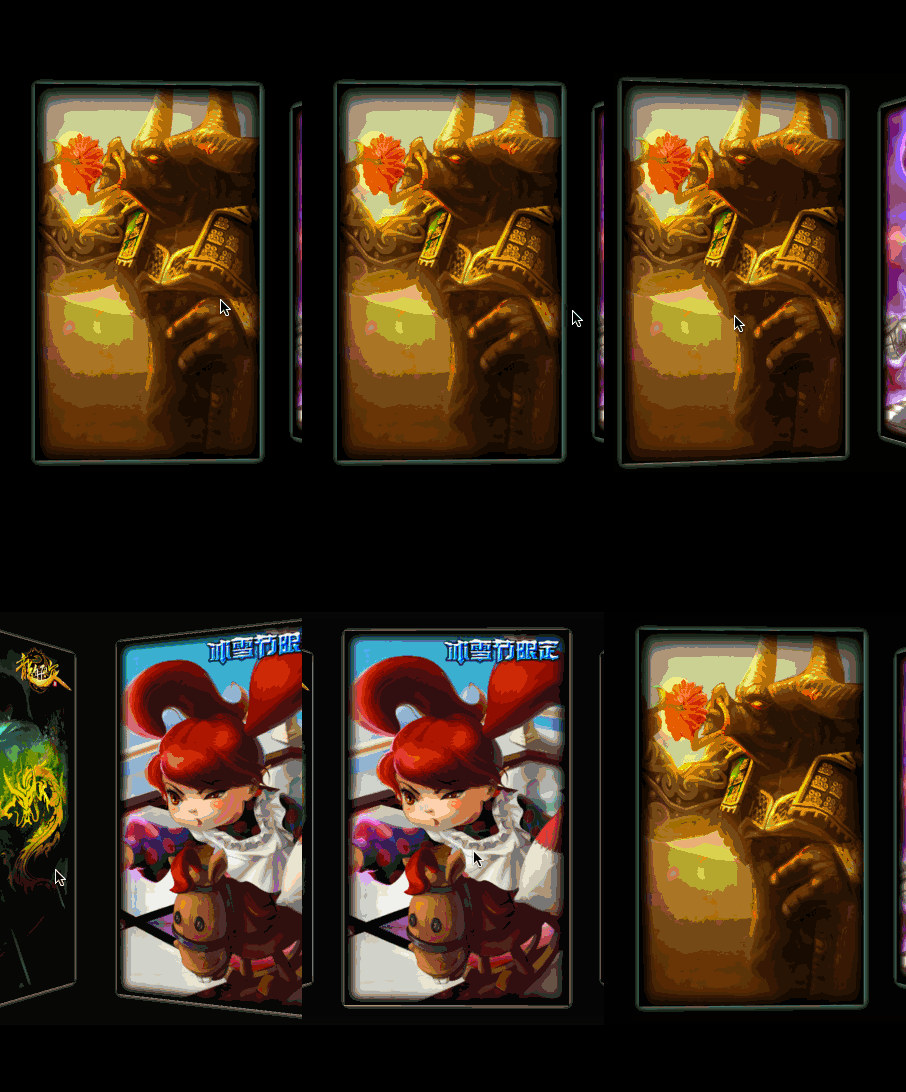
This article will not explain how to create a CollectionView. For that, see the complete code at the end, which has detailed comments. Here, I will focus on how this Demo uses CollectionViewFlowLayout.
First, create a CollectionViewFlowLayout subclass:
#import <UIKit/UIKit.h>

@interface WZXLOLCardLayout : UICollectionViewFlowLayout

@end
We need to override the following CollectionViewFlowLayout methods:
//这个用来传基本的数据 每次刷新第一步就是走这个方法
- (void)prepareLayout
//允许更新位置 你要是静态的话就不用重写了
- (BOOL)shouldInvalidateLayoutForBoundsChange:(CGRect)oldBounds
//最重要的方法 返回当前矩形内所有的UICollectionViewLayoutAttributes
- (NSArray*)layoutAttributesForElementsInRect:(CGRect)rect
If the current rectangle is confusing, think of it as collectionview's position on the screen at that moment.
- (CGPoint)targetContentOffsetForProposedContentOffset:(CGPoint)proposedContentOffset withScrollingVelocity:(CGPoint)velocity
This method is somewhat similar to scrollview's scrollViewWillEndDragging.
Specifically:
#define GiveMeHeight(HEIGTH) (HEIGTH*[UIScreen mainScreen].bounds.size.height/736.0)
#define GiveMeWidth(WIDTH) (WIDTH*[UIScreen mainScreen].bounds.size.width/414.0)

//第一个要重写的方法 设置基本的大小
- (void)prepareLayout
{
    //cell大小
    self.itemSize = CGSizeMake(GiveMeWidth(300),GiveMeHeight(500));
    //滑动方向
    self.scrollDirection = UICollectionViewScrollDirectionHorizontal;
    //组间四个方位间距
    self.sectionInset = UIEdgeInsetsMake(200, 50.0, 200, 50.0);
    //列间距
    self.minimumLineSpacing = 0.0;
}
//允许更新位置
- (BOOL)shouldInvalidateLayoutForBoundsChange:(CGRect)oldBounds
{
    return YES;
}
//最大旋转角度
#define rotate 35.0*M_PI/180.0
//返回一个rect位置下所有cell的位置数组
- (NSArray*)layoutAttributesForElementsInRect:(CGRect)rect
{
    //得到所有的UICollectionViewLayoutAttributes
    NSArray* array = [super layoutAttributesForElementsInRect:rect];

    CGRect visibleRect;
    visibleRect.origin = self.collectionView.contentOffset;
    visibleRect.size = self.collectionView.bounds.size;

    for (UICollectionViewLayoutAttributes* attributes in array) {

        //cell中心离collectionview中心的位移
        //CGRectGetMidX表示得到一个frame中心点的X坐标
        CGFloat distance = CGRectGetMidX(visibleRect) - attributes.center.x;

        //CGRectIntersectsRect 判断两个矩形是否相交
        //这里判断当前这个cell在不在rect矩形里
        if (CGRectIntersectsRect(attributes.frame, rect))
        {
            CGFloat normalizedDistance = distance / ACTIVE_DISTANCE;

        //ABS 绝对值
        //如果位移小于一个过程所需的位移
        if (ABS(distance) < ACTIVE_DISTANCE)
        {
            //normalizedDistance 当前位移比上完成一个过程所需位移 得到不完全过程的旋转角度
            CGFloat zoom = rotate*normalizedDistance;
            CATransform3D transfrom = CATransform3DIdentity;
            transfrom.m34 = 1.0 / 600;
            transfrom = CATransform3DRotate(transfrom, -zoom, 0.0f, 1.0f, 0.0f);
            attributes.transform3D = transfrom;
            attributes.zIndex = 1;

        }
        else
        {
            CATransform3D transfrom = CATransform3DIdentity;
            transfrom.m34 = 1.0 / 600;
            //向右滑
            if (distance>0)
            {
                transfrom = CATransform3DRotate(transfrom, -rotate, 0.0f, 1.0f, 0.0f);

            }
            //向左滑
            else
            {
                transfrom = CATransform3DRotate(transfrom, rotate, 0.0f, 1.0f, 0.0f);
            }

                attributes.transform3D = transfrom;
                attributes.zIndex = 1;
            }

        }
    }
    return array;
}

//类似于scrollview的scrollViewWillEndDragging
//proposedContentOffset是没有对齐到网格时本来应该停下的位置
- (CGPoint)targetContentOffsetForProposedContentOffset:(CGPoint)proposedContentOffset withScrollingVelocity:(CGPoint)velocity
{
    CGFloat offsetAdjustment = MAXFLOAT;

    //CGRectGetWidth: 返回矩形的宽度
    CGFloat horizontalCenter = proposedContentOffset.x + (CGRectGetWidth(self.collectionView.bounds) / 2.0);

    //当前rect
    CGRect targetRect = CGRectMake(proposedContentOffset.x, 0, self.collectionView.bounds.size.width, self.collectionView.bounds.size.height);

    NSArray* array = [super layoutAttributesForElementsInRect:targetRect];
    //对当前屏幕中的UICollectionViewLayoutAttributes逐个与屏幕中心进行比较,找出最接近中心的一个
    for (UICollectionViewLayoutAttributes* layoutAttributes in array)
    {
        CGFloat itemHorizontalCenter = layoutAttributes.center.x;
        if (ABS(itemHorizontalCenter - horizontalCenter) < ABS(offsetAdjustment))
        {
            //与中心的位移差
            offsetAdjustment = itemHorizontalCenter - horizontalCenter;
        }
    }
    //返回修改后停下的位置
    return CGPointMake(proposedContentOffset.x + offsetAdjustment, proposedContentOffset.y);
}
Then simply use it when creating the CollectionView:
WZXLOLCardLayout * flowLayout = [[WZXLOLCardLayout alloc]init];
_cardView = ({
    UICollectionView * collectionView = [[UICollectionView alloc]initWithFrame:CGRectMake(0, 0, self.view.frame.size.width, self.view.frame.size.height) collectionViewLayout:flowLayout];

    collectionView.delegate   = self;
    collectionView.dataSource = self;

    //提前注册
    [collectionView registerClass:[UICollectionViewCell class] forCellWithReuseIdentifier:@"cell"];

    collectionView;
});

[self.view addSubview:_cardView];
Complete code
Recommended reading: Bison's guide to iOS multithreading, part 1