
Data & networkingHistorical technical note
Integrating LianLian Pay into an iOS app
Organises the linker options, resource styles and business fields required by the LianLian Pay SDK. It explains user identifiers, card-binding agreements and server callbacks, with notes on signatures and UI customisation settings that are easy to confuse.
Originally credited to Bison. Content is retained as published.
On this page
"Our company project recently needed Lianlian Pay integration. The documentation was unclear and we encountered several pitfalls, so I recorded them in the hope of helping others."
The basic integration did not cause problems. Here I organise the official integration documentation into the following steps.
Import files
Add the header-file reference.
Set Target → Build Setting → Other Linker Flags to -all_load. If -all_load conflicts with another library, try -force_load to load one library. Follow force_load with the full path to the lib file: -force_load $(SRCROOT)//libPaySdkColor.a (*Choose this according to the path where your library is stored.)
Call the SDK to display it. Retain it: calling it after autorelease causes a crash.
self.sdk = [[[LLPaySdk alloc] init] autorealse]; // 创建
self.sdk.sdkDelegate = self;  // 设置回调
NSDictionary* signedDic = [payUtil signedOrderDic:orderParam andSignKey:md5key_or_rsakey] // 加过签名的订单字典
[self.sdk presentPaySdkInViewController:rootVC withTraderInfo:signedDic];
Write the result callback.
// 订单支付结果返回,主要是异常和成功的不同状态
- (void)paymentEnd:(LLWalletPayResult)resultCode withResultDic:(NSDictionary *)dic
Configurable SDK components
The iOS SDK can be customised through its resource bundle. Because the resources are inside the bundle, clean the project after modifying them for the changes to take effect.
1. Replace the internal images with your own designs.
2. Modify colours in default.css. Both #abcdef and 123,123,123 notation are supported.
3. List of configurable values and their meanings
Navigation-bar colour: replace shoushi3.png and modify background-color under NavBar in the CSS file. All field names below refer to default.css.
Navigation-bar title: titleIconName and titleText under NavBar.
This is a slightly tricky part: it customises the dialog for payments after the first payment. Its background cannot be changed; only the colours can be adjusted to match the app.
The changes are shown in the screenshot below:
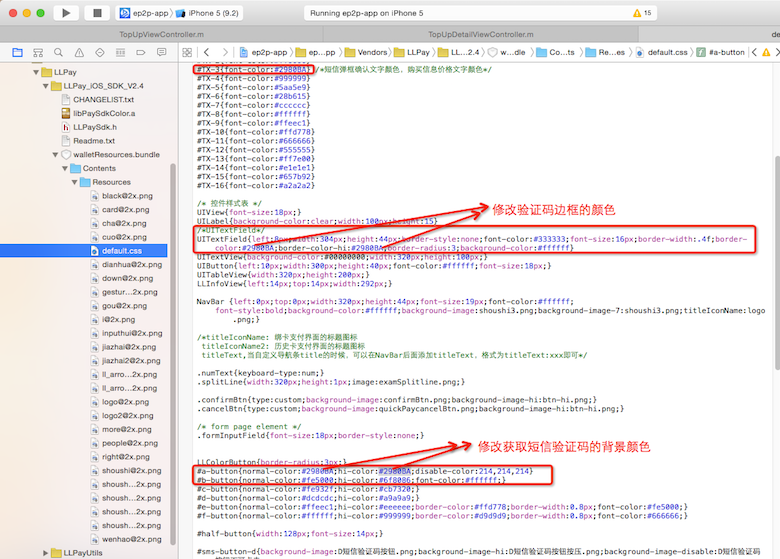
Confirm button: #a-button
Cancel button: #b-button
Text field: UITextField
Confirmation-text colour in the dialog: #TX-3
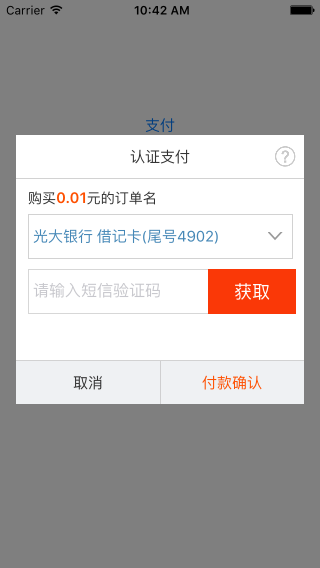
The original official appearance is shown below:
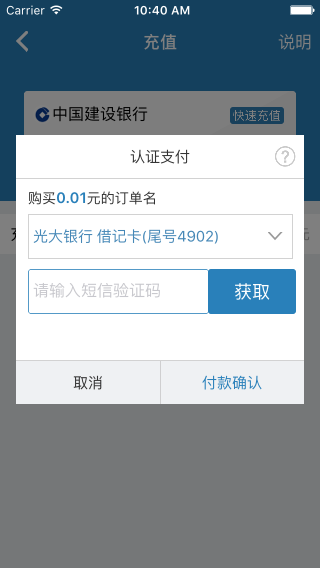
After modification, it looks like this:
Parameter fields
The demo contains parameter descriptions. Field names differ from WAP, so consult those descriptions. user_id is not the merchant number; it is the user identifier in the merchant’s own system. For card-number-first input, no_agree is the linked-card sequence number obtained through the API.
Usage
The demo’s input fields test different payment conditions, including authenticated payment with name and ID number, and card-first payment with card and agreement numbers. They are not mandatory; test according to your payment method.
The number of supported banks depends on payment type and merchant configuration. Contact operations to configure it.
Payment verification methods—SMS, gesture code or payment password—must be configured by our server staff. Contact the relevant server-integration staff.
Frequently asked questions
Prefer generating signatures on the server. If signing on the client, use payutil from the demo.
1. The app crashes immediately when run.
Answer: the SDK was not retained.
2. The SDK uses class extensions; add -all_load to Other Linker Flags.
3. An initialisation error is reported.
Answer: 1. Check that the environment and merchant number match. 2. Check the signing method against the signature tool. 3. Check for omitted order information.
4. Common initialisation errors, explanations and responses
1. The supplied type is not NSString.
Explanation: Lianlian orders require values in the form {“strkey”: “strvalue”, “strkey1″ : “strvalue2“}. Do not pass {“key”: [v1, v2]} or {“key”: {“ikey”:”v”}}.
Response: change the order-value format, especially risk_item, to a form such as {“risk_item”:”{\”r_key\”:\”v\”}”}.
2. The merchant does not have permission for this payment product.
Explanation: our products include authenticated payment, quick payment and other methods. Each method has a different package, payment call and merchant number.
Response: first check that the merchant number is correct, for example <authenticated-payment test merchant number 201408071000001543> and <quick-payment test merchant number 201408071000001546>.
Then check the corresponding package and call method. Dedicated methods have already been extracted for iOS.
// 快捷支付
- (void)presentQuickPaySdkInViewController:(UIViewController*)viewController withTraderInfo:(NSDictionary*)traderInfo;
// 认证支付
- (void)presentVerifyPaySdkInViewController:(UIViewController*)viewController withTraderInfo:(NSDictionary*)traderInfo;
3. The merchant does not have permission for this payment method.
Explanation: each merchant number supports a limited set of product business types.
Response: change the merchant business type. busi_partner is String(6). Virtual-goods sales: 101001.
Physical-goods sales: 109001
External-account top-up: 108001
4. Signature verification fails.
Explanation: signing follows specific rules and includes specific order parameters.
Response: the latest iOS demo provides payUtil, which directly generates an order with a valid signature. Again, we strongly recommend that merchants sign on the server.
After payment succeeds, no extra handling is required here; the backend has submitted through the callback URL. During integration, notify_url in the dictionary must be the server callback URL supplied by the backend staff integrating Lianlian Pay.
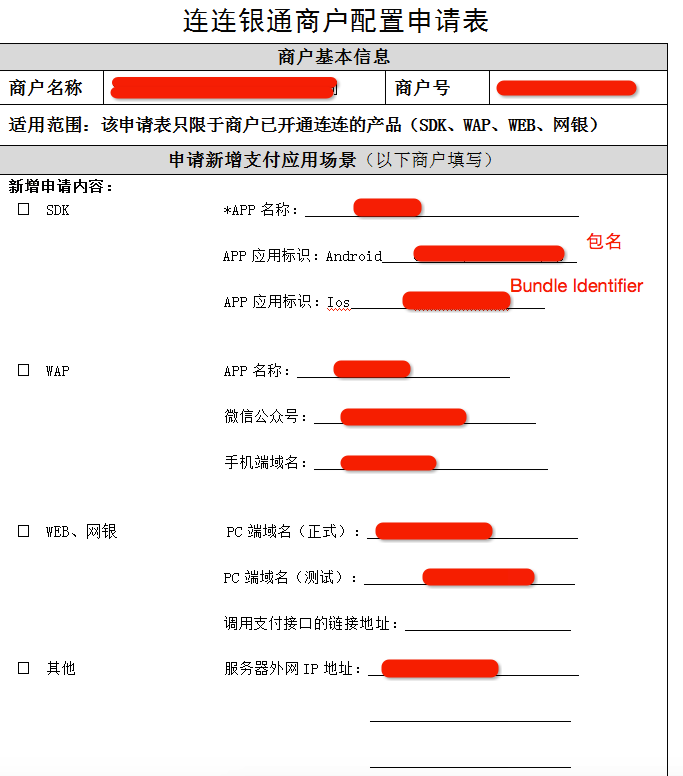
A later issue required applying for the merchant-product configuration form, shown below:
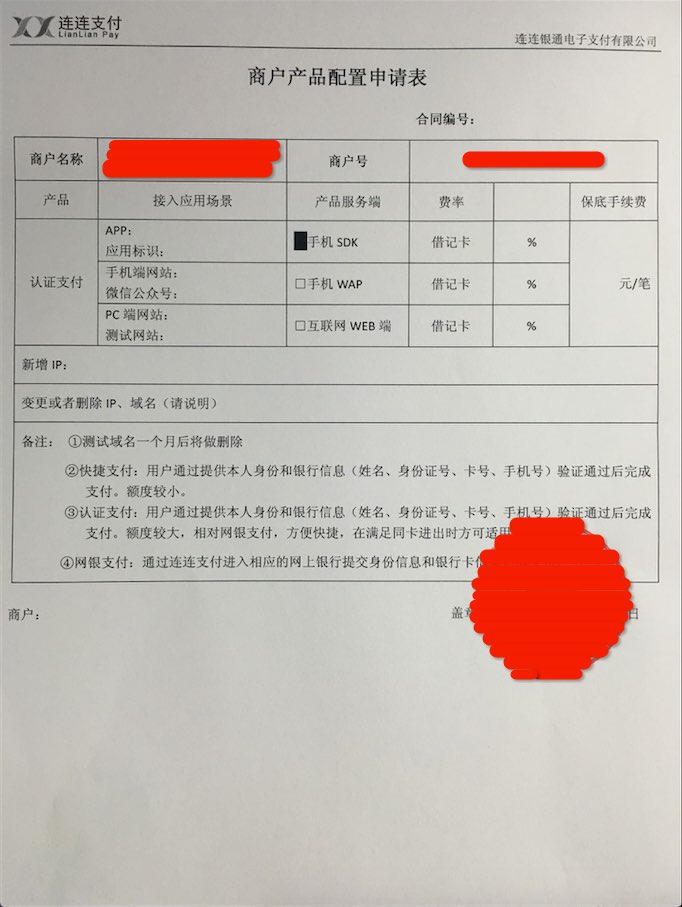
The Lianlian Tongyin merchant configuration form is also shown below:
The biggest pitfall was the risk-control parameters: 8 are required, but the demo only supplied one and did not mention the others. They are:
/*
frms_ware_category  *商品类目(固定2009)
user_info_mercht_userno 商户用户唯一标识(token)
user_info_bind_phone 绑定手机号(已有)
user_info_dt_register 注册时间
user_info_full_name  用户注册姓名(认证姓名)
user_info_id_no 用户注册证件号码
user_info_identify_state 是否实名认证 1是0非
user_info_identify_type 实名认证方式
*/
Recommended reading: A League of Legends skin-selection animation with UICollectionViewFlowLayout
Original article: https://allluckly.cn/
Copyright © Bison. Please retain a hyperlink to the original article when reproducing it.