
Tools & releasesHistorical technical note
Publishing a library to CocoaPods
Records the process of publishing an open-source library: preparing the GitHub project, registering with trunk, writing a podspec, checking versions and tags, validating and submitting. It also explains commonly used specification fields.
Originally credited to WzxJiang; edited and archived by Bison.
Source listed in the originalOn this page
"Today I wrote WZXSSL, a utility for quick string encryption, and wanted to publish it through CocoaPods. Many small details caused considerable confusion. This tutorial focuses on the likely pitfalls."
Editor: Bison
Contributor: WzxJiang
First, the intended audience for this tutorial:
Know at least basic Git. Have CocoaPods installed on your Mac. Have a GitHub account.
If you do not meet these prerequisites…

Result:
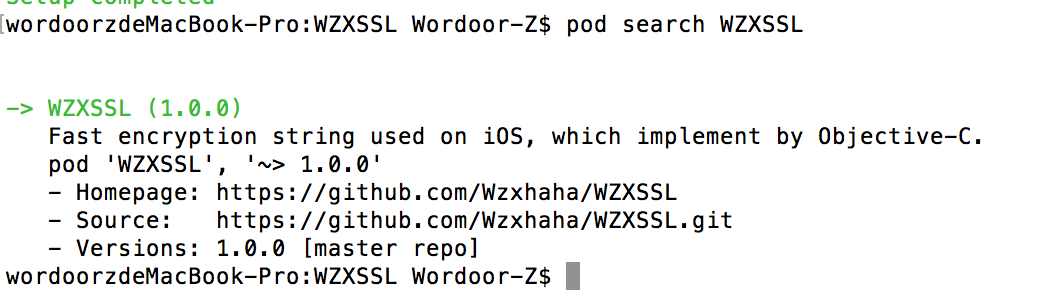
Let’s begin:
1. Create a project on GitHub and clone it locally.
Omitted.
2. Create a branch
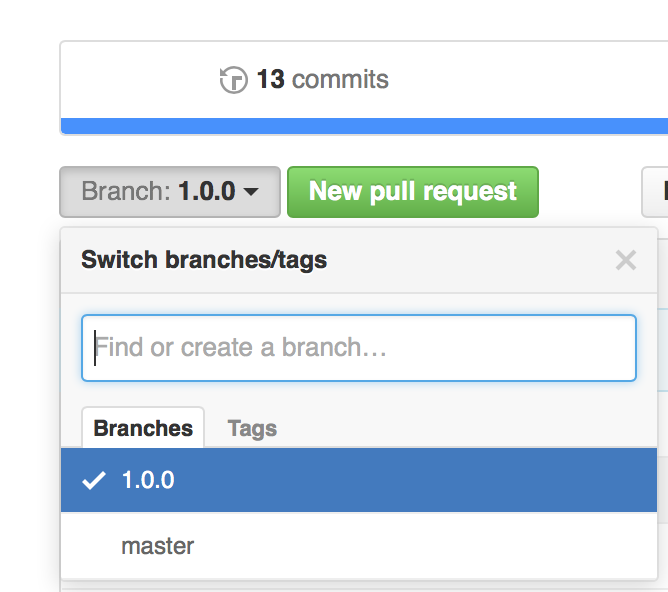
Note that this branch is not arbitrary: mine is 1.0.0. Remember that; it matters below.
3. Register with trunk
Uploading with trunk is much faster than the previous approach of branching cocoapods/specs.
In Terminal, enter
pod trunk register [email protected] 'username' --verbose
replace these with your email and username.
Run pod trunk me to check whether registration succeeded.
Success looks like this:
- Name:     xxxx
- Email:    xxxxxxxx
- Since:    xxxxxxx
- Pods:
- xxxx
- Sessions:
- xxxxxx
4. Configure the PodSpec
In Terminal, cd to your project folder.
Run pod spec create name, replacing name with your preferred name.
Open name.podspec in whichever editor you prefer, such as vim or Sublime.
The file contains many official comments, most of which you do not need.
Here is my configuration.
Pod::Spec.new do |s|

s.name          = "WZXSSL"
s.version       = "1.0.0"
s.license       = "MIT"
s.summary       = "Fast encryption string used on iOS, which implement by Objective-C."
s.homepage      = "https://github.com/Wzxhaha/WZXSSL"
s.author        = { "WzxJiang" => "[email protected]" }
s.source        = { :git => "https://github.com/Wzxhaha/WZXSSL.git", :tag => "1.0.0" }
s.requires_arc  = true
s.description   = <<-DESC
Fast encryption string, the current support for MD5 (16, 32), Sha1, Base64
DESC
s.source_files  = "WZXSSLTool/*"
s.platform      = :ios, '7.0'
s.framework     = 'Foundation', 'CoreGraphics', 'UIKit'

end
Several parameters need explanation:
①s.license
The licence used by the pod dependency. Choose the one appropriate to your library.
②s.source_files
specifies the source-file path, relative to the podspec file.
③s.frameworks
Required frameworks, without the .frameworks suffix.
Note s.version = “1.0.0”: if the version is 1.0.0, the branch you use must also be 1.0.0.
Otherwise podspec validation later reports Could not find remote branch x.x.x to clone.
5. Commit the project
Commit your project changes to GitHub.
Omitted
6. Validate
Enter these separately in Terminal:
set the new version to 1.0.0
set the new tag to 1.0.0
Bind the version number to a tag.
Then I recommend entering the following commands separately in Terminal:
pod lib lint --verbose和pod spec lint --verbose,
Check whether validation passes.
Adding --verbose displays error details if something fails.
A successful check reports XXXXX passed validation.
7. Submit
In Terminal, run pod trunk push XXXXX.podspec.
If all goes well, you will see
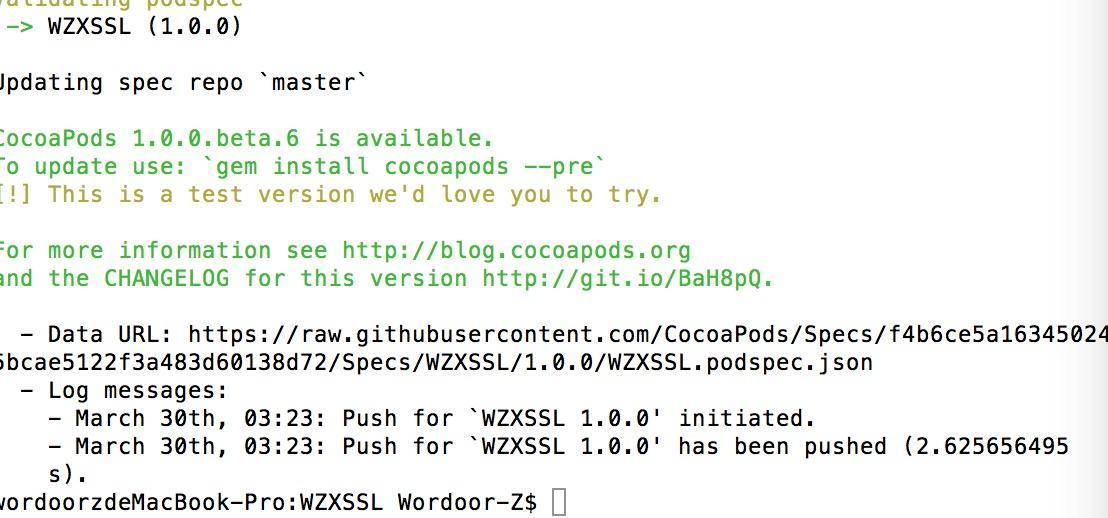
CocoaPods review is now quick. Often, after only pod setup, pod search xxxx already finds your project.
Blog posts I consulted
[Original] iOS: publish your code to CocoaPods step by step using Trunk
CocoaPods explained: creating a pod
Finally, questions are welcome in the comments. My GitHub. If you like the project, please give it a star 🌟.
Recommended reading: A beginner developer's review of 2015