
UIKit & graphicsHistorical technical note
Rich text with hyperlinks on iOS
Draws attributed strings with Core Text, inserts images into reserved text positions and adds hyperlink interaction, then compares the approach with TextKit. The examples connect the basic steps needed for chat emoji and mixed text-and-image layout.
Originally credited to Sindri; edited and archived by Bison.
Source listed in the originalOn this page
Editor: Bison
Contributor: Sindri’s Notes
When emoticons can express joy, anger, confusion, bewilderment, and more, why bother typing?
Mobile development is moving quickly. Whether we like it or not, social features appear in many app requirements. Emoticons are an important part of instant messaging, making mixed text-and-emoticon layout an important technique.
This article uses iOS's coreText framework for mixed text and images, and also implements text hyperlinks. Before the code, locate CoreText in the iOS framework architecture:
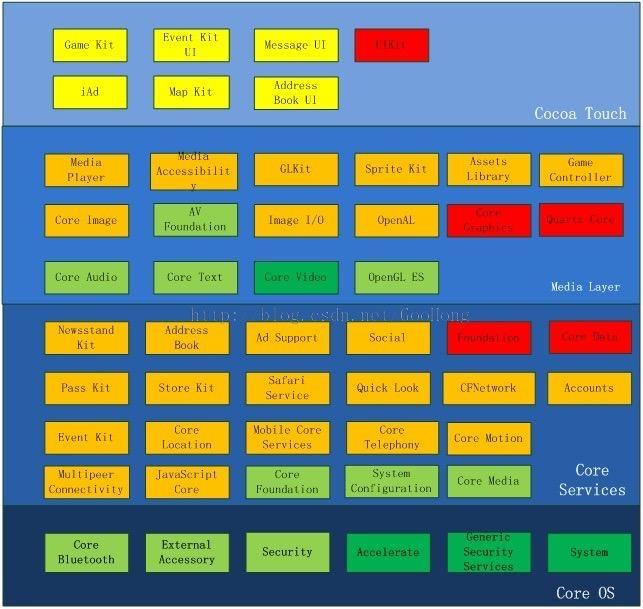
coreText fundamentals
First, the principle: put special characters where images should appear in the text, then draw images directly at those placeholder positions while rendering. This makes NSAttributedString central to mixing text and images.
Compared with NSString, NSAttributedString adds text attributes such as bold, italic, underlining, and background color, each tied to a character range. The first characters can therefore be bold while later ones are italic and underlined. Since iOS6, controls can accept attributed text, but this mixed text-and-image implementation uses coreText to draw it. Two key concepts in coreText text rendering are CTFramesetterRef and CTFrameRef , described below:
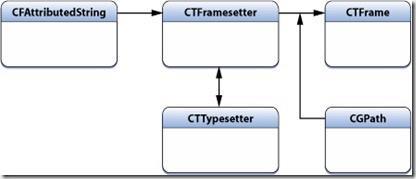
After building the attributed string, use it to create a CTFramesetterRef. Think of it as a factory that helps create a CTFrameRef . Supply a CGPathRef to obtain the corresponding CTFrameRef and render the text within that path. The creation code follows. Since coreText is a C-based library, we must release its objects manually.
CGContextRef ctx = UIGraphicsGetCurrentContext();
NSAttributedString * content = [[NSAttributedString alloc] initWithString: @"这是一个测试的富文本,这是一个测试的富文本"];
CTFramesetterRef framesetter = CTFramesetterCreateWithAttributedString((CFAttributedStringRef)content);
CGMutablePathRef paths = CGPathCreateMutable();
CGPathAddRect(paths, NULL, CGRectMake(0, 0, 100, 100));
CTFrameRef frame = CTFramesetterCreateFrame(framesetter, CFRangeMake(0, content), paths, NULL);
CTFrameDraw(frame, ctx);        //绘制文字

// 释放内存
CFRelease(paths);
CFRelease(frame);
CFRelease(framesetter);
Each created CTFrameRef also contains one or more CTLineRef objects, representing individual text lines. Each CTLineRef contains one or more CTRunRef objects. While drawing, we need not concern ourselves with exactly which characters a CTLineRef or CTRunRef represents; the deeper system layers have constructed them for us. The creation process is illustrated below:
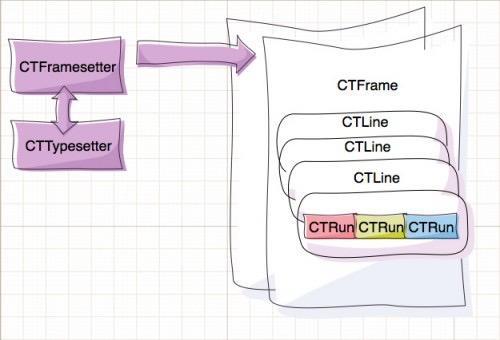
Here is how to retrieve text lines and runs from CTFrameRef:
CFArrayRef lines = CTFrameGetLines(frame);
CGPoint lineOrigins[CFArrayGetCount(lines)];
CTFrameGetLineOrigins(_frame, CFRangeMake(0, 0), lineOrigins);
for (int idx = 0; idx < CFArrayGetCount(lines); idx++) {
    NSLog(@"第%d行起始坐标%@", idx, NSStringFromCGPoint(lineOrigins[idx]));
    CTLineRef line = CFArrayGetValueAtIndex(lines, idx);
    CFArrayRef runs = CTLineGetGlyphRuns(line);
    CGFloat runAscent;
    CGFloat runDescent;

    CGFloat runWidth = CTRunGetTypographicBounds(run, CFRangeMake(0, 0), &runAscent, &runDescent, NULL);
    NSLog(@"第%d个字符组的宽度为%f", idx, runWidth);
}
To mix images and text, insert a blank placeholder where an emoji should appear, implement custom CTRunDelegateCallbacks to set its dimensions and positioning, and attach a custom text attribute containing the emoji image name. Then use CTFrameRef to retrieve rendered lines and runs, look for stored emoji information, and draw each image at its placeholder.
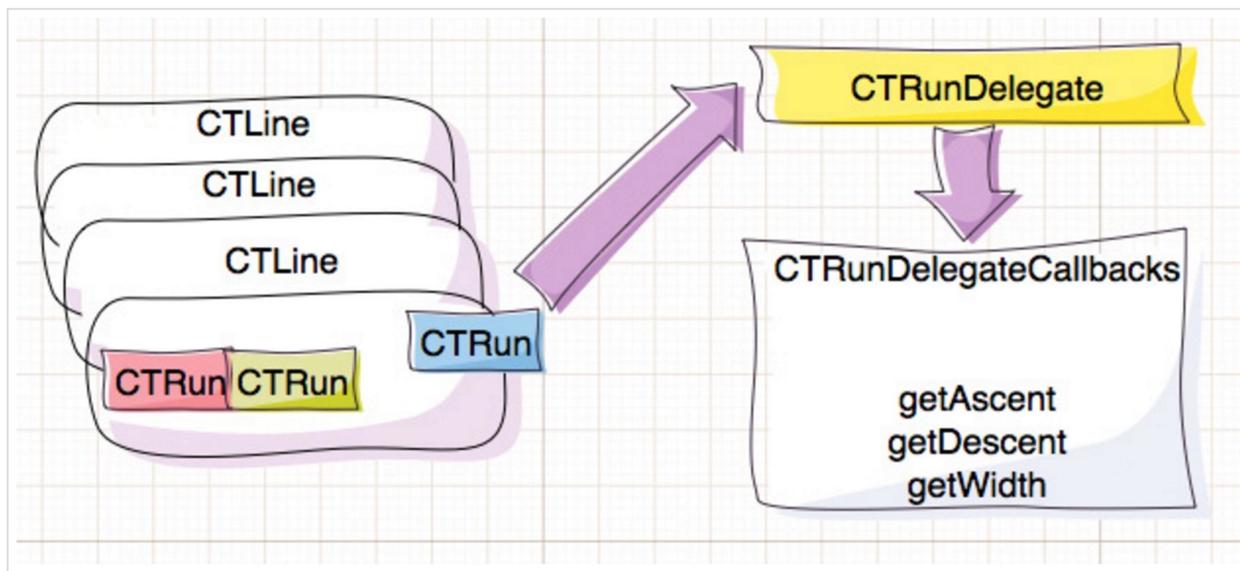
The following creates a CTRunDelegate to set the dimensions of this run:
void RunDelegateDeallocCallback(void * refCon) {}

CGFloat RunDelegateGetAscentCallback(void * refCon)
{
    return 20;
}

CGFloat RunDelegateGetDescentCallback(void * refCon)
{
    return 0;
}

CGFloat RunDelegateGetWidthCallback(void * refCon)
{
    return 20;
}

CTRunDelegateCallbacks imageCallbacks;
imageCallbacks.version = kCTRunDelegateVersion1;
imageCallbacks.dealloc = RunDelegateDeallocCallback;
imageCallbacks.getWidth = RunDelegateGetWidthCallback;
imageCallbacks.getAscent = RunDelegateGetAscentCallback;
imageCallbacks.getDescent = RunDelegateGetDescentCallback;
CTRunDelegateRef runDelegate = CTRunDelegateCreate(&imageCallbacks, "这是回调函数的参数");
Typography
Typography can involve lengthy, tedious theory, but that knowledge is indispensable for using coreText well.
-
Fonts
In computing, a font is a collection of glyphs sharing a style and size, unlike our everyday use of the term. For example, 14-point Song and 15-point Song are two fonts to a computer. What we commonly call a font—Song or Kai—is a typeface. -
Characters and glyphs
Text layout is the conversion of characters into glyphs. A character represents textual meaning; a glyph is its graphical form. The same character can have different glyphs due to size or shape. Ligatures may also make several characters correspond to a single glyph:
-
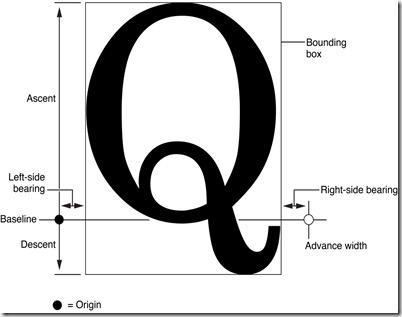
Glyph metrics
describes several aspects of a glyph's appearance, including:
1. Bounding box: An imaginary rectangle that encloses the entire glyph as closely as possible.
2. Baseline: An imaginary reference line used when rendering glyphs. The bottoms of letters such as x, m, and s normally lie at its y-coordinate.
3. Origin: The leftmost point on the baseline.
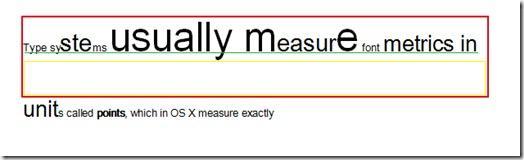
4. Leading: The space between lines.
5. Kerning: The space between characters.
6. Ascent: The positive distance from the baseline to a glyph's highest point. A line's ascent is the greatest character ascent in that line.
7. Descent: The negative distance from the baseline to a glyph's lowest point. A line uses the smallest character descent in that line.
In the diagram, the green line is the baseline and the yellow line marks the descent. The distance from the green line to the top of the red box is the ascent; the gap from the yellow line to the bottom of the box is the leading. Thus, the line-height formula islineHeight = Ascent + Descent + Leading
Mixing images and text
After all that theory, we finally reach the practical part. First, here is the article's Demo project and the result:
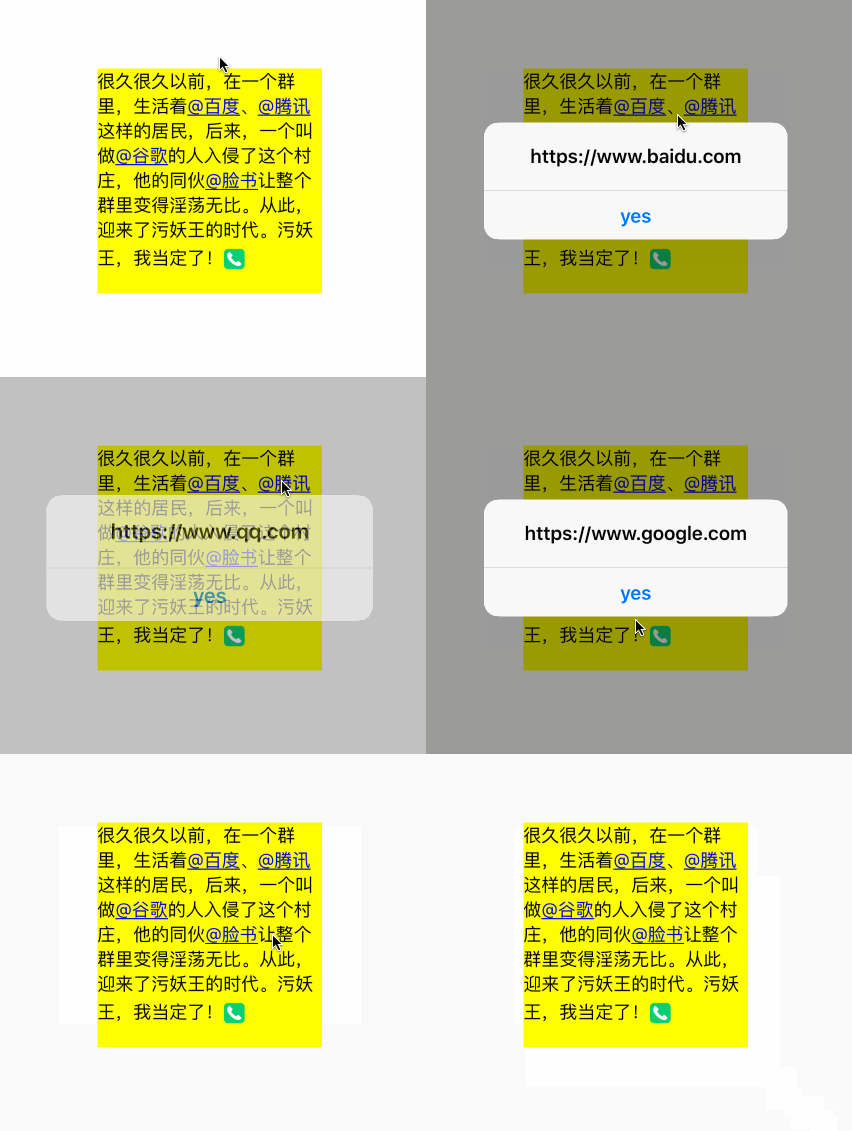
Rendering attributed text needs a CGContextRef context, so the most convenient approach is a custom UIView subclass that draws in drawRect: . I named mine LXDTextView.
When CoreText draws text, the origin is at the lower left, so we must flip the coordinate system first. Before rendering, we also need a method that constructs and returns the attributed string:
- (NSMutableAttributedString *)buildAttributedString
{
    //创建富文本,并且将超链接文本设置为蓝色+下划线
    NSMutableAttributedString * content = [[NSMutableAttributedString alloc] initWithString: @"这是一个富文本内容"];
    NSString * hyperlinkText = @"@这是链接";
    NSRange range = NSMakeRange(content.length, hyperlinkText.length);
    [content appendAttributedString: [[NSAttributedString alloc] initWithString: hyperlinkText]];
    [content addAttributes: @{ NSForegroundColorAttributeName: [UIColor blueColor] } range: range];
    [content addAttributes: @{ NSUnderlineStyleAttributeName: @(NSUnderlineStyleSingle) } range: range];

    //创建CTRunDelegateRef并设置回调函数
    CTRunDelegateCallbacks imageCallbacks;
    imageCallbacks.version = kCTRunDelegateVersion1;
    imageCallbacks.dealloc = RunDelegateDeallocCallback;
    imageCallbacks.getWidth = RunDelegateGetWidthCallback;
    imageCallbacks.getAscent = RunDelegateGetAscentCallback;
    imageCallbacks.getDescent = RunDelegateGetDescentCallback;
    NSString * imageName = @"emoji";
    CTRunDelegateRef runDelegate = CTRunDelegateCreate(&imageCallbacks, (__bridge void *)imageName);

    //插入空白表情占位符
    NSMutableAttributedString * imageAttributedString = [[NSMutableAttributedString alloc] initWithString: @" "];
    [imageAttributedString addAttribute: (NSString *)kCTRunDelegateAttributeName value: (__bridge id)runDelegate range: NSMakeRange(0, 1)];
    [imageAttributedString addAttribute: @"imageNameKey" value: imageName range: NSMakeRange(0, 1)];
    [content appendAttributedString: imageAttributedString];
    CFRelease(runDelegate);
    return content;
}

- (void)drawRect: (CGRect)rect
{
    //获取图形上下文并且翻转坐标系
    CGContextRef ctx = UIGraphicsGetCurrentContext();
    CGContextSetTextMatrix(ctx, CGAffineTransformIdentity);
    CGContextConcatCTM(ctx, CGAffineTransformMake(1, 0, 0, -1, 0, self.bounds.size.height));
    NSMutableAttributedString * content = [self buildAttributedString];

    //创建CTFramesetterRef和CTFrameRef变量
    CTFramesetterRef framesetter = CTFramesetterCreateWithAttributedString((CFAttributedStringRef)content);
    CGMutablePathRef paths = CGPathCreateMutable();
    CGPathAddRect(paths, NULL, self.bounds);
    CTFrameRef frame = CTFramesetterCreateFrame(framesetter, CFRangeMake(0, content.length), paths, NULL);
    CTFrameDraw(frame, ctx);

    //遍历文本行以及CTRunRef,将表情文本对应的表情图片绘制到图形上下文
    CFArrayRef lines = CTFrameGetLines(_frame);
    CGPoint lineOrigins[CFArrayGetCount(lines)];
    CTFrameGetLineOrigins(frame, CFRangeMake(0, 0), lineOrigins);
    for (int idx = 0; idx < CFArrayGetCount(lines); idx++) {
        CTLineRef line = CFArrayGetValueAtIndex(lines, idx);
        CGPoint lineOrigin = lineOrigins[idx];
        CFArrayRef runs = CTLineGetGlyphRuns(line);

        //遍历字符组
        for (int index = 0; index < CFArrayGetCount(runs); index++) {
            CGFloat runAscent;
            CGFloat runDescent;
            CGPoint lineOrigin = lineOrigins[idx];

            CTRunRef run = CFArrayGetValueAtIndex(runs, index);
            CGRect runRect;
            runRect.size.width = CTRunGetTypographicBounds(run, CFRangeMake(0, 0), &runAscent, &runDescent, NULL);
            runRect = CGRectMake(lineOrigin.x + CTLineGetOffsetForStringIndex(line, CTRunGetStringRange(run).location, NULL), lineOrigin.y - runDescent, runRect.size.width, runAscent + runDescent);

            //查找表情文本替换表情视图
            NSDictionary * attributes = (NSDictionary *)CTRunGetAttributes(run);
            NSString * imageName = attributes[@"imageNameKey"];
            if (imageName) {
                UIImage * image = [UIImage imageNamed: imageName];
                if (image) {
                    CGRect imageDrawRect;
                    CGFloat imageSize = ceil(runRect.size.height);
                    imageDrawRect.size = CGSizeMake(imageSize, imageSize);
                    imageDrawRect.origin.x = runRect.origin.x + lineOrigin.x;
                    imageDrawRect.origin.y = lineOrigin.y;
                    CGContextDrawImage(ctx, imageDrawRect, image.CGImage);
                }
            }
        }
    }
    CFRelease(paths);
    CFRelease(frame);
    CFRelease(framesetter);
}
After running the code, the result should look like this:

The attributed text now looks presentable, but how do we respond when hyperlink text is tapped? Testing one rectangle as with an image is insufficient, because a link may wrap across lines and occupy several rectangles. CoreText provides a function for this too.
CTLineGetStringIndexForPosition(CTLineRef, CGPoint)
This method obtains the character index at a tapped position within a line. First, however, we must find which line was tapped. Retain the drawing's CTFrameRef to do so; I store the generated CTFrameRef in an instance variable. For hyperlink ranges, convert each range to a string key and store the corresponding URL as its value in an instance dictionary.
@implementation LXDTextView
{
    CTFrameRef _frame;
    NSMutableDictionary * _textTouchMapper;
}

- (NSMutableAttributedString *)buildattrinbutedstring
{
    //do something...
    _textTouchMapper[NSStringFromRange(range)] = @"https://www.baidu.com";
    //do something...
}

- (void)drawRect: (CGRect)rect
{
    //do something...
    _frame = frame;
    //do something...
}

- (void)touchesEnded: (NSSet<UITouch *> *)touches withEvent: (UIEvent *)event
{
    CGPoint touchPoint = [touches.anyObject locationInView: self];
    CFArrayRef lines = CTFrameGetLines(_frame);
    CGPoint origins[CFArrayGetCount(lines)];

    for (int idx = 0; idx < CFArrayGetCount(lines); idx++) {
        CGPoint origin = origins[idx];
        CGPathRef path = CTFrameGetPath(_frame);
        CGRect rect = CGPathGetBoundingBox(path);

        //将坐标点更改为左上角坐标系原点的坐标
        CGFloat y = rect.origin.y + rect.size.height - origin.y;
        if (touchPoint.y <= y && (touchPoint.x >= origin.x && touchPoint.x <= rect.origin.x + rect.size.width)) {
            line = CFArrayGetValueAtIndex(lines, idx);
            lineOrigin = origin;
            NSLog(@"点击第%d行", idx);
            break;
        }
    }

    if (line == NULL) { return; }
    touchPoint.x -= lineOrigin.x;
    CFIndex index = CTLineGetStringIndexForPosition(line, touchPoint);

    for (NSString * textRange in _textTouchMapper) {
        NSRange range = NSRangeFromString(textRange);
        if (index >= range.location && index <= range.location + range.length) {
            NSLog(@"点击了图片链接:%@", _textTouchMapper[textRange]);
            break;
        }
    }
}

@end 现在运行代码,看看点击富文本的超链接时,控制台是不是输出了点击图片链接了呢?
Further encapsulation
Now that attributed text works, the next step is accepting content and mappings from outside the class. Expose two dictionary properties in the header for the caller's 文本-超链接 mapping of text to hyperlinks and 文本-表情图片 mapping of text to emoji images:
@interface LXDTextView : UIView

/*!
 *  @brief 显示文本(所有的链接文本、图片名称都应该放到这里面)
 */
@property (nonatomic, copy) NSString * text;

/*!
 *  @brief 文本-超链接映射
 */
@property (nonatomic, strong) NSDictionary * hyperlinkMapper;

/*!
 *  @brief 文本-表情映射
 */
@property (nonatomic, strong) NSDictionary * emojiTextMapper;

@end
Of course, buildAttributedString must change too. Since the text may contain several emoji, extract placeholder insertion into a reusable method. Keeping the attributed-text object content as an instance variable also makes the code easier to work with:
/*!
 *  @brief 在富文本中插入表情占位符,然后设置好属性
 *
 *  @param imageName  表情图片的名称
 *  @param emojiRange  表情文本在富文本中的位置,用于替换富文本
 */
- (void)insertEmojiAttributed: (NSString *)imageName emojiRange: (NSRange)emojiRange
{
    CTRunDelegateCallbacks imageCallbacks;
    imageCallbacks.version = kCTRunDelegateVersion1;
    imageCallbacks.dealloc = RunDelegateDeallocCallback;
    imageCallbacks.getWidth = RunDelegateGetWidthCallback;
    imageCallbacks.getAscent = RunDelegateGetAscentCallback;
    imageCallbacks.getDescent = RunDelegateGetDescentCallback;

    /*!
     *  @brief 插入图片属性文本
     */
    CTRunDelegateRef runDelegate = CTRunDelegateCreate(&imageCallbacks, (__bridge void *)imageName);
    NSMutableAttributedString * imageAttributedString = [[NSMutableAttributedString alloc] initWithString: @" "];
    [imageAttributedString addAttribute: (NSString *)kCTRunDelegateAttributeName value: (__bridge id)runDelegate range: NSMakeRange(0, 1)];
    [imageAttributedString addAttribute: LXDEmojiImageNameKey value: imageName range: NSMakeRange(0, 1)];
    [_content deleteCharactersInRange: emojiRange];
    [_content insertAttributedString: imageAttributedString atIndex: emojiRange.location];
    CFRelease(runDelegate);
}
The buildAttributedString method also gains replacement logic based on the two supplied dictionaries. Replace emoji text before hyperlink text: emoji becomes a single space, while its textual representation is generally longer than 1 character. Doing that first prevents incorrect ranges when locating hyperlinks:
- (void)buildAttributedString
{
    _content = [[NSMutableAttributedString alloc] initWithString: _text attributes: self.textAttributes];
    /*!
     *  @brief 获取所有转换emoji表情的文本位置
     */
    for (NSString * emojiText in self.emojiTextMapper) {
        NSRange range = [_content.string rangeOfString: emojiText];
        while (range.location != NSNotFound) {
            [self insertEmojiAttributed: self.emojiTextMapper[emojiText] emojiRange: range];
            range = [_content.string rangeOfString: emojiText];
        }
    }

    /*!
     *  @brief 获取所有转换超链接的文本位置
     */
    for (NSString * hyperlinkText in self.hyperlinkMapper) {
        NSRange range = [_content.string rangeOfString: hyperlinkText];
        while (range.location != NSNotFound) {
            [self.textTouchMapper setValue: self.hyperlinkMapper[hyperlinkText] forKey: NSStringFromRange(range)];
            [_content addAttributes: @{ NSForegroundColorAttributeName: [UIColor blueColor] } range: range];
            [_content addAttributes: @{ NSUnderlineStyleAttributeName: @(NSUnderlineStyleSingle) } range: range];
            range = [_content.string rangeOfString: hyperlinkText];
        }
    }
}
If you wish, you can also add attributes such as the text's line-break mode:
/*!
 *  @brief 设置字体属性
 */
CTParagraphStyleSetting styleSetting;
CTLineBreakMode lineBreak = kCTLineBreakByWordWrapping;
styleSetting.spec = kCTParagraphStyleSpecifierLineBreakMode;
styleSetting.value = &lineBreak;
styleSetting.valueSize = sizeof(CTLineBreakMode);
CTParagraphStyleSetting settings[] = { styleSetting };
CTParagraphStyleRef style = CTParagraphStyleCreate(settings, 1);
NSMutableDictionary * attributes = @{
                                     (id)kCTParagraphStyleAttributeName: (id)style
                                     }.mutableCopy;
[_content addAttributes: attributes range: NSMakeRange(0, _content.length)];
CTFontRef font = CTFontCreateWithName((CFStringRef)[UIFont systemFontOfSize: 16].fontName, 16, NULL);
[_content addAttributes: @{ (id)kCTFontAttributeName: (__bridge id)font } range: NSMakeRange(0, _content.length)];
CFRelease(font);
CFRelease(style);
The rendering process does not change with the text contents, so drawRect: remains almost unchanged. To respond to emoji taps, however, add a lookup like the hyperlink one to test whether a touch falls inside an emoji's frame. Use its rectangle as the key and image name as the value; I call this dictionary emojiTouchMapper. As discussed earlier, CoreText uses the opposite coordinate system from the usual one. Even after flipping it at the start of drawRect:, retrieved text positions are still calculated from the lower left. Without conversion, ordinary frame checks cannot correctly detect touches. Before iterating over lines, declare a variable for the topmost text y coordinate. Afterward, use it to convert each stored emoji rectangle and retain the correct frame.
- (void)drawRect: (CGRect)rect
{
    //do something...
     CGRect imageDrawRect;
     CGFloat imageSize = ceil(runRect.size.height);
     imageDrawRect.size = CGSizeMake(imageSize, imageSize);
     imageDrawRect.origin.x = runRect.origin.x + lineOrigin.x;
     imageDrawRect.origin.y = lineOrigin.y - lineDescent;
     CGContextDrawImage(ctx, imageDrawRect, image.CGImage);

     imageDrawRect.origin.y = topPoint - imageDrawRect.origin.y;
     self.emojiTouchMapper[NSStringFromCGRect(imageDrawRect)] = imageName;
    //do something...
}
The custom rich-text view is complete after the code above. Finally, when a touch ends, determine whether its position lies on an emoticon or hyperlink and invoke the corresponding callback. This example uses delegation:
- (void)touchesEnded: (NSSet<UITouch *> *)touches withEvent: (UIEvent *)event
{
    CGPoint touchPoint = [touches.anyObject locationInView: self];
    CFArrayRef lines = CTFrameGetLines(_frame);
    CGPoint origins[CFArrayGetCount(lines)];
    CTFrameGetLineOrigins(_frame, CFRangeMake(0, 0), origins);
    CTLineRef line = NULL;
    CGPoint lineOrigin = CGPointZero;

    //查找点击坐标所在的文本行
    for (int idx = 0; idx < CFArrayGetCount(lines); idx++) {
        CGPoint origin = origins[idx];
        CGPathRef path = CTFrameGetPath(_frame);
        CGRect rect = CGPathGetBoundingBox(path);

        //转换点击坐标
        CGFloat y = rect.origin.y + rect.size.height - origin.y;
        if (touchPoint.y <= y && (touchPoint.x >= origin.x && touchPoint.x <= rect.origin.x + rect.size.width)) {
            line = CFArrayGetValueAtIndex(lines, idx);
            lineOrigin = origin;
            NSLog(@"点击第%d行", idx);
            break;
        }
      }

    if (line == NULL) { return; }
    touchPoint.x -= lineOrigin.x;
    CFIndex index = CTLineGetStringIndexForPosition(line, touchPoint);

    //判断是否点击超链接文本
    for (NSString * textRange in self.textTouchMapper) {
        NSRange range = NSRangeFromString(textRange);
        if (index >= range.location && index <= range.location + range.length) {
            if ([_delegate respondsToSelector: @selector(textView:didSelectedHyperlink:)]) {
                [_delegate textView: self didSelectedHyperlink: self.textTouchMapper[textRange]];
            }
            return;
        }
    }

    //判断是否点击表情
    if (!_emojiUserInteractionEnabled) { return; }
    for (NSString * rectString in self.emojiTouchMapper) {
        CGRect textRect = CGRectFromString(rectString);
        if (CGRectContainsPoint(textRect, touchPoint)) {
            if ([_delegate respondsToSelector: @selector(textView:didSelectedEmoji:)]) {
                [_delegate textView: self didSelectedEmoji: self.emojiTouchMapper[rectString]];
            }
        }
    }
}
The code above completes a rich-text control. I tested its mixed text and images with the following code:
LXDTextView * textView = [[LXDTextView alloc] initWithFrame: CGRectMake(0, 0, 200, 300)];
textView.delegate = self;
[self.view addSubview: textView];
textView.emojiUserInteractionEnabled = YES;
textView.center = self.view.center;
textView.emojiTextMapper = @{
                             @"[emoji]": @"emoji"
                             };
textView.hyperlinkMapper = @{
                             @"@百度": @"https://www.baidu.com",
                             @"@腾讯": @"https://www.qq.com",
                             @"@谷歌": @"https://www.google.com",
                             @"@脸书": @"https://www.facebook.com",
                             };
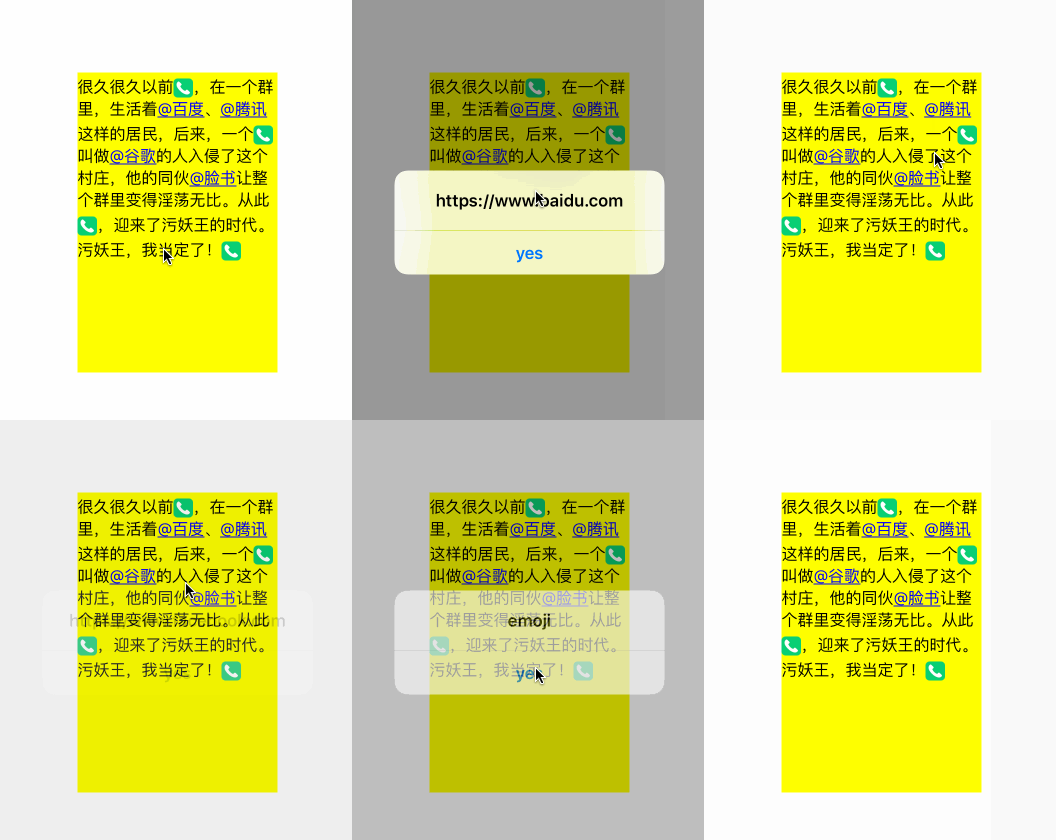
textView.text = @"很久很久以前[emoji],在一个群里,生活着@百度、@腾讯这样的居民,后来,一个[emoji]叫做@谷歌的人入侵了这个村庄,他的同伙@脸书让整个群里变得淫荡无比。从此[emoji],迎来了污妖王的时代。污妖王,我当定了![emoji]";
Result:
About TextKit
CoreText is powerful for mixing text and images, but introduces more code and complex logic. Apple introduced TextKit after iOS7. Its higher-level wrapper around CoreText makes the code simpler. The new NSTextAttachment class easily turns images into attributed content, allowing an emoji attributed string in just a few lines:
- (NSAttributedString *)attributedStringWithImageName: (NSString *)imageName
{
    NSTextAttachment * attachment = [[NSTextAttachment alloc] init];
    attachment.image = [UIImage imageNamed: imageName];
    attachment.bounds = CGRectMake(0, -5, 20, 20);
    NSAttributedString * attributed = [NSAttributedString attributedStringWithAttachment: attachment];
    return attributed;
}
The attributed-string code above using CoreText can therefore be rewritten as follows:
- (NSAttributedString *)attributedString: (NSMutableAttributedString *)attributedString replacingEmojiText: (NSString *)emojiText withImageName: (NSString *)imageName
{
    NSRange range = [attributedString.string rangeOfString: emojiText];
    while (range.location != NSNotFound) {
        [attributedString deleteCharactersInRange: range];
        NSAttributedString * imageAttributed = [self attributedStringWithImageName: imageName];
        [attributedString insertAttributedString: imageAttributed atIndex: range.location];
        range = [attributedString.string rangeOfString: emojiText];
    }
    return attributedString;
}

- (void)viewDidLoad {
    [super viewDidLoad];
    NSAttributedString * attributed = [self attributedString: [[NSMutableAttributedString alloc] initWithString: content] replacingEmojiText: @"[emoji]" withImageName: @"emoji"];
    UILabel * label = [[UILabel alloc] initWithFrame: CGRectMake(0, 0, 200, 250)];
    label.attributedText = attributed;
    label.center = self.view.center;
    label.numberOfLines = 0;
    [self.view addSubview: label];
}
care about TextKit For more ways to use it, read this article: Getting to know TextKit
Closing thoughts
Which of these two frameworks is more powerful is a matter of perspective. The higher-level TextKit offers simplicity, while CoreText is more flexible. At the time of writing, however, I had not found how to handle hyperlink taps through TextKit. Developers should understand both to make better implementation choices.