
Data & networkingHistorical technical note
Wrapping automatic object archiving and unarchiving on iOS
Starts with NSCoding and uses the runtime to enumerate instance variables and organise encoding. The WZXArchiver wrapper develops step by step, with discussion of child objects and the limits of automated storage.
Originally credited to WzxJiang; edited and archived by Bison.
Source listed in the originalOn this page
Introduction
Mobile apps have many persistence options: fmdb, coredata, realm, which is powerful, and archive, among others. As we know, SQL-style storage supports basic data types rather than storing Object instances directly. Realm supports objects, but switching an existing SQL-based project can be costly. If you use SQL but need to store a few objects, or your app only needs a small amount of persistent data, archiving can meet the requirement. I therefore wrapped this in WZXArchiver to make archiving and unarchiving effortless. Here is how I did it. Better approaches and suggestions are welcome in the comments!
Editor: Bison
Contributor: WzxJiang
Features implemented in WZXArchiver:
Automatic archiving and unarchiving of basic data.
Automatic archiving and unarchiving of objects containing other objects; unarchiving is not quite complete.
Delete all archives; not covered here.
Main article
Before wrapping automatic archiving and unarchiving, let us review basic archiving.
Basic archiving
Create an NSObject subclass, ManModel, with two instance variables: name of type NSString and age of type NSInteger.
@interface ManModel : NSObject

@property(nonatomic,copy)NSString * name;
@property(nonatomic,assign)NSInteger age;

@end
Implement it in the .m file.
- (void)encodeWithCoder:(NSCoder *)aCoder {
    [aCoder encodeObject:self.name forKey:@"name"];
    [aCoder encodeInteger:self.age forKey:@"age"];
}

- (id)initWithCoder:(NSCoder *)aDecoder {
    if (self = [super init]) {
        self.name = [aDecoder decodeObjectForKey:kNameKey];
        self.age = [aDecoder decodeIntegerForKey:kAgeKey];
    }
    return self;
}
You can now start archiving:
//归档
[NSKeyedArchiver archiveRootObject:你要归档的对象 toFile:@"地址"];

//解档
[NSKeyedUnarchiver unarchiveObjectWithFile:@"地址"];
How to wrap automatic archiving and unarchiving
First, create an NSObject category.
Why use a category instead of a utility class?
A category greatly reduces the number of parameters needed.
You can override
Add methods.
/**
 *  通过自定的名字归档
 *
 *  @param name 名字
 *
 *  @return 是否成功
 */
- (BOOL)wzx_archiveToName:(NSString *)name;

/**
 *  通过之前归档的名字解档
 *
 *  @param name 名字
 *
 *  @return 解档的对象
 */
+ (id)wzx_unArchiveToName:(NSString *)name;
Pass a string that serves as an identifier. Archiving uses it in a filename with the pattern WZX_<class name>_<identifier>.archiver, and unarchiving uses the same string to locate it.
Retrieving an object's instance variables
Automating this sort of behavior generally requires the runtime, and this case is no exception.
One point to note: I placed instance-variable inspection in a separate category to improve reuse.
The process for retrieving an object's instance variables:
Create a category.
#import "NSObject+WZXProperties.h"
Import the header: #import <objc/runtime.h>
Retrieving instance variables
- (NSArray *)wzx_allProperty {
NSMutableArray * propertyArr = [NSMutableArray array];

unsigned int outCount;

objc_property_t * properties = class_copyPropertyList([self class], &outCount);

for (int i = 0; i < outCount; i++) {
    objc_property_t property = properties[i];

    NSString *propertyName = [[NSString alloc] initWithCString:property_getName(property) encoding:NSUTF8StringEncoding] ;

    NSString * propertyType = [[NSString alloc] initWithCString:property_getAttributes(property) encoding:NSUTF8StringEncoding] ;

    [propertyArr addObject:@{
                               @"name":propertyName,
                               @"type":[self judgementType:propertyType]
                               }];
}

free(properties);

return propertyArr;
}
The returned value is an array of dictionaries. Each dictionary contains name for the variable name and type for its type. Determine the type from attributes:
- (NSString *)judgementType:(NSString *)attributes {
if ([attributes hasPrefix:@"T"]) {

    if ([attributes hasPrefix:@"T@"]) {
        if ([attributes hasPrefix:@"T@\\\\"NSString\\\\""]) {
            return @"NSString";
        } else if([attributes hasPrefix:@"T@\\\\"NSDictionary\\\\""]) {
            return @"NSDictionary";
        } else if([attributes hasPrefix:@"T@\\\\"NSArray\\\\""]) {
            return @"NSArray";
        } else if([attributes hasPrefix:@"T@\\\\"NSMutableString\\\\""]) {
            return @"NSMutableString";
        } else if([attributes hasPrefix:@"T@\\\\"NSMutableDictionary\\\\""]) {
            return @"NSMutableDictionary";
        } else if([attributes hasPrefix:@"T@\\\\"NSMutableArray\\\\""]) {
            return @"NSMutableArray";
        } else if([attributes hasPrefix:@"T@\\\\"NSData\\\\""]) {
            return @"NSData";
        } else if([attributes hasPrefix:@"T@\\\\"NSMutableData\\\\""]) {
            return @"NSMutableData";
        } else if([attributes hasPrefix:@"T@\\\\"NSSet\\\\""]) {
            return @"NSSet";
        } else if([attributes hasPrefix:@"T@\\\\"NSMutableSet\\\\""]) {
            return @"NSMutableSet";
        } else {
            return [NSString stringWithFormat:@"__Model__:%@",[attributes componentsSeparatedByString:@"\\\\""][1]];
        }

    }

    if ([attributes hasPrefix:@"Tq"]) {
        return @"NSInteger";
    } else if ([attributes hasPrefix:@"TQ"]) {
        return @"NSUInteger";
    } else if ([attributes hasPrefix:@"Td"]) {
        return @"double";
    } else if ([attributes hasPrefix:@"TB"]) {
        return @"BOOL";
    } else if ([attributes hasPrefix:@"Ti"]) {
        return @"int";
    } else if ([attributes hasPrefix:@"Tf"]) {
        return @"float";
    } else if ([attributes hasPrefix:@"Ts"]) {
        return @"short";
    }

    return @"";
} else {

    //错误的字符串
    return @"";
}
}
contains __Model__: to identify a custom instance variable and returns “Model followed by the custom instance variable's class name.
Automatic archiving
Override encodeWithCoder:.
- (void)encodeWithCoder:(NSCoder *)aCoder {
    NSArray * propertyArr = [self wzx_allProperty];
    for (NSDictionary * propertyDic in propertyArr) {
        [self encodeWithType:propertyDic[@"type"] Name:propertyDic[@"name"] Coder:aCoder];
    }
}

- (void)encodeWithType:(NSString *)type Name:(NSString *)name Coder:(NSCoder *)aCoder {
    if ([self isObject:type]) {

        [aCoder encodeObject:[self valueForKey:name] forKey:name];
    } else if([type isEqualToString:@"BOOL"]){

        [aCoder encodeBool:[[self valueForKey:name] boolValue] forKey:name];
    } else if([type isEqualToString:@"float"]){

        [aCoder encodeFloat:[[self valueForKey:name] floatValue] forKey:name];
    } else if([type isEqualToString:@"double"]){

        [aCoder encodeFloat:[[self valueForKey:name] doubleValue] forKey:name];
    } else if([type isEqualToString:@"int"]||
              [type isEqualToString:@"short"]){

        [aCoder encodeInt:[[self valueForKey:name] intValue] forKey:name];
    } else if([type isEqualToString:@"NSInteger"]||
              [type isEqualToString:@"NSUInteger"]){

        [aCoder encodeInteger:[[self valueForKey:name] integerValue] forKey:name];
    }

    if ([type hasPrefix:@"__Model__:"]) {

        NSString * className = [type componentsSeparatedByString:@"__Model__:"][1];
        NSString * path = [NSString stringWithFormat:@"%@_%@_%@_%@",NSStringFromClass(self.class),self.WZX_Archiver_Name,className,name];

        [[self valueForKey:name] wzx_archiveToName:path andIsSon:YES];
    }
}

- (BOOL)isObject:(NSString *)type {
    NSArray * objectTypeArr = @[@"NSString",
                                @"NSMutableString",
                                @"NSArray",
                                @"NSMutableArray",
                                @"NSDictionary",
                                @"NSMutableDictionary",
                                @"NSData",
                                @"NSMutableData",
                                @"NSSet",
                                @"NSMutableSet"];
    return [objectTypeArr containsObject:type];
}
This mainly checks each type and encodes it appropriately. A few points need explanation:
Use [self valueForKey:xxx] to retrieve the value of the corresponding instance variable on self.
Check whether the type begins with __Model__ : to identify a custom object. If it does, use wzx_archiveToName: andIsSon: to archive the contained child object. Its filename follows WZX_<object class>_<object identifier>_<child class>_<child name>.archiver.
On closer inspection, we cannot obtain the object's identifier here: this is a protocol method, so name cannot be passed directly into it. We therefore need to add an instance variable to the category.
Adding instance variables to a category
If you want callers to access this instance variable, add it directly in the .h file.
Otherwise, add the following in the .m file:
@interface NSObject ()
@property(nonatomic, copy)NSString * WZX_Archiver_Name;
@end
Override the setter and getter. Adding an instance variable to a category still requires runtime support.
static NSString * WZX_Archiver_Name_Key =@"WZX_Archiver_Name_Key";
- (void)setWZX_Archiver_Name:(NSString *)WZX_Archiver_Name {
 //self设置一个key为WZX_Archiver_Name_Key的值等于WZX_Archiver_Name
 //函数最后一个值是属性,这里用copy
  objc_setAssociatedObject(self, &WZX_Archiver_Name_Key, WZX_Archiver_Name, OBJC_ASSOCIATION_COPY_NONATOMIC);
}
- (NSString *)WZX_Archiver_Name {
 //返回self以WZX_Archiver_Name_Key为key的值
  return objc_getAssociatedObject(self, &WZX_Archiver_Name_Key);
}
We have now successfully added an instance variable to the category.
In wzx_archiveToName:, assign self.WZX_Archiver_Name = name;
Another problem appears: archiving a contained child object calls this method too, changing self.WZX_Archiver_Name and producing an incorrect child-object filename.
We therefore need a condition:
- (BOOL)wzx_archiveToName:(NSString *)name {
    return [self wzx_archiveToName:name andIsSon:NO];
}

- (BOOL)wzx_archiveToName:(NSString *)name andIsSon:(BOOL)isSon {
    if (isSon == NO) {
        //不是对象中的子对象
        self.WZX_Archiver_Name = name;
        NSString * path = [[self class] getPath:name];
        return [NSKeyedArchiver archiveRootObject:self toFile:path];
    } else {
        return [NSKeyedArchiver archiveRootObject:self toFile:[[self class]getSonPath:name]];
    }
}
Child objects use wzx_archiveToName:path andIsSon:YES.
That completes automatic archiving.
Automatic unarchiving
Override initWithCoder.
#pragma clang diagnostic push
#pragma clang diagnostic ignored "-Wobjc-designated-initializers"
- (instancetype)initWithCoder:(NSCoder *)aDecoder {
    NSArray * propertyArr = [self wzx_allProperty];
    for (NSDictionary * propertyDic in propertyArr) {
        if ([self decodeWithType:propertyDic[@"type"] Name:propertyDic[@"name"] Coder:aDecoder]) {
            [self setValue:[self decodeWithType:propertyDic[@"type"] Name:propertyDic[@"name"] Coder:aDecoder] forKey:propertyDic[@"name"]];
        }
    }
    return self;
}
#pragma clang diagnostic pop
First, suppress the warning about overriding init in a category.
NSObject is the root class and cannot call super here, so I did not use self = [super initWithCoder:aDecoder]. I believe this has no effect: NSObject itself would not use a XIB or storyboard, so this method would not otherwise be used.
Decoding
- (id)decodeWithType:(NSString *)type Name:(NSString *)name Coder:(NSCoder *)aDecoder {
    if ([self isObject:type]) {

        return [aDecoder decodeObjectOfClass:NSClassFromString(type) forKey:name];
    } else if([type isEqualToString:@"int"]||
              [type isEqualToString:@"short"]){

        return @([aDecoder decodeIntegerForKey:name]);
    } else if([type isEqualToString:@"BOOL"]){

        return @([aDecoder decodeBoolForKey:name]);
    } else if([type isEqualToString:@"float"]){

        return @([aDecoder decodeFloatForKey:name]);
    } else if([type isEqualToString:@"double"]){

        return @([aDecoder decodeDoubleForKey:name]);
    } else if([type isEqualToString:@"NSInteger"]||
              [type isEqualToString:@"NSUInteger"]){

        return @([aDecoder decodeIntegerForKey:name]);
    }

    if ([type hasPrefix:@"__Model__:"]) {
//        NSString * className = [type componentsSeparatedByString:@"__Model__:"][1];
//        ;
//        NSString * docPath = [NSSearchPathForDirectoriesInDomains(NSDocumentDirectory, NSUserDomainMask, YES) lastObject];
//        NSString * path = [docPath stringByAppendingPathComponent:[NSString stringWithFormat:@"WZXArchiver/WZX_%@_%@_%@.archiver",NSStringFromClass(self.class),self.WZX_Archiver_Name,className]];
//        [self setValue:[NSClassFromString(className) wzx_unArchiveToName:path isSon:YES]forKey:name];
    }
    return nil;
}

- (BOOL)isObject:(NSString *)type {
    NSArray * objectTypeArr = @[@"NSString",
                                @"NSMutableString",
                                @"NSArray",
                                @"NSMutableArray",
                                @"NSDictionary",
                                @"NSMutableDictionary",
                                @"NSData",
                                @"NSMutableData",
                                @"NSSet",
                                @"NSMutableSet"];
    return [objectTypeArr containsObject:type];
}
This is broadly the same as encoding, handling each type separately.
One issue remains unresolved: I commented out child-object unarchiving. I assign self.WZX_Archiver_Name in the unarchiving method, but it is nil when retrieved during decoding. For now, unarchiving is therefore only possible through this method:
model.manModel = [ManModel wzx_unArchiveSonEntityToName:WZXArchiver_SonPath(@"Person", @"person1", @"ManModel", @"manModel")];
If you have a better solution, please leave a comment!
Automatic unarchiving can now proceed.
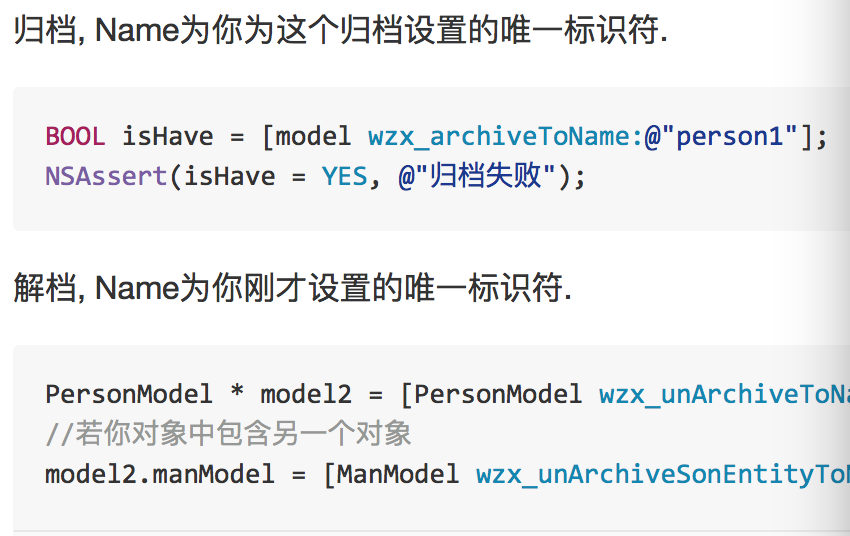
使用效果:
#import "WZXArchiver.h"

PersonModel * model = [[PersonModel alloc]init];
//Object数据类型
model.str = @"str";
model.muStr = [NSMutableString stringWithString:@"muStr"];
model.dic = @{@"key":@"value"};
model.muDic = [NSMutableDictionary dictionaryWithDictionary:@{
                                                              @"key":@"muValue"
                                                            }];
model.arr = @[@"arr1",@"arr2"];
model.muArr = [NSMutableArray arrayWithArray:@[@"muarr1",@"muarr2"]];
model.data = [model.str dataUsingEncoding:NSUTF8StringEncoding];
model.muData = [NSMutableData dataWithData:model.data];
model.set = [NSSet setWithObjects:@"1",@"2",@"3",nil];
model.muSet = [NSMutableSet setWithSet:model.set];

//基本数据类型
model.w_float = 1.1;
model.w_doule = 2.2;
model.w_cgfloat = 3.3;
model.w_int = 4;
model.w_integer = 5;
model.w_uinteger = 6;
model.w_bool = YES;

//其他对象
ManModel * manModel = [[ManModel alloc]init];
manModel.name = @"wzx";
manModel.age = 23;

model.manModel = manModel;

//归档
[model wzx_archiveToName:@"person1"];

//解档
PersonModel * model2 = [PersonModel wzx_unArchiveToName:@"person1"];
//若你对象中包含另一个对象
model2.manModel = [ManModel wzx_unArchiveSonEntityToName:WZXArchiver_SonPath(@"PersonModel", @"person1", @"ManModel", @"manModel")];
PS.
See the source for further details.
Source code
If you like the project, please give it a star ✨.
Recommended reading: Rich text with hyperlinks on iOS