
UIKit & graphicsHistorical technical note
Moving cell images as a table view scrolls
Adjusts an image's position using the offset between the cell's centre and its parent view's centre, creating parallax during UITableView scrolling. It records the custom cell and visible-item updates, with adapted code and a link to the original project.
Contributed by WzxJiang and edited and archived by Bison. The article identifies juvham’s kaiyan project as the basis of the adaptation.
Source listed in the originalOn this page
Editor: Bison
Contributor: WzxJiang
“Today I saw an excellent effect on CocoaChina by juvham. The author uses many efficient techniques, but provides few comments. I extracted my favorite effect, changed some code, and added comments. I hope you like it. First, here is the effect I extracted:”
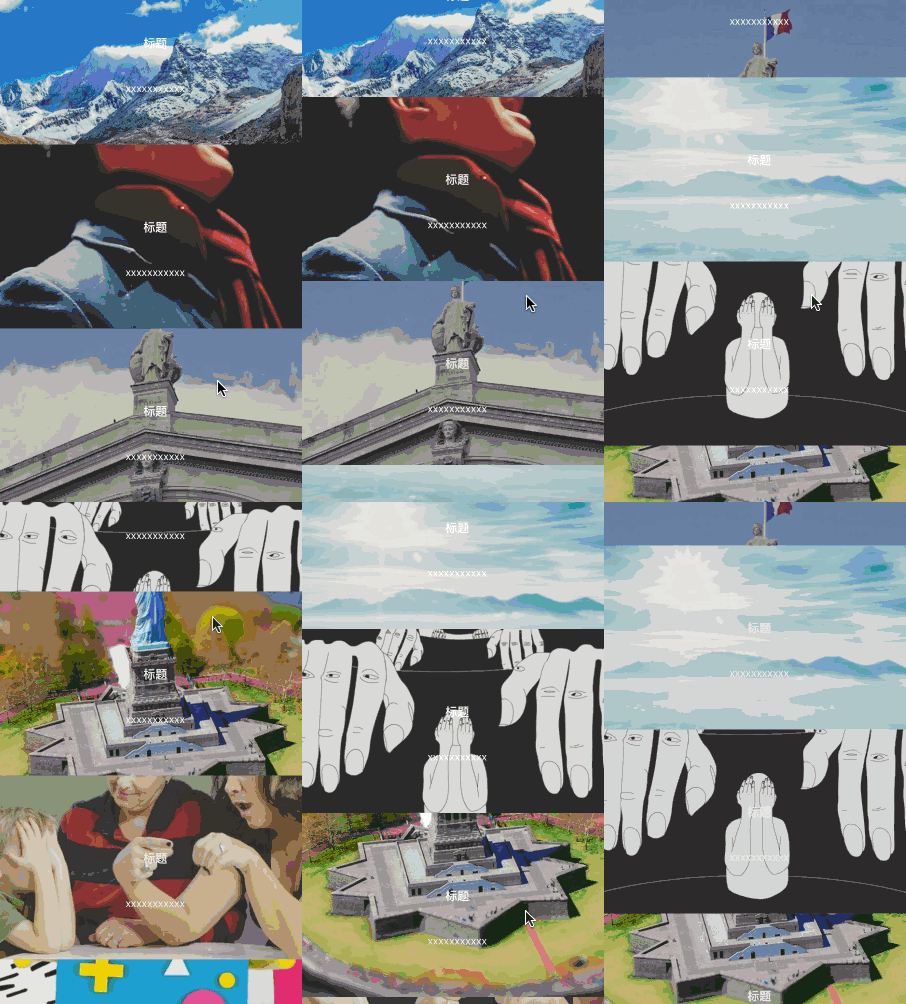
How this effect is implemented
- First, create a UITableView.
- Then create a custom UITableViewCell, for example myCell.h.
- Create several member variables in myCell.h:
/**
*  图片imgView
*/
@property (nonatomic, strong) UIImageView * pictureView;

/**
*  标题label
*/
@property (nonatomic, strong) UILabel * titleLabel;

/**
*  内容Label
*/
@property (nonatomic, strong) UILabel * littleLabel;- Implement them.
- (instancetype)initWithStyle:(UITableViewCellStyle)style reuseIdentifier:(NSString *)reuseIdentifier
{
    if ([super initWithStyle:style reuseIdentifier:reuseIdentifier]) {


        //取消选中效果
        self.selectionStyle = UITableViewCellSeparatorStyleNone;

        //裁剪看不到的
        self.clipsToBounds = YES;

        //pictureView的Y往上加一半cellHeight 高度为2 * cellHeight,这样上下多出一半的cellHeight
        _pictureView = ({
            UIImageView * picture = [[UIImageView alloc]initWithFrame:CGRectMake(0, -cellHeight/2, kWidth, cellHeight * 2)];

            picture.contentMode = UIViewContentModeScaleAspectFill;

            picture;
        });
        [self.contentView  addSubview:_pictureView];

        _titleLabel = ({
            UILabel * titleLabel = [[UILabel alloc]initWithFrame:CGRectMake(0, cellHeight / 2 - 30, kWidth, 30)];

            titleLabel.font = [UIFont boldSystemFontOfSize:16];

            titleLabel.textAlignment = NSTextAlignmentCenter;

            titleLabel.textColor = [UIColor whiteColor];

            titleLabel.text = @"标题";

            titleLabel;
        });
        [self.contentView addSubview:_titleLabel];

        _littleLabel = ({
            UILabel * littleLabel = [[UILabel alloc]initWithFrame:CGRectMake(0, cellHeight / 2 + 30, kWidth, 30)];

            littleLabel.font = [UIFont systemFontOfSize:14];

            littleLabel.textAlignment = NSTextAlignmentCenter;

            littleLabel.textColor = [UIColor whiteColor];

            littleLabel.text = @"xxxxxxxxxxx";

            littleLabel;

        });
        [self.contentView addSubview:_littleLabel];


    }
    return self;

}- Next, we need a method that supplies an image to the cell's _pictureView.
- (void)setImg:(UIImage *)img
{
    self.pictureView.image = img;
}- Processing data in willDisplayCell can improve scrolling performance.
- (void)tableView:(UITableView *)tableView willDisplayCell:(UITableViewCell *)cell forRowAtIndexPath:(NSIndexPath *)indexPath
{
    MyCell * myCell = (MyCell *)cell;

    [myCell setImg:_dataArray[indexPath.row]];

    [myCell cellOffset];
}
[myCell cellOffset] is the cell-offset method explained later. Ignore it for now.
- The data is ready. Now let's discuss the important part: scrolling.
- (void)scrollViewDidScroll:(UIScrollView *)scrollView
{
    // visibleCells 获取界面上能显示出来了cell
    NSArray<MyCell *> *array = [self.tableView visibleCells];

    //enumerateObjectsUsingBlock 类似于for,但是比for更快
    [array enumerateObjectsUsingBlock:^(MyCell * _Nonnull obj, NSUInteger idx, BOOL * _Nonnull stop) {

        [obj cellOffset];

    }];
}
This method is useful and worth remembering. Someone has tested enumerateObjectsUsingBlock and found it about 4ms faster than for. If you understand it better, please share your thoughts in the comments.
- Now let's discuss cellOffset.
- (CGFloat)cellOffset
{
    /*
    - (CGRect)convertRect:(CGRect)rect toView:(nullable UIView *)view;
    将rect由rect所在视图转换到目标视图view中,返回在目标视图view中的rect
    这里用来获取self在window上的位置
    */
    CGRect toWindow = [self convertRect:self.bounds toView:self.window];

    //获取父视图的中心
    CGPoint windowCenter = self.superview.center;

    //cell在y轴上的位移  CGRectGetMidY之前讲过,获取中心Y值
    CGFloat cellOffsetY = CGRectGetMidY(toWindow) - windowCenter.y;

    //位移比例
    CGFloat offsetDig = 2 * cellOffsetY / self.superview.frame.size.height ;

    //要补偿的位移
    CGFloat offset =  -offsetDig * cellHeight/2;

    //让pictureViewY轴方向位移offset
    CGAffineTransform transY = CGAffineTransformMakeTranslation(0,offset);
    self.pictureView.transform = transY;

    return offset;
}
cellOffsetY is the key parameter. It obtains the offset between the cell's center and its parent view's center, then shifts the pictureView on the cell.
That completes the animation.
Code
My code(If your fundamentals are still developing, start with my version; its comments are detailed.)
Code by the original author, juvham(It includes more effects, although the code is somewhat difficult to follow.)
Recommended reading: Integrating LianLian Pay into an iOS app