
UIKit & graphicsHistorical technical note
iOS animation: a fragment-based reveal
Explains how UIView's maskView affects which content is visible, then divides the mask into regions and animates them separately. These steps build a fragmented reveal and an image-carousel transition.
Originally credited to Sindri; edited and archived by Bison.
Source listed in the originalOn this page
Editor: Bison
Contributor: Sindri’s Notes
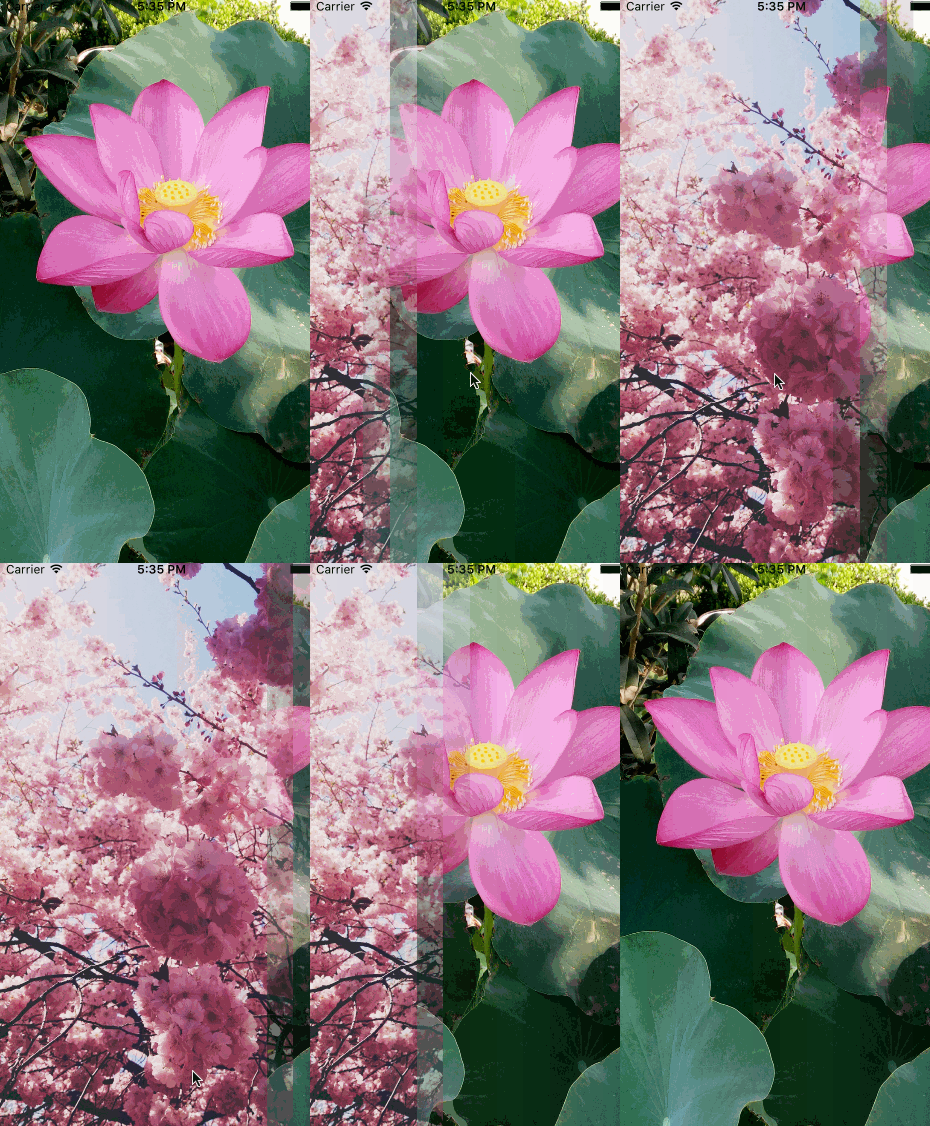
More than four months have passed since I began the animation series. Originally, this post was to introduce CoreAnimation. Looking back, though, the examples in my earlier posts were not especially attractive—in plain terms, the animations were rather ugly. I wanted to make something appealing using the basics, but could not think of an approach. Eventually I saw a striking fragmentation animation online, implemented it myself, and decided to explain it here:
Mask view
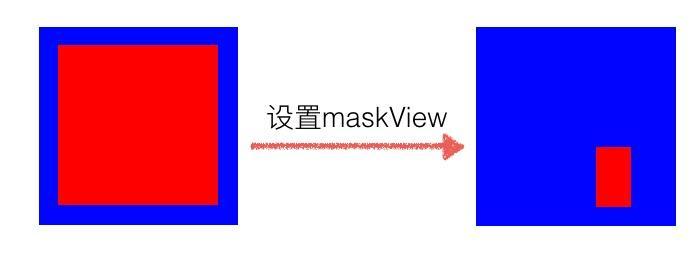
UIView has a maskView property, the most important variable for today's animation. Available since iOS8, it represents a view's mask. I struggled to find a useful analogy. Put simply, a UIView object's opacity can be changed through alpha, and masking affects visibility similarly. The difference is that the former changes a value from 0 to 1, whereas a mask view's backgroundColor, alpha, transform, and other properties all affect the masked view's transparency. For example:
UIView * viewContainer = [[UIView alloc] initWithFrame: CGRectMake(0, 0, 200, 200)];
viewContainer.backgroundColor = [UIColor blueColor];

UIView * contentView = [[UIView alloc] initWithFrame: CGRectMake(0, 0, 200, 200)];
contentView.backgroundColor = [UIColor redColor];
[viewContainer addSubview: contentView];

UIView * maskView = [[UIView alloc] initWithFrame: CGRectMake(50, 50, 75, 75)];
maskView.backgroundColor = [UIColor yellowColor];
contentView.maskView = maskView;
Make a small change to the code above, adjusting the opacity of maskView and contentView separately, and see what happens to the red view when the mask opacity changes:
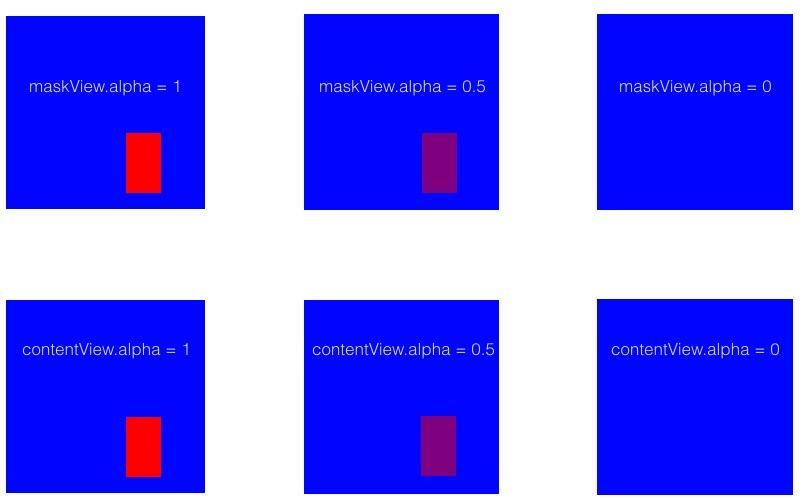
The experiment shows that changing the view's own opacity and changing maskView opacity produce the same effect. In other words, the mask's influence on the view is determined directly by two visible properties: 透明度 and 显示尺寸.
Besides alpha, which mask-view properties affect the view's appearance?
-
Color
These opacity experiments lead to a conclusion: the view’s appearance depends onmaskViewopacity. With no transparent colour components, there is no transparency effect. But if the mask colour has transparency: maskView.backgroundColor = [UIColor colorWithWhite: 1 alpha: 0.5]; //任意颜色 the result matches directly settingalpha = 0.5has the same effect. In Draw pixels to the screen reveals colour rendering andalphaproperty association. -
Subviews of
maskViewmaskView.backgroundColor = [UIColor clearColor]; UIView * sub1 = [[UIView alloc] initWithFrame: CGRectMake(0, 0, 20, 34)]; sub1.backgroundColor = [UIColor blackColor]; UIView * sub2 = [[UIView alloc] initWithFrame: CGRectMake(15, 18, 33, 40)]; sub2.backgroundColor = [UIColor blackColor]; [maskView addSubview: sub1]; [maskView addSubview: sub2];
To understand how maskView subviews affect masking, we need to remove the mask view's own influence. Set the background of maskView to transparent.
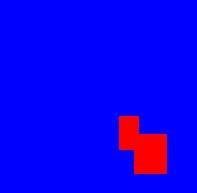
Even when the mask itself is transparent, its subviews can provide part of the mask effect. Changing their opacity therefore changes the mask too.
Animation implementation
Returning to the animation shown above, the image divides into rectangular pieces that gradually disappear. There are two rows vertically and roughly 15 columns horizontally. Add 2*15 evenly distributed subviews to maskView. Give each subview an identifier so that they can be hidden in sequence during the animation:
UIView * maskView = [[UIView alloc] initWithFrame: contentView.bounds];
const NSInteger horizontalCount = 15;
const NSInteger verticalCount = 2;
const CGFloat fadeWidth = CGRectGetWidth(maskView.frame) / horizontalCount;
const CGFloat fadeHeight = CGRectGetHeight(maskView.frame) / verticalCount;

for (NSInteger line = 0; line < horizontalCount; line ++) {
    for (NSInteger row = 0; row < verticalCount; row++) {
        CGRect frame = CGRectMake(line*fadeWidth, row*fadeHeight, fadeWidth, fadeHeight);
        UIView * fadeView = [[UIView alloc] initWithFrame: frame];
        fadeView.tag = [self viewTag: line*verticalCount+row];
        fadeView.backgroundColor = [UIColor whiteColor];
        [maskView addSubview: fadeView];
    }
}
contentView.maskView = maskView;
When the animation starts, iterate over every subview of maskView and animate them in order:
for (NSInteger line = 0; line < horizontalCount; line ++) {
    for (NSInteger row = 0; row < verticalCount; row++) {
        NSInteger idx = line*verticalCount+row;
        UIView * fadeView = [contentView.maskView viewWithTag: [self viewWithTag: idx];
        [UIView animateWithDuration: fadeDuration delay: interval*idx options: UIViewAnimationOptionCurveLinear animations: ^{
            fadeView.alpha = 0;
        } completion: nil];
    }
}
While implementing an animation, consider how to package it for reuse. This fragmentation animation can be encapsulated on UIView as a category to reduce intrusion and coupling:
#define LXDMAXDURATION 1.2
#define LXDMINDURATION .2
#define LXDMULTIPLED .25

@interface UIView (LXDFadeAnimation)

/*!
 *  @brief 视图是否隐藏
 */
@property (nonatomic, assign, readonly) BOOL isFade;
/*!
 *  @brief 是否处在动画中
 */
@property (nonatomic, assign, readonly) BOOL isFading;
/*!
 *  @brief 垂直方块个数。默认为3
 */
@property (nonatomic, assign) NSInteger verticalCount;
/*!
 *  @brief 水平方块个数。默认为18
 */
@property (nonatomic, assign) NSInteger horizontalCount;
/*!
 *  @brief 方块动画之间的间隔0.2~1.2。默认0.7
 */
@property (nonatomic, assign) NSTimeInterval intervalDuration;
/*!
 *  @brief 每个方块隐藏的动画时间0.05~0.3,最多为动画时长的25%。默认为0.175
 */
@property (nonatomic, assign) NSTimeInterval fadeAnimationDuration;

- (void)configurateWithVerticalCount: (NSInteger)verticalCount horizontalCount: (NSInteger)horizontalCount interval: (NSTimeInterval)interval duration: (NSTimeInterval)duration;

- (void)reverseWithComplete: (void(^)(void))complete;
- (void)animateFadeWithComplete: (void(^)(void))complete;
- (void)reverseWithoutAnimate;

@end
In iOS, properties declared in a category do not automatically receive compiler-provided getter and setter methods. We therefore need to implement both methods, and cannot access the variable directly using 下划线+变量名. Import objc/runtime.h and use the runtime's objc_associateObject mechanism to add properties to the view dynamically:
- (BOOL)isFade
{
    return [objc_getAssociatedObject(self, kIsFadeKey) boolValue];
}
// other getAssociatedObject method

- (void)setIsFade: (BOOL)isFade
{
    objc_setAssociatedObject(self, kIsFadeKey, @(isFade), OBJC_ASSOCIATION_RETAIN_NONATOMIC);
}
// other setAssociatedObject method
The fragmentation hide animation also needs a restoring animation:
NSInteger fadeCount = self.verticalCount * self.horizontalCount;
for (NSInteger idx = fadeCount - 1; idx >= 0; idx--) {
    UIView * subview = [self.maskView viewWithTag: [self subViewTag: idx]];
    [UIView animateWithDuration: self.fadeAnimationDuration delay: self.intervalDuration * (fadeCount - 1 - idx) options: UIViewAnimationOptionCurveLinear animations: ^{
        subview.alpha = 1;
    } completion: nil];
}
There is another issue: suppose tapping an image starts a show or hide animation based on the view's current visibility. On repeated taps, check whether an animation is already running and, if so, do not run the animation code again. Before starting, set the animation-state flag isFading to YES. But since each square has its own hide animation, how do we determine when everything ends? With fadeView objects numbering count, the whole fragmentation animation finishes when the last square disappears, that is, when animation number count completes. Use a temporary variable to track this:
__block NSInteger timeCount = 0;
//......
[UIView animateWithDuration: self.fadeAnimationDuration delay: self.intervalDuration * (fadeCount - 1 - idx) options: UIViewAnimationOptionCurveLinear animations: ^{
    subview.alpha = 1;
} completion: ^(BOOL finished) {
    if (++timeCount == fadeCount) {
        self.isFade = NO;
        self.isFading = NO;
        if (complete) { complete(); }
    }
}];
//......
Once we know when the animation ends, add a block so the caller can perform other work on completion.
Carousel fragmentation animation
With fragmentation understood, I want to make an advertising carousel, again using category approach. The demo carousel uses only local images. Here is the effect:

What steps are needed for an advertising carousel?
1. Insert a UIImageView to display the next image. Reuse this whenever possible: imageView
2. Add UIPageControl as the image index.
I therefore provide an interface accepting an image array to run the animation:
// 获取动态绑定临时展示的UIImageView
- (UIImageView *)associateTempBannerWithImage: (UIImage *)image
{
    UIImageView * tempBanner = objc_getAssociatedObject(self, kTempImageKey);
    if (!tempBanner) {
        tempBanner = [[UIImageView alloc] initWithFrame: self.frame];
        objc_setAssociatedObject(self, kTempImageKey, tempBanner, OBJC_ASSOCIATION_RETAIN_NONATOMIC);
        [self.superview insertSubview: tempBanner belowSubview: self];
    }
    tempBanner.image = image;
    return tempBanner;
}
Initially, I added pageControl to the animated imageView, but halfway through, the pageControl disappeared along with the partial hiding animation. Instead, recalculate an appropriate size and position using the current coordinates of imageView:
- (void)associatePageControlWithCurrentIdx: (NSInteger)idx
{
    UIPageControl * pageControl = objc_getAssociatedObject(self, kPageControlKey);
    if (!pageControl) {
        pageControl = [[UIPageControl alloc] initWithFrame: CGRectMake(self.frame.origin.x, CGRectGetHeight(self.frame) - 37 + self.frame.origin.y, CGRectGetWidth(self.frame), 37)];
        [self.superview addSubview: pageControl];
        pageControl.numberOfPages = self.bannerImages.count;
        objc_setAssociatedObject(self, kPageControlKey, pageControl, OBJC_ASSOCIATION_RETAIN_NONATOMIC);
    }
    pageControl.currentPage = idx;
}
After each fragmentation animation completes, the same animation code needs to run again. Completion is handled by a block, so we need to nest a call to the same block within it. First declare the animation code as a block variable. Also declare an idx variable to update the image after each fragmentation, using __block so its value can change in the callback:
- (void)fadeBanner
    NSParameterAssert(self.superview);
    UIImageView * tempBanner = [self associateTempBannerWithImage: [UIImage imageNamed: self.bannerImages[1]]];
    self.stop = NO;
    __block NSInteger idx = 0;
    __weak typeof(self) weakSelf = self;
    [self associatePageControlWithCurrentIdx: idx];

    void (^complete)() = ^{
        NSInteger updateIndex = [weakSelf updateImageWithCurrentIndex: ++idx tempBanner: tempBanner];
        idx = updateIndex;
        [weakSelf associatePageControlWithCurrentIdx: idx];
    };
    // 保存block并执行动画
    objc_setAssociatedObject(self, kCompleteBlockKey, complete, OBJC_ASSOCIATION_COPY_NONATOMIC);
    [self animateFadeWithComplete: ^{
        if (!self.stop) {
            complete();
        }
    }];
}

// 更新展示的图片,并且返回下一次要展示的图片下标
- (NSInteger)updateImageWithCurrentIndex: (NSInteger)idx tempBanner: (UIImageView *)tempBanner
{
    if (idx >= self.bannerImages.count) { idx = 0; }
    self.image = [UIImage imageNamed: self.bannerImages[idx]];
    [self reverseWithoutAnimate];
    NSInteger nextIdx = idx + 1;
    if (nextIdx >= self.bannerImages.count) { nextIdx = 0; }
    tempBanner.image = [UIImage imageNamed: self.bannerImages[nextIdx]];
    [self animateFadeWithComplete: ^{
        if (!self.stop) {
            void (^complete)() = objc_getAssociatedObject(self, kCompleteBlockKey);
            complete();
        }
    }];
    return idx;
}
Note that I used objc_Associate above to retain the completion block, which is necessary. Even if you prefer not to encapsulate the image-update code and instead put it directly in the complete declaration above, it must still be stored dynamically. Otherwise, the block is released during the third image fragmentation, causing a crash.
Remember to restore all mask subviews after each image transition and update the displayed image.
- (void)reverseWithoutAnimate
{
    if (self.isFading) {
        NSLog(@"It's animating!");
        return;
    }
    for (UIView * subview in self.maskView.subviews) {
        subview.alpha = 1;
    }
}
Finally
Time for a closing digression. I have been practising for the road test and feel rather talented—another experienced driver in the making! Unfortunately, time off to practise has also cost me money. /(ㄒoㄒ)/~~
More than four months since the series began—time has flown. Starting next time, we will officially enter CoreAnimation phase. This is an exceptionally powerful animation framework; even the impressive maskView is actually based on the layer’s mask property. Finally, here is the demo: LXDMaskViewAnimation
Recommended reading: Rich text with hyperlinks on iOS